Introduction
Ariel OS is an operating system for secure, memory-safe, networked applications running on low-power microcontrollers. It is based on Rust from the ground up and supports hardware based on 32-bit microcontroller architectures (Cortex-M, RISC-V, and Xtensa). Many features provided by Ariel OS can individually be enabled or disabled at build time in order to minimize resource consumption.
This is the manual of Ariel OS. Other resources available are:
- 🛠️ Reference documentation for Ariel OS can be found in the API documentation.
- ⚙️ The git repository is available on GitHub.
- ✨ Examples demonstrate various features of Ariel OS.
- 🧪 A set of test cases further verifies the capabilities of Ariel OS.
- 🚧 The roadmap shows the planned features for Ariel OS.
Goals and Design
Ariel OS builds on top of existing projects from the Embedded Rust ecosystem, including Embassy, esp-hal, defmt, probe-rs, sequential-storage, and embedded-test.
Ariel OS follows an approach whereby it simultaneously integrates a curated ecosystem of libraries (available via crates.io), and adds missing operating system functionalities as depicted below. Such functionalities include a preemptive multicore scheduler, portable peripheral APIs, additional network security facilities, as well as a meta-build system to bind it all together.
As a result, a low-power IoT developer can focus on business logic sitting on top of APIs which remain close to the hardware but nevertheless stay the same across all supported hardware, inspired by what RIOT tends to in that regard. The intent is three-fold: reduce application development time, increase code portability, and minimize core system vulnerabilities.
In a nutshell: Ariel OS contributes to the global effort aiming to (re)write IoT system software foundations on more solid ground than what traditional building blocks written in C can provide. And this is a joyful and welcoming open-source community, so: join us!
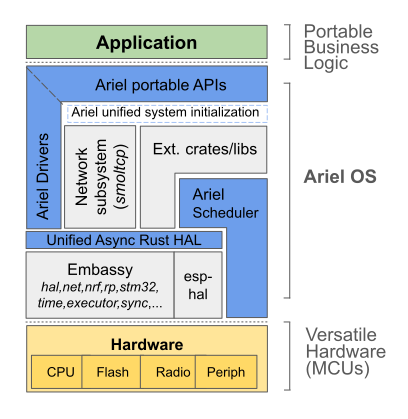
Further Reading
Even though not necessary for using Ariel OS, readers of this book might also want to have a look at the following resources:
- The Embedded Rust Book: General information about how to use Rust for embedded and the structure of the Rust embedded ecosystem, which Ariel OS abstracts over.
- Embassy Book: Hardware abstractions and async executors that Ariel OS builds on.
Hardware & Functionality Support
Hardware support is organized into tiers, each with their own testing policy:
- Tier 1 hardware gets regularly tested, either automatically or manually.
- Tier 2 hardware only gets tested infrequently, but Ariel OS maintainers do have access to the hardware.
- Tier 3 hardware is build-tested only, as Ariel OS maintainers do not have access to the hardware.
Tiers therefore are not related to the functionality coverage of each piece of hardware, and only says something about how much testing they undergo.
Note
The table below indicates whether we support using the piece of functionality in a portable manner, through an abstraction layer and platform-aware configuration.
| Board | Functionality | ||||||||||||||
|---|---|---|---|---|---|---|---|---|---|---|---|---|---|---|---|
| Manufacturer Name | laze builders | Tier | Debug Channel | Logging | GPIO | I2C Controller Mode | SPI Main Mode | UART | Ethernet | User USB | Ethernet over USB | Wi-Fi | Bluetooth Low Energy | Hardware Random Number Generator | Persistent Storage |
| BBC micro:bit V2 | |||||||||||||||
bbc-microbit-v2 |
1 | ✅ | ✅ | ✅ | ✅ | ✅ | ✅ | – | – | – | – | ✅ | ✅ | ✅ | |
| Espressif ESP32-C3-LCDkit | |||||||||||||||
espressif-esp32-c3-lcdkit |
1 | ✅ | ✅ | ✅ | ✅ | ✅ | ✅ | – | – | – | ✅ | ✅ | ✅ | ❌ | |
| Espressif ESP32-C6-DevKitC-1 | |||||||||||||||
espressif-esp32-c6-devkitc-1 |
1 | ✅ | ✅ | ✅ | ✅ | ✅ | ✅ | – | – | – | ✅ | ✅ | ✅ | ❌ | |
| Espressif ESP32-S3-DevKitC-1 | |||||||||||||||
espressif-esp32-s3-devkitc-1 |
1 | ✅ | ✅ | ✅ | ✅ | 🚦 | ✅ | – | ✅ | ✅ | ✅ | ✅ | ✅ | ❌ | |
| native | |||||||||||||||
native |
1 | – | ✅ | ❌ | ❌ | ❌ | ❌ | – | ❌ | ❌ | ❌ | ❌ | ✅ | ❌ | |
| nRF52840-DK | |||||||||||||||
nrf52840dk |
1 | ✅ | ✅ | ✅ | ✅ | ✅ | ✅ | – | ✅ | ✅ | – | ✅ | ✅ | ✅ | |
| nRF5340-DK | |||||||||||||||
nrf5340dk-app |
1 | ✅ | ✅ | ✅ | ✅ | ✅ | ✅ | – | ✅ | ✅ | – | – | ✅ | ✅ | |
nrf5340dk-net |
1 | ✅ | ✅ | ☑️ | ❌ | ❌ | ❌ | – | – | – | – | ✅ | ✅ | ❌ | |
| Raspberry Pi Pico | |||||||||||||||
rpi-pico |
1 | ✅ | ✅ | ✅ | ✅ | ✅ | ✅ | – | ✅ | ✅ | – | – | ✅ | ✅ | |
| Raspberry Pi Pico 2 | |||||||||||||||
rpi-pico2 |
1 | ✅ | ✅ | ✅ | ✅ | ✅ | ✅ | – | ✅ | ✅ | – | – | ✅ | ✅ | |
| Raspberry Pi Pico 2 W | |||||||||||||||
rpi-pico2-w |
1 | ✅ | ✅ | ✅ | ✅ | ✅ | ✅ | – | ✅ | ✅ | ✅ | ✅ | ✅ | ✅ | |
| Raspberry Pi Pico W | |||||||||||||||
rpi-pico-w |
1 | ✅ | ✅ | ✅ | ✅ | ✅ | ✅ | – | ✅ | ✅ | ✅ | ✅ | ✅ | ✅ | |
| ST NUCLEO-C031C6 | |||||||||||||||
st-nucleo-c031c6 |
1 | ✅ | ✅ | ✅ | ✅ | ✅ | ✅ | – | – | – | – | – | – | ❌ | |
| ST NUCLEO-H755ZI-Q | |||||||||||||||
st-nucleo-h755zi-q |
1 | ✅ | ✅ | ✅ | ✅ | ✅ | ✅ | ✅ | ✅ | ❌ | – | – | ✅ | ☑️ | |
| ST NUCLEO-WB55RG | |||||||||||||||
st-nucleo-wb55 |
1 | ✅ | ✅ | ✅ | ✅ | ✅ | ✅ | – | ✅ | ✅ | – | ❌ | ✅ | ☑️ | |
| STM32U083C-DK | |||||||||||||||
stm32u083c-dk |
1 | ✅ | ✅ | ✅ | ✅ | ✅ | ✅ | – | ✅ | ✅ | – | – | ✅ | ☑️ | |
| Adafruit Feather nRF52840 Express | |||||||||||||||
adafruit-feather-nrf52840-express |
2 | ✅ | ✅ | ✅ | ✅ | ✅ | ✅ | – | ✅ | ✅ | – | ✅ | ✅ | ✅ | |
| Arduino UNO Q | |||||||||||||||
arduino-uno-q |
2 | ✅ | ✅ | ✅ | ✅ | ✅ | ✅ | – | – | – | – | – | ✅ | ☑️ | |
| DFRobot FireBeetle 2 ESP32-C6 | |||||||||||||||
dfrobot-firebeetle2-esp32-c6 |
2 | ✅ | ✅ | ✅ | ✅ | ✅ | ✅ | – | – | – | ✅ | ✅ | ✅ | ❌ | |
| makerdiary nRF9151 Connect Kit | |||||||||||||||
makerdiary-nrf9151-connect-kit |
2 | ✅ | ✅ | ✅ | ✅ | ✅ | 🚦 | – | – | – | – | – | ✅ | ✅ | |
| Nordic Thingy:91 X | |||||||||||||||
nordic-thingy-91-x-nrf9151 |
2 | ✅ | ✅ | ✅ | ✅ | ✅ | 🚦 | – | – | – | ❌ | – | ✅ | ✅ | |
nordic-thingy-91-x-nrf5340-app |
2 | ✅ | ✅ | ✅ | ✅ | ✅ | ✅ | – | ✅ | ✅ | ❌ | – | ✅ | ✅ | |
nordic-thingy-91-x-nrf5340-net |
2 | ✅ | ✅ | ☑️ | ❌ | ❌ | ❌ | – | – | – | ❌ | ✅ | ✅ | ❌ | |
| nRF52-DK | |||||||||||||||
nrf52dk |
2 | ✅ | ✅ | ✅ | ❌ | ❌ | ✅ | – | – | – | – | ✅ | ✅ | ✅ | |
| nRF9151-DK | |||||||||||||||
nrf9151-dk |
2 | ✅ | ✅ | ✅ | ✅ | ✅ | 🚦 | – | – | – | – | – | ✅ | ✅ | |
| nRF9160-DK | |||||||||||||||
nrf9160dk-nrf9160 |
2 | ✅ | ✅ | ✅ | ✅ | ✅ | ✅ | – | – | – | – | – | ✅ | ✅ | |
| Seeed Studio XIAO ESP32C6 | |||||||||||||||
seeedstudio-xiao-esp32c6 |
2 | ✅ | ✅ | ✅ | ✅ | ✅ | ✅ | – | – | – | ✅ | ✅ | ✅ | ❌ | |
| ST B-L475E-IOT01A | |||||||||||||||
st-b-l475e-iot01a |
2 | ✅ | ✅ | ✅ | 🚦 | 🚦 | 🚦 | – | ✅ | ❌ | ❌ | ❌ | ✅ | ☑️ | |
| ST NUCLEO-F303RE | |||||||||||||||
st-nucleo-f303re |
2 | ✅ | ✅ | ✅ | ✅ | ✅ | ✅ | – | – | – | – | – | – | ✅ | |
| ST NUCLEO-F401RE | |||||||||||||||
st-nucleo-f401re |
2 | ✅ | ✅ | ✅ | 🚦 | 🚦 | ✅ | – | – | – | – | – | – | ❌ | |
| ST STEVAL-MKBOXPRO | |||||||||||||||
st-steval-mkboxpro |
2 | ✅ | ✅ | ✅ | ✅ | ✅ | ✅ | – | ✅ | ❌ | – | ❌ | ✅ | ☑️ | |
| Ulanzi TC001 | |||||||||||||||
ulanzi-tc001 |
2 | – | ✅ | ✅ | ✅ | 🚦 | 🚦 | – | – | – | ✅ | ✅ | ✅ | ❌ | |
| Unihiker K10 | |||||||||||||||
unihiker-k10 |
2 | ✅ | ✅ | ✅ | ✅ | 🚦 | ✅ | – | ✅ | ✅ | ✅ | ✅ | ✅ | ❌ | |
| Adafruit Feather nRF52840 Sense | |||||||||||||||
adafruit-feather-nrf52840-sense |
3 | ✅ | ✅ | ✅ | ✅ | ✅ | ✅ | – | 🚦 | 🚦 | – | ✅ | ✅ | ✅ | |
| BBC micro:bit V1 | |||||||||||||||
bbc-microbit-v1 |
3 | ✅ | ✅ | ✅ | ❌ | ❌ | ❌ | – | – | – | – | ❌ | ✅ | ❌ | |
| Decawave DWM1001-DEV | |||||||||||||||
decawave-dwm1001-dev |
3 | ✅ | ✅ | ✅ | ❌ | ❌ | ✅ | – | – | – | – | ✅ | ✅ | ✅ | |
| Espressif ESP32-C3-DevKit-RUST-1 | |||||||||||||||
espressif-esp32-c3-devkit-rust-1 |
3 | ✅ | ✅ | ✅ | ✅ | ✅ | ✅ | – | – | – | ✅ | ✅ | ✅ | ❌ | |
| Espressif ESP32-H2-DevKitM-1 | |||||||||||||||
espressif-esp32-h2-devkitm-1 |
3 | ✅ | ✅ | ✅ | ✅ | ✅ | ✅ | – | – | – | – | ✅ | ✅ | ❌ | |
| Espressif ESP32-S2-DevKitC-1 | |||||||||||||||
espressif-esp32-s2-devkitc-1 |
3 | ✅ | ✅ | ✅ | ✅ | 🚦 | ✅ | – | ✅ | ✅ | ✅ | – | ✅ | ❌ | |
| Espressif ESP8684-DevKitC-02 | |||||||||||||||
espressif-esp8684-devkitc-02 |
3 | 🚦 | ✅ | ✅ | ✅ | ✅ | ✅ | – | – | – | ✅ | ✅ | ✅ | ❌ | |
| Heltec WiFi LoRa 32 V3 | |||||||||||||||
heltec-wifi-lora-32-v3 |
3 | ✅ | ✅ | ✅ | ✅ | 🚦 | ✅ | – | – | – | ✅ | ✅ | ✅ | ❌ | |
| makerdiary nRF52840 MDK | |||||||||||||||
makerdiary-nrf52840-mdk |
3 | ✅ | ✅ | ✅ | ✅ | ✅ | ✅ | – | 🚦 | 🚦 | – | ✅ | ✅ | ✅ | |
| makerdiary nRF52840 MDK USB Dongle | |||||||||||||||
makerdiary-nrf52840-mdk-usb-dongle |
3 | ✅ | ✅ | ✅ | ✅ | ✅ | ✅ | – | ✅ | ✅ | – | ✅ | ✅ | ✅ | |
| nRF54L15-DK | |||||||||||||||
nrf54l15dk-app |
3 | ✅ | ✅ | ✅ | ❌ | ❌ | ❌ | – | – | – | – | ❌ | ✅ | ❌ | |
| Seeed Studio LoRa-E5 mini | |||||||||||||||
seeedstudio-lora-e5-mini |
3 | ✅ | ✅ | ✅ | ❌ | ❌ | 🚦 | – | – | – | – | – | ✅ | ☑️ | |
| Seeed Studio XIAO ESP32-S3 | |||||||||||||||
seeedstudio-xiao-esp32-s3 |
3 | ✅ | ✅ | ✅ | ✅ | 🚦 | ✅ | – | ✅ | ✅ | ✅ | ✅ | ✅ | ❌ | |
| Seeed Studio XIAO NRF52840 Plus | |||||||||||||||
seeedstudio-xiao-nrf52840-plus |
3 | ✅ | ✅ | ✅ | ✅ | ✅ | ✅ | – | 🚦 | 🚦 | – | ✅ | ✅ | ✅ | |
| ST B-L072Z-LRWAN1 | |||||||||||||||
st-b-l072z-lrwan1 |
3 | ✅ | ✅ | ✅ | ✅ | ✅ | 🚦 | – | 🚦 | ❌ | – | – | ✅ | ❌ | |
| ST NUCLEO-F042K6 | |||||||||||||||
st-nucleo-f042k6 |
3 | ✅ | ✅ | ✅ | ❌ | ❌ | 🚦 | – | – | – | – | – | – | ❌ | |
| ST NUCLEO-F411RE | |||||||||||||||
st-nucleo-f411re |
3 | ✅ | ✅ | ✅ | ✅ | ✅ | 🚦 | – | – | – | – | – | – | ❌ | |
| ST NUCLEO-G431RB | |||||||||||||||
st-nucleo-g431rb |
3 | ✅ | ✅ | ✅ | 🚦 | ✅ | ✅ | – | – | – | – | – | ✅ | ✅ | |
| ST NUCLEO-H753ZI | |||||||||||||||
st-nucleo-h753zi |
3 | ✅ | ✅ | ✅ | ❌ | ❌ | ❌ | ✅ | ✅ | ❌ | – | – | ❌ | ☑️ | |
| ST NUCLEO-WBA55CG | |||||||||||||||
st-nucleo-wba55 |
3 | ✅ | ✅ | ✅ | ❌ | ❌ | 🚦 | – | – | – | – | ❌ | ✅ | ❌ | |
| ST NUCLEO-WBA65RI | |||||||||||||||
st-nucleo-wba65ri |
3 | ✅ | ✅ | ✅ | ❌ | ❌ | 🚦 | – | 🚦 | 🚦 | – | ❌ | ✅ | ☑️ | |
| Waveshare ESP32-S3-ETH | |||||||||||||||
waveshare-esp32-s3-eth |
3 | ✅ | ✅ | ✅ | ✅ | 🚦 | ✅ | ✅ | ✅ | ✅ | ✅ | ✅ | ✅ | ❌ | |
| Waveshare ESP32-S3-Matrix | |||||||||||||||
waveshare-esp32-s3-matrix |
3 | ✅ | ✅ | ✅ | 🚦 | 🚦 | 🚦 | – | ✅ | ✅ | ✅ | ✅ | ✅ | ❌ | |
Key:
- ✅
- supported
- ☑️
- supported with some caveats
- 🚦
- needs testing
- ❌
- available in hardware, but not currently supported by Ariel OS
- –
- not available on this piece of hardware
Board Pages
- Adafruit Feather nRF52840 Express
- Adafruit Feather nRF52840 Sense
- Arduino UNO Q
- BBC micro:bit V1
- BBC micro:bit V2
- makerdiary nRF52840 MDK
- makerdiary nRF52840 MDK USB Dongle
- makerdiary nRF9151 Connect Kit
- native
- Nordic Thingy:91 X
- nRF52-DK
- nRF52840-DK
- nRF5340-DK
- nRF54L15-DK
- nRF9151-DK
- nRF9160-DK
- Raspberry Pi Pico
- Raspberry Pi Pico W
- Raspberry Pi Pico 2
- Raspberry Pi Pico 2 W
- Decawave DWM1001-DEV
- DFRobot FireBeetle 2 ESP32-C6
- Espressif ESP32-C3-DevKit-RUST-1
- Espressif ESP32-C3-LCDkit
- Espressif ESP32-C6-DevKitC-1
- Espressif ESP32-H2-DevKitM-1
- Espressif ESP8684-DevKitC-02
- Espressif ESP32-S2-DevKitC-1
- Espressif ESP32-S3-DevKitC-1
- Heltec WiFi LoRa 32 V3
- Seeed Studio XIAO ESP32C6
- Seeed Studio XIAO NRF52840 Plus
- Seeed Studio XIAO ESP32-S3
- Seeed Studio LoRa-E5 mini
- ST B-L072Z-LRWAN1
- ST B-L475E-IOT01A
- ST NUCLEO-C031C6
- ST NUCLEO-F042K6
- ST NUCLEO-F303RE
- ST NUCLEO-F401RE
- ST NUCLEO-F411RE
- ST NUCLEO-G431RB
- ST NUCLEO-H753ZI
- ST NUCLEO-H755ZI-Q
- ST NUCLEO-WB55RG
- ST NUCLEO-WBA55CG
- ST NUCLEO-WBA65RI
- ST STEVAL-MKBOXPRO
- STM32U083C-DK
- Ulanzi TC001
- Unihiker K10
- Waveshare ESP32-S3-ETH
- Waveshare ESP32-S3-Matrix
Adafruit Feather nRF52840 Express
References
laze Builders
For more information on laze builders, check out this page.
adafruit-feather-nrf52840-express
- Tier: 2
- Chip: nRF52840
- Chip Ariel OS Name:
nrf52840
To target this laze builder, run the following command in the root of your Ariel OS app:
laze build -b adafruit-feather-nrf52840-express
Support Matrix
| Functionality | Support Status |
|---|---|
| Debug Channel | ✅ |
| Logging | ✅ |
| GPIO | ✅ |
| I2C Controller Mode | ✅ |
| SPI Main Mode | ✅ |
| UART | ✅ |
| Ethernet | – |
| User USB | ✅ |
| Ethernet over USB | ✅ |
| Wi-Fi | – |
| Bluetooth Low Energy | ✅ |
| Hardware Random Number Generator | ✅ |
| Persistent Storage | ✅ |
Legend:
- ✅
- supported
- ☑️
- supported with some caveats
- 🚦
- needs testing
- ❌
- available in hardware, but not currently supported by Ariel OS
- –
- not available on this piece of hardware
Adafruit Feather nRF52840 Sense
References
laze Builders
For more information on laze builders, check out this page.
adafruit-feather-nrf52840-sense
- Tier: 3
- Chip: nRF52840
- Chip Ariel OS Name:
nrf52840
To target this laze builder, run the following command in the root of your Ariel OS app:
laze build -b adafruit-feather-nrf52840-sense
Support Matrix
| Functionality | Support Status |
|---|---|
| Debug Channel | ✅ |
| Logging | ✅ |
| GPIO | ✅ |
| I2C Controller Mode | ✅ |
| SPI Main Mode | ✅ |
| UART | ✅ |
| Ethernet | – |
| User USB | 🚦 |
| Ethernet over USB | 🚦 |
| Wi-Fi | – |
| Bluetooth Low Energy | ✅ |
| Hardware Random Number Generator | ✅ |
| Persistent Storage | ✅ |
Legend:
- ✅
- supported
- ☑️
- supported with some caveats
- 🚦
- needs testing
- ❌
- available in hardware, but not currently supported by Ariel OS
- –
- not available on this piece of hardware
Arduino UNO Q
References
laze Builders
For more information on laze builders, check out this page.
arduino-uno-q
- Tier: 2
- Chip: STM32U585AI
- Chip Ariel OS Name:
stm32u585ai
To target this laze builder, run the following command in the root of your Ariel OS app:
laze build -b arduino-uno-q
Support Matrix
| Functionality | Support Status |
|---|---|
| Debug Channel | ✅ |
| Logging | ✅ |
| GPIO | ✅ |
| I2C Controller Mode | ✅ |
| SPI Main Mode | ✅ |
| UART | ✅ |
| Ethernet | – |
| User USB | –1 |
| Ethernet over USB | – |
| Wi-Fi | – |
| Bluetooth Low Energy | – |
| Hardware Random Number Generator | ✅ |
| Persistent Storage | ☑️2 |
Additional Notes
The MCU can be flashed from the Qualcomm chip on the board which runs a Linux system with the openocd binary ready for use. Install adb to communicate with the Qualcomm chip.
Build your application (in this case the blinky example from the Ariel OS repository):
laze -C examples/blinky build -b arduino-uno-q
Then copy the binary onto the Qualcomm chip:
adb push build/bin/arduino-uno-q/cargo/thumbv8m.main-none-eabihf/release/blinky /tmp
Get a shell on the Qualcomm chip:
adb shell
Flash your application onto the STM32 MCU
/opt/openocd/bin/openocd -d3 -s /opt/openocd -f openocd_gpiod.cfg -c 'program /tmp/blinky verify reset exit'
Legend:
- ✅
- supported
- ☑️
- supported with some caveats
- 🚦
- needs testing
- ❌
- available in hardware, but not currently supported by Ariel OS
- –
- not available on this piece of hardware
-
Despite having a USB port on the board, it is only usable by the Qualcomm chip. ↩
-
Removing items not supported. ↩
BBC micro:bit V1
References
laze Builders
For more information on laze builders, check out this page.
bbc-microbit-v1
- Tier: 3
- Chip: nRF51822-xxAA
- Chip Ariel OS Name:
nrf51822-xxaa
To target this laze builder, run the following command in the root of your Ariel OS app:
laze build -b bbc-microbit-v1
Support Matrix
| Functionality | Support Status |
|---|---|
| Debug Channel | ✅ |
| Logging | ✅ |
| GPIO | ✅ |
| I2C Controller Mode | ❌ |
| SPI Main Mode | ❌ |
| UART | ❌ |
| Ethernet | – |
| User USB | – |
| Ethernet over USB | – |
| Wi-Fi | – |
| Bluetooth Low Energy | ❌ |
| Hardware Random Number Generator | ✅ |
| Persistent Storage | ❌ |
Legend:
- ✅
- supported
- ☑️
- supported with some caveats
- 🚦
- needs testing
- ❌
- available in hardware, but not currently supported by Ariel OS
- –
- not available on this piece of hardware
BBC micro:bit V2
References
laze Builders
For more information on laze builders, check out this page.
bbc-microbit-v2
- Tier: 1
- Chip: nRF52833
- Chip Ariel OS Name:
nrf52833
To target this laze builder, run the following command in the root of your Ariel OS app:
laze build -b bbc-microbit-v2
Support Matrix
| Functionality | Support Status |
|---|---|
| Debug Channel | ✅ |
| Logging | ✅ |
| GPIO | ✅ |
| I2C Controller Mode | ✅ |
| SPI Main Mode | ✅ |
| UART | ✅ |
| Ethernet | – |
| User USB | – |
| Ethernet over USB | – |
| Wi-Fi | – |
| Bluetooth Low Energy | ✅ |
| Hardware Random Number Generator | ✅ |
| Persistent Storage | ✅ |
Legend:
- ✅
- supported
- ☑️
- supported with some caveats
- 🚦
- needs testing
- ❌
- available in hardware, but not currently supported by Ariel OS
- –
- not available on this piece of hardware
Decawave DWM1001-DEV
References
laze Builders
For more information on laze builders, check out this page.
decawave-dwm1001-dev
- Tier: 3
- Chip: nRF52832
- Chip Ariel OS Name:
nrf52832
To target this laze builder, run the following command in the root of your Ariel OS app:
laze build -b decawave-dwm1001-dev
Support Matrix
| Functionality | Support Status |
|---|---|
| Debug Channel | ✅ |
| Logging | ✅ |
| GPIO | ✅ |
| I2C Controller Mode | ❌ |
| SPI Main Mode | ❌ |
| UART | ✅ |
| Ethernet | – |
| User USB | – |
| Ethernet over USB | – |
| Wi-Fi | – |
| Bluetooth Low Energy | ✅ |
| Hardware Random Number Generator | ✅ |
| Persistent Storage | ✅ |
Legend:
- ✅
- supported
- ☑️
- supported with some caveats
- 🚦
- needs testing
- ❌
- available in hardware, but not currently supported by Ariel OS
- –
- not available on this piece of hardware
DFRobot FireBeetle 2 ESP32-C6
References
laze Builders
For more information on laze builders, check out this page.
dfrobot-firebeetle2-esp32-c6
- Tier: 2
- Chip: ESP32-C6Fx4
- Chip Ariel OS Name:
esp32c6fx4
To target this laze builder, run the following command in the root of your Ariel OS app:
laze build -b dfrobot-firebeetle2-esp32-c6
Support Matrix
| Functionality | Support Status |
|---|---|
| Debug Channel | ✅ |
| Logging | ✅ |
| GPIO | ✅ |
| I2C Controller Mode | ✅ |
| SPI Main Mode | ✅ |
| UART | ✅ |
| Ethernet | – |
| User USB | –1 |
| Ethernet over USB | – |
| Wi-Fi | ✅ |
| Bluetooth Low Energy | ✅ |
| Hardware Random Number Generator | ✅ |
| Persistent Storage | ❌2 |
Legend:
- ✅
- supported
- ☑️
- supported with some caveats
- 🚦
- needs testing
- ❌
- available in hardware, but not currently supported by Ariel OS
- –
- not available on this piece of hardware
Espressif ESP32-C3-DevKit-RUST-1
References
laze Builders
For more information on laze builders, check out this page.
espressif-esp32-c3-devkit-rust-1
- Tier: 3
- Chip: ESP32-C3
- Chip Ariel OS Name:
esp32c3
To target this laze builder, run the following command in the root of your Ariel OS app:
laze build -b espressif-esp32-c3-devkit-rust-1
Support Matrix
| Functionality | Support Status |
|---|---|
| Debug Channel | ✅ |
| Logging | ✅ |
| GPIO | ✅ |
| I2C Controller Mode | ✅ |
| SPI Main Mode | ✅ |
| UART | ✅ |
| Ethernet | – |
| User USB | –1 |
| Ethernet over USB | – |
| Wi-Fi | ✅ |
| Bluetooth Low Energy | ✅ |
| Hardware Random Number Generator | ✅ |
| Persistent Storage | ❌2 |
Legend:
- ✅
- supported
- ☑️
- supported with some caveats
- 🚦
- needs testing
- ❌
- available in hardware, but not currently supported by Ariel OS
- –
- not available on this piece of hardware
Espressif ESP32-C3-LCDkit
References
laze Builders
For more information on laze builders, check out this page.
espressif-esp32-c3-lcdkit
- Tier: 1
- Chip: ESP32-C3
- Chip Ariel OS Name:
esp32c3
To target this laze builder, run the following command in the root of your Ariel OS app:
laze build -b espressif-esp32-c3-lcdkit
Support Matrix
| Functionality | Support Status |
|---|---|
| Debug Channel | ✅ |
| Logging | ✅ |
| GPIO | ✅ |
| I2C Controller Mode | ✅ |
| SPI Main Mode | ✅ |
| UART | ✅ |
| Ethernet | – |
| User USB | –1 |
| Ethernet over USB | – |
| Wi-Fi | ✅ |
| Bluetooth Low Energy | ✅ |
| Hardware Random Number Generator | ✅ |
| Persistent Storage | ❌2 |
Legend:
- ✅
- supported
- ☑️
- supported with some caveats
- 🚦
- needs testing
- ❌
- available in hardware, but not currently supported by Ariel OS
- –
- not available on this piece of hardware
Espressif ESP32-C6-DevKitC-1
References
laze Builders
For more information on laze builders, check out this page.
espressif-esp32-c6-devkitc-1
- Tier: 1
- Chip: ESP32-C6
- Chip Ariel OS Name:
esp32c6
To target this laze builder, run the following command in the root of your Ariel OS app:
laze build -b espressif-esp32-c6-devkitc-1
Support Matrix
| Functionality | Support Status |
|---|---|
| Debug Channel | ✅ |
| Logging | ✅ |
| GPIO | ✅ |
| I2C Controller Mode | ✅ |
| SPI Main Mode | ✅ |
| UART | ✅ |
| Ethernet | – |
| User USB | –1 |
| Ethernet over USB | – |
| Wi-Fi | ✅ |
| Bluetooth Low Energy | ✅ |
| Hardware Random Number Generator | ✅ |
| Persistent Storage | ❌2 |
Additional Notes
USB Ports
This board features two USB ports: one is labeled “USB” while the other is labeled “UART”.
The “USB” port is connected to the USB CDC-ACM/JTAG USB peripheral of the MCU and can be used to flash the board either through the bootloader over USB CDC-ACM using espflash, or over JTAG using probe-rs.
It can also be used to obtain logs when the logging-over-usb laze module is enabled.
The “UART” port is connected to a USB ⟷ UART adapter, wired to UART0.
It can be used to flash the board through the bootloader using espflash.
It can also be used to obtain logs when the logging-over-uart laze module is enabled.
Note: On the ESP32-C3, enabling logging-over-uart will not prevent the logs from also being printed using the USB CDC-ACM USB peripheral.
Legend:
- ✅
- supported
- ☑️
- supported with some caveats
- 🚦
- needs testing
- ❌
- available in hardware, but not currently supported by Ariel OS
- –
- not available on this piece of hardware
Espressif ESP32-H2-DevKitM-1
References
laze Builders
For more information on laze builders, check out this page.
espressif-esp32-h2-devkitm-1
- Tier: 3
- Chip: ESP32-H2FH4S
- Chip Ariel OS Name:
esp32h2fh4s
To target this laze builder, run the following command in the root of your Ariel OS app:
laze build -b espressif-esp32-h2-devkitm-1
Support Matrix
| Functionality | Support Status |
|---|---|
| Debug Channel | ✅ |
| Logging | ✅ |
| GPIO | ✅ |
| I2C Controller Mode | ✅ |
| SPI Main Mode | ✅ |
| UART | ✅ |
| Ethernet | – |
| User USB | –1 |
| Ethernet over USB | – |
| Wi-Fi | – |
| Bluetooth Low Energy | ✅ |
| Hardware Random Number Generator | ✅ |
| Persistent Storage | ❌2 |
Additional Notes
USB Ports
This board features two USB ports: one is labeled “USB” while the other is labeled “UART”.
The “USB” port is connected to the USB CDC-ACM/JTAG USB peripheral of the MCU and can be used to flash the board either through the bootloader over USB CDC-ACM using espflash, or over JTAG using probe-rs.
It can also be used to obtain logs when the logging-over-usb laze module is enabled.
The “UART” port is connected to a USB ⟷ UART adapter, wired to UART0.
It can be used to flash the board through the bootloader using espflash.
It can also be used to obtain logs when the logging-over-uart laze module is enabled.
Note: On the ESP32-C3, enabling logging-over-uart will not prevent the logs from also being printed using the USB CDC-ACM USB peripheral.
Legend:
- ✅
- supported
- ☑️
- supported with some caveats
- 🚦
- needs testing
- ❌
- available in hardware, but not currently supported by Ariel OS
- –
- not available on this piece of hardware
Espressif ESP32-S2-DevKitC-1
References
laze Builders
For more information on laze builders, check out this page.
espressif-esp32-s2-devkitc-1
- Tier: 3
- Chip: ESP32-S2
- Chip Ariel OS Name:
esp32s2
To target this laze builder, run the following command in the root of your Ariel OS app:
laze build -b espressif-esp32-s2-devkitc-1
Support Matrix
| Functionality | Support Status |
|---|---|
| Debug Channel | ✅ |
| Logging | ✅ |
| GPIO | ✅ |
| I2C Controller Mode | ✅ |
| SPI Main Mode | 🚦 |
| UART | ✅ |
| Ethernet | – |
| User USB | ✅ |
| Ethernet over USB | ✅ |
| Wi-Fi | ✅ |
| Bluetooth Low Energy | – |
| Hardware Random Number Generator | ✅ |
| Persistent Storage | ❌1 |
Additional Notes
USB Ports
This board features two USB ports: one is labeled “USB” while the other is labeled “UART”.
The “USB” port is connected to the USB OTG peripheral of the MCU and can only be used by the application.
The “UART” port is connected to a USB ⟷ UART adapter, wired to UART0.
It can be used to flash the board through the bootloader using espflash.
It can also be used to obtain logs when the logging-over-uart laze module is enabled.
Legend:
- ✅
- supported
- ☑️
- supported with some caveats
- 🚦
- needs testing
- ❌
- available in hardware, but not currently supported by Ariel OS
- –
- not available on this piece of hardware
-
Requires partitioning support. ↩
Espressif ESP32-S3-DevKitC-1
References
laze Builders
For more information on laze builders, check out this page.
espressif-esp32-s3-devkitc-1
- Tier: 1
- Chip: ESP32-S3
- Chip Ariel OS Name:
esp32s3
To target this laze builder, run the following command in the root of your Ariel OS app:
laze build -b espressif-esp32-s3-devkitc-1
Support Matrix
| Functionality | Support Status |
|---|---|
| Debug Channel | ✅ |
| Logging | ✅ |
| GPIO | ✅ |
| I2C Controller Mode | ✅ |
| SPI Main Mode | 🚦 |
| UART | ✅ |
| Ethernet | – |
| User USB | ✅ |
| Ethernet over USB | ✅ |
| Wi-Fi | ✅ |
| Bluetooth Low Energy | ✅ |
| Hardware Random Number Generator | ✅ |
| Persistent Storage | ❌1 |
Additional Notes
USB Ports
This board features two USB ports: one is labeled “USB” while the other is labeled “UART”.
The “USB” port is connected to the internal USB PHY, which is shared by the USB CDC-ACM/JTAG USB peripheral and the USB OTG peripheral.
It can be used to flash the board either through the bootloader over USB CDC-ACM using espflash, or over JTAG using probe-rs.
When the USB OTG peripheral is not used by the application, the “USB” port can also be used to obtain logs when the logging-over-usb laze module is enabled.
The “UART” port is connected to a USB ⟷ UART adapter, wired to UART0.
It can be used to flash the board through the bootloader using espflash.
It can also be used to obtain logs when the logging-over-uart laze module is enabled.
Note: On the ESP32-S3, enabling logging-over-uart will not prevent the logs from also being printed using the USB CDC-ACM USB peripheral.
Legend:
- ✅
- supported
- ☑️
- supported with some caveats
- 🚦
- needs testing
- ❌
- available in hardware, but not currently supported by Ariel OS
- –
- not available on this piece of hardware
-
Requires partitioning support. ↩
Espressif ESP8684-DevKitC-02
References
laze Builders
For more information on laze builders, check out this page.
espressif-esp8684-devkitc-02
- Tier: 3
- Chip: ESP8684H4
- Chip Ariel OS Name:
esp8684h4
To target this laze builder, run the following command in the root of your Ariel OS app:
laze build -b espressif-esp8684-devkitc-02
Support Matrix
| Functionality | Support Status |
|---|---|
| Debug Channel | 🚦 |
| Logging | ✅ |
| GPIO | ✅ |
| I2C Controller Mode | ✅ |
| SPI Main Mode | ✅ |
| UART | ✅ |
| Ethernet | – |
| User USB | – |
| Ethernet over USB | – |
| Wi-Fi | ✅ |
| Bluetooth Low Energy | ✅ |
| Hardware Random Number Generator | ✅ |
| Persistent Storage | ❌1 |
Legend:
- ✅
- supported
- ☑️
- supported with some caveats
- 🚦
- needs testing
- ❌
- available in hardware, but not currently supported by Ariel OS
- –
- not available on this piece of hardware
-
Requires partitioning support. ↩
Heltec WiFi LoRa 32 V3
References
laze Builders
For more information on laze builders, check out this page.
heltec-wifi-lora-32-v3
- Tier: 3
- Chip: ESP32-S3
- Chip Ariel OS Name:
esp32s3
To target this laze builder, run the following command in the root of your Ariel OS app:
laze build -b heltec-wifi-lora-32-v3
Support Matrix
| Functionality | Support Status |
|---|---|
| Debug Channel | ✅ |
| Logging | ✅ |
| GPIO | ✅ |
| I2C Controller Mode | ✅ |
| SPI Main Mode | 🚦 |
| UART | ✅ |
| Ethernet | – |
| User USB | – |
| Ethernet over USB | – |
| Wi-Fi | ✅ |
| Bluetooth Low Energy | ✅ |
| Hardware Random Number Generator | ✅ |
| Persistent Storage | ❌1 |
Legend:
- ✅
- supported
- ☑️
- supported with some caveats
- 🚦
- needs testing
- ❌
- available in hardware, but not currently supported by Ariel OS
- –
- not available on this piece of hardware
-
Requires partitioning support. ↩
makerdiary nRF52840 MDK
References
laze Builders
For more information on laze builders, check out this page.
makerdiary-nrf52840-mdk
- Tier: 3
- Chip: nRF52840
- Chip Ariel OS Name:
nrf52840
To target this laze builder, run the following command in the root of your Ariel OS app:
laze build -b makerdiary-nrf52840-mdk
Support Matrix
| Functionality | Support Status |
|---|---|
| Debug Channel | ✅ |
| Logging | ✅ |
| GPIO | ✅ |
| I2C Controller Mode | ✅ |
| SPI Main Mode | ✅ |
| UART | ✅ |
| Ethernet | – |
| User USB | 🚦 |
| Ethernet over USB | 🚦 |
| Wi-Fi | – |
| Bluetooth Low Energy | ✅ |
| Hardware Random Number Generator | ✅ |
| Persistent Storage | ✅ |
Legend:
- ✅
- supported
- ☑️
- supported with some caveats
- 🚦
- needs testing
- ❌
- available in hardware, but not currently supported by Ariel OS
- –
- not available on this piece of hardware
makerdiary nRF52840 MDK USB Dongle
References
laze Builders
For more information on laze builders, check out this page.
makerdiary-nrf52840-mdk-usb-dongle
- Tier: 3
- Chip: nRF52840
- Chip Ariel OS Name:
nrf52840
To target this laze builder, run the following command in the root of your Ariel OS app:
laze build -b makerdiary-nrf52840-mdk-usb-dongle
Support Matrix
| Functionality | Support Status |
|---|---|
| Debug Channel | ✅ |
| Logging | ✅ |
| GPIO | ✅ |
| I2C Controller Mode | ✅ |
| SPI Main Mode | ✅ |
| UART | ✅ |
| Ethernet | – |
| User USB | ✅ |
| Ethernet over USB | ✅ |
| Wi-Fi | – |
| Bluetooth Low Energy | ✅ |
| Hardware Random Number Generator | ✅ |
| Persistent Storage | ✅ |
Legend:
- ✅
- supported
- ☑️
- supported with some caveats
- 🚦
- needs testing
- ❌
- available in hardware, but not currently supported by Ariel OS
- –
- not available on this piece of hardware
makerdiary nRF9151 Connect Kit
References
laze Builders
For more information on laze builders, check out this page.
makerdiary-nrf9151-connect-kit
- Tier: 2
- Chip: nRF9151
- Chip Ariel OS Name:
nrf9151
To target this laze builder, run the following command in the root of your Ariel OS app:
laze build -b makerdiary-nrf9151-connect-kit
Support Matrix
| Functionality | Support Status |
|---|---|
| Debug Channel | ✅ |
| Logging | ✅ |
| GPIO | ✅ |
| I2C Controller Mode | ✅ |
| SPI Main Mode | ✅ |
| UART | 🚦 |
| Ethernet | – |
| User USB | – |
| Ethernet over USB | – |
| Wi-Fi | – |
| Bluetooth Low Energy | – |
| Hardware Random Number Generator | ✅ |
| Persistent Storage | ✅ |
Legend:
- ✅
- supported
- ☑️
- supported with some caveats
- 🚦
- needs testing
- ❌
- available in hardware, but not currently supported by Ariel OS
- –
- not available on this piece of hardware
native
References
laze Builders
For more information on laze builders, check out this page.
native
- Tier: 1
- Chip: native
- Chip Ariel OS Name:
native-chip
To target this laze builder, run the following command in the root of your Ariel OS app:
laze build -b native
Support Matrix
| Functionality | Support Status |
|---|---|
| Debug Channel | – |
| Logging | ✅ |
| GPIO | ❌ |
| I2C Controller Mode | ❌ |
| SPI Main Mode | ❌ |
| UART | ❌ |
| Ethernet | – |
| User USB | ❌ |
| Ethernet over USB | ❌ |
| Wi-Fi | ❌ |
| Bluetooth Low Energy | ❌ |
| Hardware Random Number Generator | ✅ |
| Persistent Storage | ❌ |
Legend:
- ✅
- supported
- ☑️
- supported with some caveats
- 🚦
- needs testing
- ❌
- available in hardware, but not currently supported by Ariel OS
- –
- not available on this piece of hardware
Nordic Thingy:91 X
References
laze Builders
For more information on laze builders, check out this page.
nordic-thingy-91-x-nrf9151
- Tier: 2
- Chip: nRF9151
- Chip Ariel OS Name:
nrf9151
To target this laze builder, run the following command in the root of your Ariel OS app:
laze build -b nordic-thingy-91-x-nrf9151
Support Matrix
| Functionality | Support Status |
|---|---|
| Debug Channel | ✅ |
| Logging | ✅ |
| GPIO | ✅ |
| I2C Controller Mode | ✅ |
| SPI Main Mode | ✅ |
| UART | 🚦 |
| Ethernet | – |
| User USB | – |
| Ethernet over USB | – |
| Wi-Fi | ❌1 |
| Bluetooth Low Energy | – |
| Hardware Random Number Generator | ✅ |
| Persistent Storage | ✅ |
nordic-thingy-91-x-nrf5340-app
- Tier: 2
- Chip: nRF5340 application core
- Chip Ariel OS Name:
nrf5340-app
To target this laze builder, run the following command in the root of your Ariel OS app:
laze build -b nordic-thingy-91-x-nrf5340-app
Support Matrix
| Functionality | Support Status |
|---|---|
| Debug Channel | ✅ |
| Logging | ✅ |
| GPIO | ✅ |
| I2C Controller Mode | ✅ |
| SPI Main Mode | ✅ |
| UART | ✅ |
| Ethernet | – |
| User USB | ✅ |
| Ethernet over USB | ✅ |
| Wi-Fi | ❌1 |
| Bluetooth Low Energy | – |
| Hardware Random Number Generator | ✅ |
| Persistent Storage | ✅ |
nordic-thingy-91-x-nrf5340-net
- Tier: 2
- Chip: nRF5340 network core
- Chip Ariel OS Name:
nrf5340-net
To target this laze builder, run the following command in the root of your Ariel OS app:
laze build -b nordic-thingy-91-x-nrf5340-net
Support Matrix
| Functionality | Support Status |
|---|---|
| Debug Channel | ✅ |
| Logging | ✅ |
| GPIO | ☑️2 |
| I2C Controller Mode | ❌ |
| SPI Main Mode | ❌ |
| UART | ❌ |
| Ethernet | – |
| User USB | – |
| Ethernet over USB | – |
| Wi-Fi | ❌1 |
| Bluetooth Low Energy | ✅ |
| Hardware Random Number Generator | ✅ |
| Persistent Storage | ❌ |
Legend:
- ✅
- supported
- ☑️
- supported with some caveats
- 🚦
- needs testing
- ❌
- available in hardware, but not currently supported by Ariel OS
- –
- not available on this piece of hardware
-
Pins need to be assigned to the network core from the application core. ↩
nRF52-DK
References
laze Builders
For more information on laze builders, check out this page.
nrf52dk
- Tier: 2
- Chip: nRF52832
- Chip Ariel OS Name:
nrf52832
To target this laze builder, run the following command in the root of your Ariel OS app:
laze build -b nrf52dk
Support Matrix
| Functionality | Support Status |
|---|---|
| Debug Channel | ✅ |
| Logging | ✅ |
| GPIO | ✅ |
| I2C Controller Mode | ❌ |
| SPI Main Mode | ❌ |
| UART | ✅ |
| Ethernet | – |
| User USB | – |
| Ethernet over USB | – |
| Wi-Fi | – |
| Bluetooth Low Energy | ✅ |
| Hardware Random Number Generator | ✅ |
| Persistent Storage | ✅ |
Legend:
- ✅
- supported
- ☑️
- supported with some caveats
- 🚦
- needs testing
- ❌
- available in hardware, but not currently supported by Ariel OS
- –
- not available on this piece of hardware
nRF52840-DK
References
laze Builders
For more information on laze builders, check out this page.
nrf52840dk
- Tier: 1
- Chip: nRF52840
- Chip Ariel OS Name:
nrf52840
To target this laze builder, run the following command in the root of your Ariel OS app:
laze build -b nrf52840dk
Support Matrix
| Functionality | Support Status |
|---|---|
| Debug Channel | ✅ |
| Logging | ✅ |
| GPIO | ✅ |
| I2C Controller Mode | ✅ |
| SPI Main Mode | ✅ |
| UART | ✅ |
| Ethernet | – |
| User USB | ✅ |
| Ethernet over USB | ✅ |
| Wi-Fi | – |
| Bluetooth Low Energy | ✅ |
| Hardware Random Number Generator | ✅ |
| Persistent Storage | ✅ |
Legend:
- ✅
- supported
- ☑️
- supported with some caveats
- 🚦
- needs testing
- ❌
- available in hardware, but not currently supported by Ariel OS
- –
- not available on this piece of hardware
nRF5340-DK
References
laze Builders
For more information on laze builders, check out this page.
nrf5340dk-app
- Tier: 1
- Chip: nRF5340 application core
- Chip Ariel OS Name:
nrf5340-app
To target this laze builder, run the following command in the root of your Ariel OS app:
laze build -b nrf5340dk-app
Support Matrix
| Functionality | Support Status |
|---|---|
| Debug Channel | ✅ |
| Logging | ✅ |
| GPIO | ✅ |
| I2C Controller Mode | ✅ |
| SPI Main Mode | ✅ |
| UART | ✅ |
| Ethernet | – |
| User USB | ✅ |
| Ethernet over USB | ✅ |
| Wi-Fi | – |
| Bluetooth Low Energy | – |
| Hardware Random Number Generator | ✅ |
| Persistent Storage | ✅ |
nrf5340dk-net
- Tier: 1
- Chip: nRF5340 network core
- Chip Ariel OS Name:
nrf5340-net
To target this laze builder, run the following command in the root of your Ariel OS app:
laze build -b nrf5340dk-net
Support Matrix
| Functionality | Support Status |
|---|---|
| Debug Channel | ✅ |
| Logging | ✅ |
| GPIO | ☑️1 |
| I2C Controller Mode | ❌ |
| SPI Main Mode | ❌ |
| UART | ❌ |
| Ethernet | – |
| User USB | – |
| Ethernet over USB | – |
| Wi-Fi | – |
| Bluetooth Low Energy | ✅ |
| Hardware Random Number Generator | ✅ |
| Persistent Storage | ❌ |
Legend:
- ✅
- supported
- ☑️
- supported with some caveats
- 🚦
- needs testing
- ❌
- available in hardware, but not currently supported by Ariel OS
- –
- not available on this piece of hardware
-
Pins need to be assigned to the network core from the application core. ↩
nRF54L15-DK
References
laze Builders
For more information on laze builders, check out this page.
nrf54l15dk-app
- Tier: 3
- Chip: nRF54L15 application core
- Chip Ariel OS Name:
nrf54l15-app
To target this laze builder, run the following command in the root of your Ariel OS app:
laze build -b nrf54l15dk-app
Support Matrix
| Functionality | Support Status |
|---|---|
| Debug Channel | ✅ |
| Logging | ✅ |
| GPIO | ✅ |
| I2C Controller Mode | ❌ |
| SPI Main Mode | ❌ |
| UART | ❌ |
| Ethernet | – |
| User USB | – |
| Ethernet over USB | – |
| Wi-Fi | – |
| Bluetooth Low Energy | ❌ |
| Hardware Random Number Generator | ✅ |
| Persistent Storage | ❌ |
Legend:
- ✅
- supported
- ☑️
- supported with some caveats
- 🚦
- needs testing
- ❌
- available in hardware, but not currently supported by Ariel OS
- –
- not available on this piece of hardware
nRF9151-DK
References
laze Builders
For more information on laze builders, check out this page.
nrf9151-dk
- Tier: 2
- Chip: nRF9151
- Chip Ariel OS Name:
nrf9151
To target this laze builder, run the following command in the root of your Ariel OS app:
laze build -b nrf9151-dk
Support Matrix
| Functionality | Support Status |
|---|---|
| Debug Channel | ✅ |
| Logging | ✅ |
| GPIO | ✅ |
| I2C Controller Mode | ✅ |
| SPI Main Mode | ✅ |
| UART | 🚦 |
| Ethernet | – |
| User USB | – |
| Ethernet over USB | – |
| Wi-Fi | – |
| Bluetooth Low Energy | – |
| Hardware Random Number Generator | ✅ |
| Persistent Storage | ✅ |
Legend:
- ✅
- supported
- ☑️
- supported with some caveats
- 🚦
- needs testing
- ❌
- available in hardware, but not currently supported by Ariel OS
- –
- not available on this piece of hardware
nRF9160-DK
References
laze Builders
For more information on laze builders, check out this page.
nrf9160dk-nrf9160
- Tier: 2
- Chip: nRF9160
- Chip Ariel OS Name:
nrf9160
To target this laze builder, run the following command in the root of your Ariel OS app:
laze build -b nrf9160dk-nrf9160
Support Matrix
| Functionality | Support Status |
|---|---|
| Debug Channel | ✅ |
| Logging | ✅ |
| GPIO | ✅ |
| I2C Controller Mode | ✅ |
| SPI Main Mode | ✅ |
| UART | ✅ |
| Ethernet | – |
| User USB | – |
| Ethernet over USB | – |
| Wi-Fi | – |
| Bluetooth Low Energy | – |
| Hardware Random Number Generator | ✅ |
| Persistent Storage | ✅ |
Legend:
- ✅
- supported
- ☑️
- supported with some caveats
- 🚦
- needs testing
- ❌
- available in hardware, but not currently supported by Ariel OS
- –
- not available on this piece of hardware
Raspberry Pi Pico
References
laze Builders
For more information on laze builders, check out this page.
rpi-pico
- Tier: 1
- Chip: RP2040
- Chip Ariel OS Name:
rp2040
To target this laze builder, run the following command in the root of your Ariel OS app:
laze build -b rpi-pico
Support Matrix
| Functionality | Support Status |
|---|---|
| Debug Channel | ✅ |
| Logging | ✅ |
| GPIO | ✅ |
| I2C Controller Mode | ✅ |
| SPI Main Mode | ✅ |
| UART | ✅ |
| Ethernet | – |
| User USB | ✅ |
| Ethernet over USB | ✅ |
| Wi-Fi | – |
| Bluetooth Low Energy | – |
| Hardware Random Number Generator | ✅ |
| Persistent Storage | ✅ |
Legend:
- ✅
- supported
- ☑️
- supported with some caveats
- 🚦
- needs testing
- ❌
- available in hardware, but not currently supported by Ariel OS
- –
- not available on this piece of hardware
Raspberry Pi Pico 2
References
laze Builders
For more information on laze builders, check out this page.
rpi-pico2
- Tier: 1
- Chip: RP235xA
- Chip Ariel OS Name:
rp235xa
To target this laze builder, run the following command in the root of your Ariel OS app:
laze build -b rpi-pico2
Support Matrix
| Functionality | Support Status |
|---|---|
| Debug Channel | ✅ |
| Logging | ✅ |
| GPIO | ✅ |
| I2C Controller Mode | ✅ |
| SPI Main Mode | ✅ |
| UART | ✅ |
| Ethernet | – |
| User USB | ✅ |
| Ethernet over USB | ✅ |
| Wi-Fi | – |
| Bluetooth Low Energy | – |
| Hardware Random Number Generator | ✅ |
| Persistent Storage | ✅ |
Legend:
- ✅
- supported
- ☑️
- supported with some caveats
- 🚦
- needs testing
- ❌
- available in hardware, but not currently supported by Ariel OS
- –
- not available on this piece of hardware
Raspberry Pi Pico 2 W
References
laze Builders
For more information on laze builders, check out this page.
rpi-pico2-w
- Tier: 1
- Chip: RP235xA
- Chip Ariel OS Name:
rp235xa
To target this laze builder, run the following command in the root of your Ariel OS app:
laze build -b rpi-pico2-w
Support Matrix
| Functionality | Support Status |
|---|---|
| Debug Channel | ✅ |
| Logging | ✅ |
| GPIO | ✅ |
| I2C Controller Mode | ✅ |
| SPI Main Mode | ✅ |
| UART | ✅ |
| Ethernet | – |
| User USB | ✅ |
| Ethernet over USB | ✅ |
| Wi-Fi | ✅ |
| Bluetooth Low Energy | ✅ |
| Hardware Random Number Generator | ✅ |
| Persistent Storage | ✅ |
Legend:
- ✅
- supported
- ☑️
- supported with some caveats
- 🚦
- needs testing
- ❌
- available in hardware, but not currently supported by Ariel OS
- –
- not available on this piece of hardware
Raspberry Pi Pico W
References
laze Builders
For more information on laze builders, check out this page.
rpi-pico-w
- Tier: 1
- Chip: RP2040
- Chip Ariel OS Name:
rp2040
To target this laze builder, run the following command in the root of your Ariel OS app:
laze build -b rpi-pico-w
Support Matrix
| Functionality | Support Status |
|---|---|
| Debug Channel | ✅ |
| Logging | ✅ |
| GPIO | ✅ |
| I2C Controller Mode | ✅ |
| SPI Main Mode | ✅ |
| UART | ✅ |
| Ethernet | – |
| User USB | ✅ |
| Ethernet over USB | ✅ |
| Wi-Fi | ✅ |
| Bluetooth Low Energy | ✅ |
| Hardware Random Number Generator | ✅ |
| Persistent Storage | ✅ |
Legend:
- ✅
- supported
- ☑️
- supported with some caveats
- 🚦
- needs testing
- ❌
- available in hardware, but not currently supported by Ariel OS
- –
- not available on this piece of hardware
Seeed Studio LoRa-E5 mini
References
laze Builders
For more information on laze builders, check out this page.
seeedstudio-lora-e5-mini
- Tier: 3
- Chip: STM32WLE5JC
- Chip Ariel OS Name:
stm32wle5jc
To target this laze builder, run the following command in the root of your Ariel OS app:
laze build -b seeedstudio-lora-e5-mini
Support Matrix
| Functionality | Support Status |
|---|---|
| Debug Channel | ✅ |
| Logging | ✅ |
| GPIO | ✅ |
| I2C Controller Mode | ❌ |
| SPI Main Mode | ❌ |
| UART | 🚦 |
| Ethernet | – |
| User USB | – |
| Ethernet over USB | – |
| Wi-Fi | – |
| Bluetooth Low Energy | – |
| Hardware Random Number Generator | ✅ |
| Persistent Storage | ☑️1 |
Legend:
- ✅
- supported
- ☑️
- supported with some caveats
- 🚦
- needs testing
- ❌
- available in hardware, but not currently supported by Ariel OS
- –
- not available on this piece of hardware
-
Removing items not supported. ↩
Seeed Studio XIAO ESP32-S3
References
laze Builders
For more information on laze builders, check out this page.
seeedstudio-xiao-esp32-s3
- Tier: 3
- Chip: ESP32-S3R8
- Chip Ariel OS Name:
esp32s3r8
To target this laze builder, run the following command in the root of your Ariel OS app:
laze build -b seeedstudio-xiao-esp32-s3
Support Matrix
| Functionality | Support Status |
|---|---|
| Debug Channel | ✅ |
| Logging | ✅ |
| GPIO | ✅ |
| I2C Controller Mode | ✅ |
| SPI Main Mode | 🚦 |
| UART | ✅ |
| Ethernet | – |
| User USB | ✅ |
| Ethernet over USB | ✅ |
| Wi-Fi | ✅ |
| Bluetooth Low Energy | ✅ |
| Hardware Random Number Generator | ✅ |
| Persistent Storage | ❌1 |
Legend:
- ✅
- supported
- ☑️
- supported with some caveats
- 🚦
- needs testing
- ❌
- available in hardware, but not currently supported by Ariel OS
- –
- not available on this piece of hardware
-
Requires partitioning support. ↩
Seeed Studio XIAO ESP32C6
References
laze Builders
For more information on laze builders, check out this page.
seeedstudio-xiao-esp32c6
- Tier: 2
- Chip: ESP32-C6Fx4
- Chip Ariel OS Name:
esp32c6fx4
To target this laze builder, run the following command in the root of your Ariel OS app:
laze build -b seeedstudio-xiao-esp32c6
Support Matrix
| Functionality | Support Status |
|---|---|
| Debug Channel | ✅ |
| Logging | ✅ |
| GPIO | ✅ |
| I2C Controller Mode | ✅ |
| SPI Main Mode | ✅ |
| UART | ✅ |
| Ethernet | – |
| User USB | –1 |
| Ethernet over USB | – |
| Wi-Fi | ✅ |
| Bluetooth Low Energy | ✅ |
| Hardware Random Number Generator | ✅ |
| Persistent Storage | ❌2 |
Legend:
- ✅
- supported
- ☑️
- supported with some caveats
- 🚦
- needs testing
- ❌
- available in hardware, but not currently supported by Ariel OS
- –
- not available on this piece of hardware
Seeed Studio XIAO NRF52840 Plus
References
laze Builders
For more information on laze builders, check out this page.
seeedstudio-xiao-nrf52840-plus
- Tier: 3
- Chip: nRF52840
- Chip Ariel OS Name:
nrf52840
To target this laze builder, run the following command in the root of your Ariel OS app:
laze build -b seeedstudio-xiao-nrf52840-plus
Support Matrix
| Functionality | Support Status |
|---|---|
| Debug Channel | ✅ |
| Logging | ✅ |
| GPIO | ✅ |
| I2C Controller Mode | ✅ |
| SPI Main Mode | ✅ |
| UART | ✅ |
| Ethernet | – |
| User USB | 🚦 |
| Ethernet over USB | 🚦 |
| Wi-Fi | – |
| Bluetooth Low Energy | ✅ |
| Hardware Random Number Generator | ✅ |
| Persistent Storage | ✅ |
Legend:
- ✅
- supported
- ☑️
- supported with some caveats
- 🚦
- needs testing
- ❌
- available in hardware, but not currently supported by Ariel OS
- –
- not available on this piece of hardware
ST B-L072Z-LRWAN1
References
laze Builders
For more information on laze builders, check out this page.
st-b-l072z-lrwan1
- Tier: 3
- Chip: STM32L072CZ
- Chip Ariel OS Name:
stm32l072cz
To target this laze builder, run the following command in the root of your Ariel OS app:
laze build -b st-b-l072z-lrwan1
Support Matrix
| Functionality | Support Status |
|---|---|
| Debug Channel | ✅ |
| Logging | ✅ |
| GPIO | ✅ |
| I2C Controller Mode | ✅ |
| SPI Main Mode | ✅ |
| UART | 🚦 |
| Ethernet | – |
| User USB | 🚦1 |
| Ethernet over USB | ❌2 |
| Wi-Fi | – |
| Bluetooth Low Energy | – |
| Hardware Random Number Generator | ✅ |
| Persistent Storage | ❌ |
Legend:
- ✅
- supported
- ☑️
- supported with some caveats
- 🚦
- needs testing
- ❌
- available in hardware, but not currently supported by Ariel OS
- –
- not available on this piece of hardware
-
Solder bridges SB15 and SB16 need to be closed to connect the USB user connector to the MCU. ↩
-
Not enough RAM for the network stack. ↩
ST B-L475E-IOT01A
References
laze Builders
For more information on laze builders, check out this page.
st-b-l475e-iot01a
- Tier: 2
- Chip: STM32L475VG
- Chip Ariel OS Name:
stm32l475vg
To target this laze builder, run the following command in the root of your Ariel OS app:
laze build -b st-b-l475e-iot01a
Support Matrix
| Functionality | Support Status |
|---|---|
| Debug Channel | ✅ |
| Logging | ✅ |
| GPIO | ✅ |
| I2C Controller Mode | 🚦 |
| SPI Main Mode | 🚦 |
| UART | 🚦 |
| Ethernet | – |
| User USB | ✅ |
| Ethernet over USB | ❌1 |
| Wi-Fi | ❌2 |
| Bluetooth Low Energy | ❌ |
| Hardware Random Number Generator | ✅ |
| Persistent Storage | ☑️3 |
Legend:
- ✅
- supported
- ☑️
- supported with some caveats
- 🚦
- needs testing
- ❌
- available in hardware, but not currently supported by Ariel OS
- –
- not available on this piece of hardware
ST NUCLEO-C031C6
References
laze Builders
For more information on laze builders, check out this page.
st-nucleo-c031c6
- Tier: 1
- Chip: STM32C031C6
- Chip Ariel OS Name:
stm32c031c6
To target this laze builder, run the following command in the root of your Ariel OS app:
laze build -b st-nucleo-c031c6
Support Matrix
| Functionality | Support Status |
|---|---|
| Debug Channel | ✅ |
| Logging | ✅ |
| GPIO | ✅ |
| I2C Controller Mode | ✅ |
| SPI Main Mode | ✅ |
| UART | ✅ |
| Ethernet | – |
| User USB | – |
| Ethernet over USB | – |
| Wi-Fi | – |
| Bluetooth Low Energy | – |
| Hardware Random Number Generator | – |
| Persistent Storage | ❌1 |
Legend:
- ✅
- supported
- ☑️
- supported with some caveats
- 🚦
- needs testing
- ❌
- available in hardware, but not currently supported by Ariel OS
- –
- not available on this piece of hardware
-
Would need to allocate some flash. ↩
ST NUCLEO-F042K6
References
laze Builders
For more information on laze builders, check out this page.
st-nucleo-f042k6
- Tier: 3
- Chip: STM32F042K6
- Chip Ariel OS Name:
stm32f042k6
To target this laze builder, run the following command in the root of your Ariel OS app:
laze build -b st-nucleo-f042k6
Support Matrix
| Functionality | Support Status |
|---|---|
| Debug Channel | ✅ |
| Logging | ✅ |
| GPIO | ✅ |
| I2C Controller Mode | ❌ |
| SPI Main Mode | ❌ |
| UART | 🚦 |
| Ethernet | – |
| User USB | – |
| Ethernet over USB | – |
| Wi-Fi | – |
| Bluetooth Low Energy | – |
| Hardware Random Number Generator | – |
| Persistent Storage | ❌1 |
Legend:
- ✅
- supported
- ☑️
- supported with some caveats
- 🚦
- needs testing
- ❌
- available in hardware, but not currently supported by Ariel OS
- –
- not available on this piece of hardware
-
Would need to allocate some flash. ↩
ST NUCLEO-F303RE
References
laze Builders
For more information on laze builders, check out this page.
st-nucleo-f303re
- Tier: 2
- Chip: STM32F303RE
- Chip Ariel OS Name:
stm32f303re
To target this laze builder, run the following command in the root of your Ariel OS app:
laze build -b st-nucleo-f303re
Support Matrix
| Functionality | Support Status |
|---|---|
| Debug Channel | ✅ |
| Logging | ✅ |
| GPIO | ✅ |
| I2C Controller Mode | ✅ |
| SPI Main Mode | ✅ |
| UART | ✅ |
| Ethernet | – |
| User USB | – |
| Ethernet over USB | – |
| Wi-Fi | – |
| Bluetooth Low Energy | – |
| Hardware Random Number Generator | – |
| Persistent Storage | ✅1 |
Legend:
- ✅
- supported
- ☑️
- supported with some caveats
- 🚦
- needs testing
- ❌
- available in hardware, but not currently supported by Ariel OS
- –
- not available on this piece of hardware
-
Removing items not supported. ↩
ST NUCLEO-F401RE
References
laze Builders
For more information on laze builders, check out this page.
st-nucleo-f401re
- Tier: 2
- Chip: STM32F401RE
- Chip Ariel OS Name:
stm32f401re
To target this laze builder, run the following command in the root of your Ariel OS app:
laze build -b st-nucleo-f401re
Support Matrix
| Functionality | Support Status |
|---|---|
| Debug Channel | ✅ |
| Logging | ✅ |
| GPIO | ✅ |
| I2C Controller Mode | 🚦 |
| SPI Main Mode | 🚦 |
| UART | ✅ |
| Ethernet | – |
| User USB | – |
| Ethernet over USB | – |
| Wi-Fi | – |
| Bluetooth Low Energy | – |
| Hardware Random Number Generator | – |
| Persistent Storage | ❌1 |
Legend:
- ✅
- supported
- ☑️
- supported with some caveats
- 🚦
- needs testing
- ❌
- available in hardware, but not currently supported by Ariel OS
- –
- not available on this piece of hardware
-
Unsupported heterogeneous flash organization. ↩
ST NUCLEO-F411RE
References
laze Builders
For more information on laze builders, check out this page.
st-nucleo-f411re
- Tier: 3
- Chip: STM32F411RE
- Chip Ariel OS Name:
stm32f411re
To target this laze builder, run the following command in the root of your Ariel OS app:
laze build -b st-nucleo-f411re
Support Matrix
| Functionality | Support Status |
|---|---|
| Debug Channel | ✅ |
| Logging | ✅ |
| GPIO | ✅ |
| I2C Controller Mode | ✅ |
| SPI Main Mode | ✅ |
| UART | 🚦 |
| Ethernet | – |
| User USB | – |
| Ethernet over USB | – |
| Wi-Fi | – |
| Bluetooth Low Energy | – |
| Hardware Random Number Generator | – |
| Persistent Storage | ❌1 |
Legend:
- ✅
- supported
- ☑️
- supported with some caveats
- 🚦
- needs testing
- ❌
- available in hardware, but not currently supported by Ariel OS
- –
- not available on this piece of hardware
-
Unsupported heterogeneous flash organization. ↩
ST NUCLEO-G431RB
References
laze Builders
For more information on laze builders, check out this page.
st-nucleo-g431rb
- Tier: 3
- Chip: STM32G431RB
- Chip Ariel OS Name:
stm32g431rb
To target this laze builder, run the following command in the root of your Ariel OS app:
laze build -b st-nucleo-g431rb
Support Matrix
| Functionality | Support Status |
|---|---|
| Debug Channel | ✅ |
| Logging | ✅ |
| GPIO | ✅ |
| I2C Controller Mode | 🚦 |
| SPI Main Mode | ✅ |
| UART | ✅ |
| Ethernet | – |
| User USB | – |
| Ethernet over USB | – |
| Wi-Fi | – |
| Bluetooth Low Energy | – |
| Hardware Random Number Generator | ✅ |
| Persistent Storage | ✅ |
Legend:
- ✅
- supported
- ☑️
- supported with some caveats
- 🚦
- needs testing
- ❌
- available in hardware, but not currently supported by Ariel OS
- –
- not available on this piece of hardware
ST NUCLEO-H753ZI
References
laze Builders
For more information on laze builders, check out this page.
st-nucleo-h753zi
- Tier: 3
- Chip: STM32H753ZI
- Chip Ariel OS Name:
stm32h753zi
To target this laze builder, run the following command in the root of your Ariel OS app:
laze build -b st-nucleo-h753zi
Support Matrix
| Functionality | Support Status |
|---|---|
| Debug Channel | ✅ |
| Logging | ✅ |
| GPIO | ✅ |
| I2C Controller Mode | ❌ |
| SPI Main Mode | ❌ |
| UART | ❌ |
| Ethernet | ✅ |
| User USB | ✅ |
| Ethernet over USB | ❌1 |
| Wi-Fi | – |
| Bluetooth Low Energy | – |
| Hardware Random Number Generator | ❌ |
| Persistent Storage | ☑️2 |
Legend:
- ✅
- supported
- ☑️
- supported with some caveats
- 🚦
- needs testing
- ❌
- available in hardware, but not currently supported by Ariel OS
- –
- not available on this piece of hardware
-
Removing items not supported. ↩
ST NUCLEO-H755ZI-Q
References
laze Builders
For more information on laze builders, check out this page.
st-nucleo-h755zi-q
- Tier: 1
- Chip: STM32H755ZI
- Chip Ariel OS Name:
stm32h755zi
To target this laze builder, run the following command in the root of your Ariel OS app:
laze build -b st-nucleo-h755zi-q
Support Matrix
| Functionality | Support Status |
|---|---|
| Debug Channel | ✅ |
| Logging | ✅ |
| GPIO | ✅ |
| I2C Controller Mode | ✅ |
| SPI Main Mode | ✅ |
| UART | ✅ |
| Ethernet | ✅ |
| User USB | ✅ |
| Ethernet over USB | ❌1 |
| Wi-Fi | – |
| Bluetooth Low Energy | – |
| Hardware Random Number Generator | ✅ |
| Persistent Storage | ☑️2 |
Legend:
- ✅
- supported
- ☑️
- supported with some caveats
- 🚦
- needs testing
- ❌
- available in hardware, but not currently supported by Ariel OS
- –
- not available on this piece of hardware
-
Removing items not supported. ↩
ST NUCLEO-WB55RG
References
laze Builders
For more information on laze builders, check out this page.
st-nucleo-wb55
- Tier: 1
- Chip: STM32WB55RG
- Chip Ariel OS Name:
stm32wb55rg
To target this laze builder, run the following command in the root of your Ariel OS app:
laze build -b st-nucleo-wb55
Support Matrix
| Functionality | Support Status |
|---|---|
| Debug Channel | ✅ |
| Logging | ✅ |
| GPIO | ✅ |
| I2C Controller Mode | ✅ |
| SPI Main Mode | ✅ |
| UART | ✅ |
| Ethernet | – |
| User USB | ✅ |
| Ethernet over USB | ✅ |
| Wi-Fi | – |
| Bluetooth Low Energy | ❌ |
| Hardware Random Number Generator | ✅ |
| Persistent Storage | ☑️1 |
Legend:
- ✅
- supported
- ☑️
- supported with some caveats
- 🚦
- needs testing
- ❌
- available in hardware, but not currently supported by Ariel OS
- –
- not available on this piece of hardware
-
Removing items not supported. ↩
ST NUCLEO-WBA55CG
References
laze Builders
For more information on laze builders, check out this page.
st-nucleo-wba55
- Tier: 3
- Chip: STM32WBA55CG
- Chip Ariel OS Name:
stm32wba55cg
To target this laze builder, run the following command in the root of your Ariel OS app:
laze build -b st-nucleo-wba55
Support Matrix
| Functionality | Support Status |
|---|---|
| Debug Channel | ✅ |
| Logging | ✅ |
| GPIO | ✅ |
| I2C Controller Mode | ❌ |
| SPI Main Mode | ❌ |
| UART | 🚦 |
| Ethernet | – |
| User USB | – |
| Ethernet over USB | – |
| Wi-Fi | – |
| Bluetooth Low Energy | ❌ |
| Hardware Random Number Generator | ✅ |
| Persistent Storage | ❌1 |
Legend:
- ✅
- supported
- ☑️
- supported with some caveats
- 🚦
- needs testing
- ❌
- available in hardware, but not currently supported by Ariel OS
- –
- not available on this piece of hardware
-
Removing items not supported. ↩
ST NUCLEO-WBA65RI
References
laze Builders
For more information on laze builders, check out this page.
st-nucleo-wba65ri
- Tier: 3
- Chip: STM32WBA65RI
- Chip Ariel OS Name:
stm32wba65ri
To target this laze builder, run the following command in the root of your Ariel OS app:
laze build -b st-nucleo-wba65ri
Support Matrix
| Functionality | Support Status |
|---|---|
| Debug Channel | ✅ |
| Logging | ✅ |
| GPIO | ✅ |
| I2C Controller Mode | ❌ |
| SPI Main Mode | ❌ |
| UART | 🚦 |
| Ethernet | – |
| User USB | 🚦 |
| Ethernet over USB | 🚦 |
| Wi-Fi | – |
| Bluetooth Low Energy | ❌ |
| Hardware Random Number Generator | ✅ |
| Persistent Storage | ☑️1 |
Legend:
- ✅
- supported
- ☑️
- supported with some caveats
- 🚦
- needs testing
- ❌
- available in hardware, but not currently supported by Ariel OS
- –
- not available on this piece of hardware
-
Removing items not supported. ↩
ST STEVAL-MKBOXPRO
References
laze Builders
For more information on laze builders, check out this page.
st-steval-mkboxpro
- Tier: 2
- Chip: STM32U585AI
- Chip Ariel OS Name:
stm32u585ai
To target this laze builder, run the following command in the root of your Ariel OS app:
laze build -b st-steval-mkboxpro
Support Matrix
| Functionality | Support Status |
|---|---|
| Debug Channel | ✅ |
| Logging | ✅ |
| GPIO | ✅ |
| I2C Controller Mode | ✅ |
| SPI Main Mode | ✅ |
| UART | ✅ |
| Ethernet | – |
| User USB | ✅ |
| Ethernet over USB | ❌1 |
| Wi-Fi | – |
| Bluetooth Low Energy | ❌ |
| Hardware Random Number Generator | ✅ |
| Persistent Storage | ☑️2 |
Additional Notes
The st-steval-mkboxpro can be flashed using USB DFU and using a debug probe.
Using USB DFU for Flashing
After connecting a USB-C cable, start the bootloader with DFU by cycling the power of the microcontroller while pressing button 2 on the side of the case.
The microcontroller enumerates as “STMicroelectronics STM Device in DFU Mode” on the host computer.
Use the laze build flash-dfuse task to flash the microcontroller.
Using a Debug Probe for Flashing
After opening the case, use the JP2/SWD connector (marked “MCU SWD”) with an SWD debug probe (e.g., the STLINK-V3MINIE): do note that JP2 is not keyed, the red wire of the ribbon cable must be closer to the JP2 pin marked “1” on the PCB (close to the POWER switch).
Legend:
- ✅
- supported
- ☑️
- supported with some caveats
- 🚦
- needs testing
- ❌
- available in hardware, but not currently supported by Ariel OS
- –
- not available on this piece of hardware
-
Removing items not supported. ↩
STM32U083C-DK
References
laze Builders
For more information on laze builders, check out this page.
stm32u083c-dk
- Tier: 1
- Chip: STM32U083MC
- Chip Ariel OS Name:
stm32u083mc
To target this laze builder, run the following command in the root of your Ariel OS app:
laze build -b stm32u083c-dk
Support Matrix
| Functionality | Support Status |
|---|---|
| Debug Channel | ✅ |
| Logging | ✅ |
| GPIO | ✅ |
| I2C Controller Mode | ✅ |
| SPI Main Mode | ✅ |
| UART | ✅ |
| Ethernet | – |
| User USB | ✅ |
| Ethernet over USB | ✅ |
| Wi-Fi | – |
| Bluetooth Low Energy | – |
| Hardware Random Number Generator | ✅ |
| Persistent Storage | ☑️1 |
Legend:
- ✅
- supported
- ☑️
- supported with some caveats
- 🚦
- needs testing
- ❌
- available in hardware, but not currently supported by Ariel OS
- –
- not available on this piece of hardware
-
Removing items not supported. ↩
Ulanzi TC001
References
laze Builders
For more information on laze builders, check out this page.
ulanzi-tc001
- Tier: 2
- Chip: ESP32-D0WD
- Chip Ariel OS Name:
esp32-d0wd
To target this laze builder, run the following command in the root of your Ariel OS app:
laze build -b ulanzi-tc001
Support Matrix
| Functionality | Support Status |
|---|---|
| Debug Channel | –1 |
| Logging | ✅ |
| GPIO | ✅ |
| I2C Controller Mode | ✅ |
| SPI Main Mode | 🚦 |
| UART | 🚦 |
| Ethernet | – |
| User USB | – |
| Ethernet over USB | – |
| Wi-Fi | ✅ |
| Bluetooth Low Energy | ✅ |
| Hardware Random Number Generator | ✅ |
| Persistent Storage | ❌2 |
Legend:
- ✅
- supported
- ☑️
- supported with some caveats
- 🚦
- needs testing
- ❌
- available in hardware, but not currently supported by Ariel OS
- –
- not available on this piece of hardware
Unihiker K10
References
laze Builders
For more information on laze builders, check out this page.
unihiker-k10
- Tier: 2
- Chip: ESP32-S3
- Chip Ariel OS Name:
esp32s3
To target this laze builder, run the following command in the root of your Ariel OS app:
laze build -b unihiker-k10
Support Matrix
| Functionality | Support Status |
|---|---|
| Debug Channel | ✅ |
| Logging | ✅ |
| GPIO | ✅ |
| I2C Controller Mode | ✅ |
| SPI Main Mode | 🚦 |
| UART | ✅ |
| Ethernet | – |
| User USB | ✅ |
| Ethernet over USB | ✅ |
| Wi-Fi | ✅ |
| Bluetooth Low Energy | ✅ |
| Hardware Random Number Generator | ✅ |
| Persistent Storage | ❌1 |
Legend:
- ✅
- supported
- ☑️
- supported with some caveats
- 🚦
- needs testing
- ❌
- available in hardware, but not currently supported by Ariel OS
- –
- not available on this piece of hardware
-
Requires partitioning support. ↩
Waveshare ESP32-S3-ETH
References
laze Builders
For more information on laze builders, check out this page.
waveshare-esp32-s3-eth
- Tier: 3
- Chip: ESP32-S3R8
- Chip Ariel OS Name:
esp32s3r8
To target this laze builder, run the following command in the root of your Ariel OS app:
laze build -b waveshare-esp32-s3-eth
Support Matrix
| Functionality | Support Status |
|---|---|
| Debug Channel | ✅ |
| Logging | ✅ |
| GPIO | ✅ |
| I2C Controller Mode | ✅ |
| SPI Main Mode | 🚦 |
| UART | ✅ |
| Ethernet | ✅ |
| User USB | ✅ |
| Ethernet over USB | ✅ |
| Wi-Fi | ✅ |
| Bluetooth Low Energy | ✅ |
| Hardware Random Number Generator | ✅ |
| Persistent Storage | ❌1 |
Legend:
- ✅
- supported
- ☑️
- supported with some caveats
- 🚦
- needs testing
- ❌
- available in hardware, but not currently supported by Ariel OS
- –
- not available on this piece of hardware
-
Requires partitioning support. ↩
Waveshare ESP32-S3-Matrix
References
laze Builders
For more information on laze builders, check out this page.
waveshare-esp32-s3-matrix
- Tier: 3
- Chip: ESP32-S3Fx4R2
- Chip Ariel OS Name:
esp32s3fx4r2
To target this laze builder, run the following command in the root of your Ariel OS app:
laze build -b waveshare-esp32-s3-matrix
Support Matrix
| Functionality | Support Status |
|---|---|
| Debug Channel | ✅ |
| Logging | ✅ |
| GPIO | ✅ |
| I2C Controller Mode | 🚦 |
| SPI Main Mode | 🚦 |
| UART | 🚦 |
| Ethernet | – |
| User USB | ✅ |
| Ethernet over USB | ✅ |
| Wi-Fi | ✅ |
| Bluetooth Low Energy | ✅ |
| Hardware Random Number Generator | ✅ |
| Persistent Storage | ❌1 |
Legend:
- ✅
- supported
- ☑️
- supported with some caveats
- 🚦
- needs testing
- ❌
- available in hardware, but not currently supported by Ariel OS
- –
- not available on this piece of hardware
-
Requires partitioning support. ↩
Chip Pages
Here is the list of supported chips in Ariel OS.
Ariel OS
Espressif
- ESP32-C2
- ESP32-C3
- ESP32-C3Fx4
- ESP32-C6
- ESP32-C6Fx4
- ESP32-D0WD
- ESP32-H2
- ESP32-H2FH2S
- ESP32-H2FH4S
- ESP32-S2
- ESP32-S2Fx2
- ESP32-S2Fx4
- ESP32-S2Fx4R2
- ESP32-S3
- ESP32-S3Fx4R2
- ESP32-S3Fx8
- ESP32-S3R8
- ESP8684H2
- ESP8684H4
Nordic Semiconductor
- nRF51822-xxAA
- nRF52832
- nRF52833
- nRF52840
- nRF5340 application core
- nRF5340 network core
- nRF54L15 application core
- nRF9151
- nRF9160
Raspberry Pi
STMicroelectronics
- STM32C031C6
- STM32F042K6
- STM32F303CB
- STM32F303RE
- STM32F401RE
- STM32F411RE
- STM32G431RB
- STM32H753ZI
- STM32H755ZI
- STM32L072CZ
- STM32L475VG
- STM32U073KC
- STM32U083MC
- STM32U585AI
- STM32WB55RG
- STM32WBA55CG
- STM32WBA65RI
- STM32WLE5JC
ESP32-D0WD
Chip Info
- Ariel OS Name:
esp32-d0wd
Support Matrix
| Functionality | Support Status |
|---|---|
| Debug Channel | 🚦 |
| Logging | ✅ |
| GPIO | ✅ |
| I2C Controller Mode | ✅ |
| SPI Main Mode | 🚦 |
| UART | 🚦 |
| Ethernet | – |
| User USB | – |
| Ethernet over USB | – |
| Wi-Fi | ✅ |
| Bluetooth Low Energy | ✅ |
| Hardware Random Number Generator | ✅ |
| Persistent Storage | ❌1 |
Legend:
- ✅
- supported
- ☑️
- supported with some caveats
- 🚦
- needs testing
- ❌
- available in hardware, but not currently supported by Ariel OS
- –
- not available on this piece of hardware
Boards
Boards using this chip.
| Board | Functionality | ||||||||||||||
|---|---|---|---|---|---|---|---|---|---|---|---|---|---|---|---|
| Manufacturer Name | laze builders | Tier | Debug Channel | Logging | GPIO | I2C Controller Mode | SPI Main Mode | UART | Ethernet | User USB | Ethernet over USB | Wi-Fi | Bluetooth Low Energy | Hardware Random Number Generator | Persistent Storage |
| Ulanzi TC001 | |||||||||||||||
ulanzi-tc001 |
2 | – | ✅ | ✅ | ✅ | 🚦 | 🚦 | – | – | – | ✅ | ✅ | ✅ | ❌ | |
Key:
- ✅
- supported
- ☑️
- supported with some caveats
- 🚦
- needs testing
- ❌
- available in hardware, but not currently supported by Ariel OS
- –
- not available on this piece of hardware
-
Requires partitioning support. ↩
ESP32-C2
Chip Info
- Ariel OS Name:
esp32c2
Support Matrix
| Functionality | Support Status |
|---|---|
| Debug Channel | 🚦 |
| Logging | ✅ |
| GPIO | ✅ |
| I2C Controller Mode | ✅ |
| SPI Main Mode | ✅ |
| UART | ✅ |
| Ethernet | – |
| User USB | – |
| Ethernet over USB | – |
| Wi-Fi | ✅ |
| Bluetooth Low Energy | ✅ |
| Hardware Random Number Generator | ✅ |
| Persistent Storage | ❌1 |
Legend:
- ✅
- supported
- ☑️
- supported with some caveats
- 🚦
- needs testing
- ❌
- available in hardware, but not currently supported by Ariel OS
- –
- not available on this piece of hardware
-
Requires partitioning support. ↩
ESP32-C3
Chip Info
- Ariel OS Name:
esp32c3
Support Matrix
| Functionality | Support Status |
|---|---|
| Debug Channel | ✅ |
| Logging | ✅ |
| GPIO | ✅ |
| I2C Controller Mode | ✅ |
| SPI Main Mode | ✅ |
| UART | ✅ |
| Ethernet | – |
| User USB | –1 |
| Ethernet over USB | – |
| Wi-Fi | ✅ |
| Bluetooth Low Energy | ✅ |
| Hardware Random Number Generator | ✅ |
| Persistent Storage | ❌2 |
Legend:
- ✅
- supported
- ☑️
- supported with some caveats
- 🚦
- needs testing
- ❌
- available in hardware, but not currently supported by Ariel OS
- –
- not available on this piece of hardware
Boards
Boards using this chip.
| Board | Functionality | ||||||||||||||
|---|---|---|---|---|---|---|---|---|---|---|---|---|---|---|---|
| Manufacturer Name | laze builders | Tier | Debug Channel | Logging | GPIO | I2C Controller Mode | SPI Main Mode | UART | Ethernet | User USB | Ethernet over USB | Wi-Fi | Bluetooth Low Energy | Hardware Random Number Generator | Persistent Storage |
| Espressif ESP32-C3-LCDkit | |||||||||||||||
espressif-esp32-c3-lcdkit |
1 | ✅ | ✅ | ✅ | ✅ | ✅ | ✅ | – | – | – | ✅ | ✅ | ✅ | ❌ | |
| Espressif ESP32-C3-DevKit-RUST-1 | |||||||||||||||
espressif-esp32-c3-devkit-rust-1 |
3 | ✅ | ✅ | ✅ | ✅ | ✅ | ✅ | – | – | – | ✅ | ✅ | ✅ | ❌ | |
Key:
- ✅
- supported
- ☑️
- supported with some caveats
- 🚦
- needs testing
- ❌
- available in hardware, but not currently supported by Ariel OS
- –
- not available on this piece of hardware
ESP32-C3Fx4
Chip Info
- Ariel OS Name:
esp32c3fx4
Support Matrix
| Functionality | Support Status |
|---|---|
| Debug Channel | ✅ |
| Logging | ✅ |
| GPIO | ✅ |
| I2C Controller Mode | ✅ |
| SPI Main Mode | ✅ |
| UART | ✅ |
| Ethernet | – |
| User USB | –1 |
| Ethernet over USB | – |
| Wi-Fi | ✅ |
| Bluetooth Low Energy | ✅ |
| Hardware Random Number Generator | ✅ |
| Persistent Storage | ❌2 |
Legend:
- ✅
- supported
- ☑️
- supported with some caveats
- 🚦
- needs testing
- ❌
- available in hardware, but not currently supported by Ariel OS
- –
- not available on this piece of hardware
ESP32-C6
Chip Info
- Ariel OS Name:
esp32c6
Support Matrix
| Functionality | Support Status |
|---|---|
| Debug Channel | ✅ |
| Logging | ✅ |
| GPIO | ✅ |
| I2C Controller Mode | ✅ |
| SPI Main Mode | ✅ |
| UART | ✅ |
| Ethernet | – |
| User USB | –1 |
| Ethernet over USB | – |
| Wi-Fi | ✅ |
| Bluetooth Low Energy | ✅ |
| Hardware Random Number Generator | ✅ |
| Persistent Storage | ❌2 |
Legend:
- ✅
- supported
- ☑️
- supported with some caveats
- 🚦
- needs testing
- ❌
- available in hardware, but not currently supported by Ariel OS
- –
- not available on this piece of hardware
Boards
Boards using this chip.
| Board | Functionality | ||||||||||||||
|---|---|---|---|---|---|---|---|---|---|---|---|---|---|---|---|
| Manufacturer Name | laze builders | Tier | Debug Channel | Logging | GPIO | I2C Controller Mode | SPI Main Mode | UART | Ethernet | User USB | Ethernet over USB | Wi-Fi | Bluetooth Low Energy | Hardware Random Number Generator | Persistent Storage |
| Espressif ESP32-C6-DevKitC-1 | |||||||||||||||
espressif-esp32-c6-devkitc-1 |
1 | ✅ | ✅ | ✅ | ✅ | ✅ | ✅ | – | – | – | ✅ | ✅ | ✅ | ❌ | |
Key:
- ✅
- supported
- ☑️
- supported with some caveats
- 🚦
- needs testing
- ❌
- available in hardware, but not currently supported by Ariel OS
- –
- not available on this piece of hardware
ESP32-C6Fx4
Chip Info
- Ariel OS Name:
esp32c6fx4
Support Matrix
| Functionality | Support Status |
|---|---|
| Debug Channel | ✅ |
| Logging | ✅ |
| GPIO | ✅ |
| I2C Controller Mode | ✅ |
| SPI Main Mode | ✅ |
| UART | ✅ |
| Ethernet | – |
| User USB | –1 |
| Ethernet over USB | – |
| Wi-Fi | ✅ |
| Bluetooth Low Energy | ✅ |
| Hardware Random Number Generator | ✅ |
| Persistent Storage | ❌2 |
Legend:
- ✅
- supported
- ☑️
- supported with some caveats
- 🚦
- needs testing
- ❌
- available in hardware, but not currently supported by Ariel OS
- –
- not available on this piece of hardware
Boards
Boards using this chip.
| Board | Functionality | ||||||||||||||
|---|---|---|---|---|---|---|---|---|---|---|---|---|---|---|---|
| Manufacturer Name | laze builders | Tier | Debug Channel | Logging | GPIO | I2C Controller Mode | SPI Main Mode | UART | Ethernet | User USB | Ethernet over USB | Wi-Fi | Bluetooth Low Energy | Hardware Random Number Generator | Persistent Storage |
| DFRobot FireBeetle 2 ESP32-C6 | |||||||||||||||
dfrobot-firebeetle2-esp32-c6 |
2 | ✅ | ✅ | ✅ | ✅ | ✅ | ✅ | – | – | – | ✅ | ✅ | ✅ | ❌ | |
| Seeed Studio XIAO ESP32C6 | |||||||||||||||
seeedstudio-xiao-esp32c6 |
2 | ✅ | ✅ | ✅ | ✅ | ✅ | ✅ | – | – | – | ✅ | ✅ | ✅ | ❌ | |
Key:
- ✅
- supported
- ☑️
- supported with some caveats
- 🚦
- needs testing
- ❌
- available in hardware, but not currently supported by Ariel OS
- –
- not available on this piece of hardware
ESP32-H2
Chip Info
- Ariel OS Name:
esp32h2
Support Matrix
| Functionality | Support Status |
|---|---|
| Debug Channel | ✅ |
| Logging | ✅ |
| GPIO | ✅ |
| I2C Controller Mode | ✅ |
| SPI Main Mode | ✅ |
| UART | ✅ |
| Ethernet | – |
| User USB | –1 |
| Ethernet over USB | – |
| Wi-Fi | – |
| Bluetooth Low Energy | ✅ |
| Hardware Random Number Generator | ✅ |
| Persistent Storage | ❌2 |
Legend:
- ✅
- supported
- ☑️
- supported with some caveats
- 🚦
- needs testing
- ❌
- available in hardware, but not currently supported by Ariel OS
- –
- not available on this piece of hardware
ESP32-H2FH2S
Chip Info
- Ariel OS Name:
esp32h2fh2s
Support Matrix
| Functionality | Support Status |
|---|---|
| Debug Channel | ✅ |
| Logging | ✅ |
| GPIO | ✅ |
| I2C Controller Mode | ✅ |
| SPI Main Mode | ✅ |
| UART | ✅ |
| Ethernet | – |
| User USB | –1 |
| Ethernet over USB | – |
| Wi-Fi | – |
| Bluetooth Low Energy | ✅ |
| Hardware Random Number Generator | ✅ |
| Persistent Storage | ❌2 |
Legend:
- ✅
- supported
- ☑️
- supported with some caveats
- 🚦
- needs testing
- ❌
- available in hardware, but not currently supported by Ariel OS
- –
- not available on this piece of hardware
ESP32-H2FH4S
Chip Info
- Ariel OS Name:
esp32h2fh4s
Support Matrix
| Functionality | Support Status |
|---|---|
| Debug Channel | ✅ |
| Logging | ✅ |
| GPIO | ✅ |
| I2C Controller Mode | ✅ |
| SPI Main Mode | ✅ |
| UART | ✅ |
| Ethernet | – |
| User USB | –1 |
| Ethernet over USB | – |
| Wi-Fi | – |
| Bluetooth Low Energy | ✅ |
| Hardware Random Number Generator | ✅ |
| Persistent Storage | ❌2 |
Legend:
- ✅
- supported
- ☑️
- supported with some caveats
- 🚦
- needs testing
- ❌
- available in hardware, but not currently supported by Ariel OS
- –
- not available on this piece of hardware
Boards
Boards using this chip.
| Board | Functionality | ||||||||||||||
|---|---|---|---|---|---|---|---|---|---|---|---|---|---|---|---|
| Manufacturer Name | laze builders | Tier | Debug Channel | Logging | GPIO | I2C Controller Mode | SPI Main Mode | UART | Ethernet | User USB | Ethernet over USB | Wi-Fi | Bluetooth Low Energy | Hardware Random Number Generator | Persistent Storage |
| Espressif ESP32-H2-DevKitM-1 | |||||||||||||||
espressif-esp32-h2-devkitm-1 |
3 | ✅ | ✅ | ✅ | ✅ | ✅ | ✅ | – | – | – | – | ✅ | ✅ | ❌ | |
Key:
- ✅
- supported
- ☑️
- supported with some caveats
- 🚦
- needs testing
- ❌
- available in hardware, but not currently supported by Ariel OS
- –
- not available on this piece of hardware
ESP32-S2
Chip Info
- Ariel OS Name:
esp32s2
Support Matrix
| Functionality | Support Status |
|---|---|
| Debug Channel | ✅ |
| Logging | ✅ |
| GPIO | ✅ |
| I2C Controller Mode | ✅ |
| SPI Main Mode | 🚦 |
| UART | ✅ |
| Ethernet | – |
| User USB | ✅ |
| Ethernet over USB | ✅ |
| Wi-Fi | ✅ |
| Bluetooth Low Energy | – |
| Hardware Random Number Generator | ✅ |
| Persistent Storage | ❌1 |
Legend:
- ✅
- supported
- ☑️
- supported with some caveats
- 🚦
- needs testing
- ❌
- available in hardware, but not currently supported by Ariel OS
- –
- not available on this piece of hardware
Boards
Boards using this chip.
| Board | Functionality | ||||||||||||||
|---|---|---|---|---|---|---|---|---|---|---|---|---|---|---|---|
| Manufacturer Name | laze builders | Tier | Debug Channel | Logging | GPIO | I2C Controller Mode | SPI Main Mode | UART | Ethernet | User USB | Ethernet over USB | Wi-Fi | Bluetooth Low Energy | Hardware Random Number Generator | Persistent Storage |
| Espressif ESP32-S2-DevKitC-1 | |||||||||||||||
espressif-esp32-s2-devkitc-1 |
3 | ✅ | ✅ | ✅ | ✅ | 🚦 | ✅ | – | ✅ | ✅ | ✅ | – | ✅ | ❌ | |
Key:
- ✅
- supported
- ☑️
- supported with some caveats
- 🚦
- needs testing
- ❌
- available in hardware, but not currently supported by Ariel OS
- –
- not available on this piece of hardware
-
Requires partitioning support. ↩
ESP32-S2Fx2
Chip Info
- Ariel OS Name:
esp32s2fx2
Support Matrix
| Functionality | Support Status |
|---|---|
| Debug Channel | ✅ |
| Logging | ✅ |
| GPIO | ✅ |
| I2C Controller Mode | ✅ |
| SPI Main Mode | 🚦 |
| UART | ✅ |
| Ethernet | – |
| User USB | ✅ |
| Ethernet over USB | ✅ |
| Wi-Fi | ✅ |
| Bluetooth Low Energy | – |
| Hardware Random Number Generator | ✅ |
| Persistent Storage | ❌1 |
Legend:
- ✅
- supported
- ☑️
- supported with some caveats
- 🚦
- needs testing
- ❌
- available in hardware, but not currently supported by Ariel OS
- –
- not available on this piece of hardware
-
Requires partitioning support. ↩
ESP32-S2Fx4
Chip Info
- Ariel OS Name:
esp32s2fx4
Support Matrix
| Functionality | Support Status |
|---|---|
| Debug Channel | ✅ |
| Logging | ✅ |
| GPIO | ✅ |
| I2C Controller Mode | ✅ |
| SPI Main Mode | 🚦 |
| UART | ✅ |
| Ethernet | – |
| User USB | ✅ |
| Ethernet over USB | ✅ |
| Wi-Fi | ✅ |
| Bluetooth Low Energy | – |
| Hardware Random Number Generator | ✅ |
| Persistent Storage | ❌1 |
Legend:
- ✅
- supported
- ☑️
- supported with some caveats
- 🚦
- needs testing
- ❌
- available in hardware, but not currently supported by Ariel OS
- –
- not available on this piece of hardware
-
Requires partitioning support. ↩
ESP32-S2Fx4R2
Chip Info
- Ariel OS Name:
esp32s2fx4r2
Support Matrix
| Functionality | Support Status |
|---|---|
| Debug Channel | ✅ |
| Logging | ✅ |
| GPIO | ✅ |
| I2C Controller Mode | ✅ |
| SPI Main Mode | 🚦 |
| UART | ✅ |
| Ethernet | – |
| User USB | ✅ |
| Ethernet over USB | ✅ |
| Wi-Fi | ✅ |
| Bluetooth Low Energy | – |
| Hardware Random Number Generator | ✅ |
| Persistent Storage | ❌1 |
Legend:
- ✅
- supported
- ☑️
- supported with some caveats
- 🚦
- needs testing
- ❌
- available in hardware, but not currently supported by Ariel OS
- –
- not available on this piece of hardware
-
Requires partitioning support. ↩
ESP32-S3
Chip Info
- Ariel OS Name:
esp32s3
Support Matrix
| Functionality | Support Status |
|---|---|
| Debug Channel | ✅ |
| Logging | ✅ |
| GPIO | ✅ |
| I2C Controller Mode | ✅ |
| SPI Main Mode | 🚦 |
| UART | ✅ |
| Ethernet | – |
| User USB | ✅ |
| Ethernet over USB | ✅ |
| Wi-Fi | ✅ |
| Bluetooth Low Energy | ✅ |
| Hardware Random Number Generator | ✅ |
| Persistent Storage | ❌1 |
Legend:
- ✅
- supported
- ☑️
- supported with some caveats
- 🚦
- needs testing
- ❌
- available in hardware, but not currently supported by Ariel OS
- –
- not available on this piece of hardware
Boards
Boards using this chip.
| Board | Functionality | ||||||||||||||
|---|---|---|---|---|---|---|---|---|---|---|---|---|---|---|---|
| Manufacturer Name | laze builders | Tier | Debug Channel | Logging | GPIO | I2C Controller Mode | SPI Main Mode | UART | Ethernet | User USB | Ethernet over USB | Wi-Fi | Bluetooth Low Energy | Hardware Random Number Generator | Persistent Storage |
| Espressif ESP32-S3-DevKitC-1 | |||||||||||||||
espressif-esp32-s3-devkitc-1 |
1 | ✅ | ✅ | ✅ | ✅ | 🚦 | ✅ | – | ✅ | ✅ | ✅ | ✅ | ✅ | ❌ | |
| Unihiker K10 | |||||||||||||||
unihiker-k10 |
2 | ✅ | ✅ | ✅ | ✅ | 🚦 | ✅ | – | ✅ | ✅ | ✅ | ✅ | ✅ | ❌ | |
| Heltec WiFi LoRa 32 V3 | |||||||||||||||
heltec-wifi-lora-32-v3 |
3 | ✅ | ✅ | ✅ | ✅ | 🚦 | ✅ | – | – | – | ✅ | ✅ | ✅ | ❌ | |
Key:
- ✅
- supported
- ☑️
- supported with some caveats
- 🚦
- needs testing
- ❌
- available in hardware, but not currently supported by Ariel OS
- –
- not available on this piece of hardware
-
Requires partitioning support. ↩
ESP32-S3Fx4R2
Chip Info
- Ariel OS Name:
esp32s3fx4r2
Support Matrix
| Functionality | Support Status |
|---|---|
| Debug Channel | ✅ |
| Logging | ✅ |
| GPIO | ✅ |
| I2C Controller Mode | 🚦 |
| SPI Main Mode | 🚦 |
| UART | 🚦 |
| Ethernet | – |
| User USB | ✅ |
| Ethernet over USB | ✅ |
| Wi-Fi | ✅ |
| Bluetooth Low Energy | ✅ |
| Hardware Random Number Generator | ✅ |
| Persistent Storage | ❌1 |
Legend:
- ✅
- supported
- ☑️
- supported with some caveats
- 🚦
- needs testing
- ❌
- available in hardware, but not currently supported by Ariel OS
- –
- not available on this piece of hardware
Boards
Boards using this chip.
| Board | Functionality | ||||||||||||||
|---|---|---|---|---|---|---|---|---|---|---|---|---|---|---|---|
| Manufacturer Name | laze builders | Tier | Debug Channel | Logging | GPIO | I2C Controller Mode | SPI Main Mode | UART | Ethernet | User USB | Ethernet over USB | Wi-Fi | Bluetooth Low Energy | Hardware Random Number Generator | Persistent Storage |
| Waveshare ESP32-S3-Matrix | |||||||||||||||
waveshare-esp32-s3-matrix |
3 | ✅ | ✅ | ✅ | 🚦 | 🚦 | 🚦 | – | ✅ | ✅ | ✅ | ✅ | ✅ | ❌ | |
Key:
- ✅
- supported
- ☑️
- supported with some caveats
- 🚦
- needs testing
- ❌
- available in hardware, but not currently supported by Ariel OS
- –
- not available on this piece of hardware
-
Requires partitioning support. ↩
ESP32-S3Fx8
Chip Info
- Ariel OS Name:
esp32s3fx8
Support Matrix
| Functionality | Support Status |
|---|---|
| Debug Channel | ✅ |
| Logging | ✅ |
| GPIO | ✅ |
| I2C Controller Mode | ✅ |
| SPI Main Mode | 🚦 |
| UART | ✅ |
| Ethernet | – |
| User USB | ✅ |
| Ethernet over USB | ✅ |
| Wi-Fi | ✅ |
| Bluetooth Low Energy | ✅ |
| Hardware Random Number Generator | ✅ |
| Persistent Storage | ❌1 |
Legend:
- ✅
- supported
- ☑️
- supported with some caveats
- 🚦
- needs testing
- ❌
- available in hardware, but not currently supported by Ariel OS
- –
- not available on this piece of hardware
-
Requires partitioning support. ↩
ESP32-S3R8
Chip Info
- Ariel OS Name:
esp32s3r8
Support Matrix
| Functionality | Support Status |
|---|---|
| Debug Channel | ✅ |
| Logging | ✅ |
| GPIO | ✅ |
| I2C Controller Mode | ✅ |
| SPI Main Mode | 🚦 |
| UART | ✅ |
| Ethernet | – |
| User USB | ✅ |
| Ethernet over USB | ✅ |
| Wi-Fi | ✅ |
| Bluetooth Low Energy | ✅ |
| Hardware Random Number Generator | ✅ |
| Persistent Storage | ❌1 |
Legend:
- ✅
- supported
- ☑️
- supported with some caveats
- 🚦
- needs testing
- ❌
- available in hardware, but not currently supported by Ariel OS
- –
- not available on this piece of hardware
Boards
Boards using this chip.
| Board | Functionality | ||||||||||||||
|---|---|---|---|---|---|---|---|---|---|---|---|---|---|---|---|
| Manufacturer Name | laze builders | Tier | Debug Channel | Logging | GPIO | I2C Controller Mode | SPI Main Mode | UART | Ethernet | User USB | Ethernet over USB | Wi-Fi | Bluetooth Low Energy | Hardware Random Number Generator | Persistent Storage |
| Seeed Studio XIAO ESP32-S3 | |||||||||||||||
seeedstudio-xiao-esp32-s3 |
3 | ✅ | ✅ | ✅ | ✅ | 🚦 | ✅ | – | ✅ | ✅ | ✅ | ✅ | ✅ | ❌ | |
| Waveshare ESP32-S3-ETH | |||||||||||||||
waveshare-esp32-s3-eth |
3 | ✅ | ✅ | ✅ | ✅ | 🚦 | ✅ | ✅ | ✅ | ✅ | ✅ | ✅ | ✅ | ❌ | |
Key:
- ✅
- supported
- ☑️
- supported with some caveats
- 🚦
- needs testing
- ❌
- available in hardware, but not currently supported by Ariel OS
- –
- not available on this piece of hardware
-
Requires partitioning support. ↩
ESP8684H2
Chip Info
- Ariel OS Name:
esp8684h2
Support Matrix
| Functionality | Support Status |
|---|---|
| Debug Channel | 🚦 |
| Logging | ✅ |
| GPIO | ✅ |
| I2C Controller Mode | ✅ |
| SPI Main Mode | ✅ |
| UART | ✅ |
| Ethernet | – |
| User USB | – |
| Ethernet over USB | – |
| Wi-Fi | ✅ |
| Bluetooth Low Energy | ✅ |
| Hardware Random Number Generator | ✅ |
| Persistent Storage | ❌1 |
Legend:
- ✅
- supported
- ☑️
- supported with some caveats
- 🚦
- needs testing
- ❌
- available in hardware, but not currently supported by Ariel OS
- –
- not available on this piece of hardware
-
Requires partitioning support. ↩
ESP8684H4
Chip Info
- Ariel OS Name:
esp8684h4
Support Matrix
| Functionality | Support Status |
|---|---|
| Debug Channel | 🚦 |
| Logging | ✅ |
| GPIO | ✅ |
| I2C Controller Mode | ✅ |
| SPI Main Mode | ✅ |
| UART | ✅ |
| Ethernet | – |
| User USB | – |
| Ethernet over USB | – |
| Wi-Fi | ✅ |
| Bluetooth Low Energy | ✅ |
| Hardware Random Number Generator | ✅ |
| Persistent Storage | ❌1 |
Legend:
- ✅
- supported
- ☑️
- supported with some caveats
- 🚦
- needs testing
- ❌
- available in hardware, but not currently supported by Ariel OS
- –
- not available on this piece of hardware
Boards
Boards using this chip.
| Board | Functionality | ||||||||||||||
|---|---|---|---|---|---|---|---|---|---|---|---|---|---|---|---|
| Manufacturer Name | laze builders | Tier | Debug Channel | Logging | GPIO | I2C Controller Mode | SPI Main Mode | UART | Ethernet | User USB | Ethernet over USB | Wi-Fi | Bluetooth Low Energy | Hardware Random Number Generator | Persistent Storage |
| Espressif ESP8684-DevKitC-02 | |||||||||||||||
espressif-esp8684-devkitc-02 |
3 | 🚦 | ✅ | ✅ | ✅ | ✅ | ✅ | – | – | – | ✅ | ✅ | ✅ | ❌ | |
Key:
- ✅
- supported
- ☑️
- supported with some caveats
- 🚦
- needs testing
- ❌
- available in hardware, but not currently supported by Ariel OS
- –
- not available on this piece of hardware
-
Requires partitioning support. ↩
native
Chip Info
- Ariel OS Name:
native-chip
Support Matrix
| Functionality | Support Status |
|---|---|
| Debug Channel | – |
| Logging | ✅ |
| GPIO | ❌ |
| I2C Controller Mode | ❌ |
| SPI Main Mode | ❌ |
| UART | ❌ |
| Ethernet | – |
| User USB | ❌ |
| Ethernet over USB | ❌ |
| Wi-Fi | ❌ |
| Bluetooth Low Energy | ❌ |
| Hardware Random Number Generator | ✅ |
| Persistent Storage | ❌ |
Legend:
- ✅
- supported
- ☑️
- supported with some caveats
- 🚦
- needs testing
- ❌
- available in hardware, but not currently supported by Ariel OS
- –
- not available on this piece of hardware
Boards
Boards using this chip.
| Board | Functionality | ||||||||||||||
|---|---|---|---|---|---|---|---|---|---|---|---|---|---|---|---|
| Manufacturer Name | laze builders | Tier | Debug Channel | Logging | GPIO | I2C Controller Mode | SPI Main Mode | UART | Ethernet | User USB | Ethernet over USB | Wi-Fi | Bluetooth Low Energy | Hardware Random Number Generator | Persistent Storage |
| native | |||||||||||||||
native |
1 | – | ✅ | ❌ | ❌ | ❌ | ❌ | – | ❌ | ❌ | ❌ | ❌ | ✅ | ❌ | |
Key:
- ✅
- supported
- ☑️
- supported with some caveats
- 🚦
- needs testing
- ❌
- available in hardware, but not currently supported by Ariel OS
- –
- not available on this piece of hardware
nRF51822-xxAA
Chip Info
- Ariel OS Name:
nrf51822-xxaa
Support Matrix
| Functionality | Support Status |
|---|---|
| Debug Channel | ✅ |
| Logging | ✅ |
| GPIO | ✅ |
| I2C Controller Mode | ❌ |
| SPI Main Mode | ❌ |
| UART | ❌ |
| Ethernet | – |
| User USB | – |
| Ethernet over USB | – |
| Wi-Fi | – |
| Bluetooth Low Energy | ❌ |
| Hardware Random Number Generator | ✅ |
| Persistent Storage | ❌ |
Legend:
- ✅
- supported
- ☑️
- supported with some caveats
- 🚦
- needs testing
- ❌
- available in hardware, but not currently supported by Ariel OS
- –
- not available on this piece of hardware
Boards
Boards using this chip.
| Board | Functionality | ||||||||||||||
|---|---|---|---|---|---|---|---|---|---|---|---|---|---|---|---|
| Manufacturer Name | laze builders | Tier | Debug Channel | Logging | GPIO | I2C Controller Mode | SPI Main Mode | UART | Ethernet | User USB | Ethernet over USB | Wi-Fi | Bluetooth Low Energy | Hardware Random Number Generator | Persistent Storage |
| BBC micro:bit V1 | |||||||||||||||
bbc-microbit-v1 |
3 | ✅ | ✅ | ✅ | ❌ | ❌ | ❌ | – | – | – | – | ❌ | ✅ | ❌ | |
Key:
- ✅
- supported
- ☑️
- supported with some caveats
- 🚦
- needs testing
- ❌
- available in hardware, but not currently supported by Ariel OS
- –
- not available on this piece of hardware
nRF52832
Chip Info
- Ariel OS Name:
nrf52832
Support Matrix
| Functionality | Support Status |
|---|---|
| Debug Channel | ✅ |
| Logging | ✅ |
| GPIO | ✅ |
| I2C Controller Mode | ❌ |
| SPI Main Mode | ❌ |
| UART | ✅ |
| Ethernet | – |
| User USB | – |
| Ethernet over USB | – |
| Wi-Fi | – |
| Bluetooth Low Energy | ✅ |
| Hardware Random Number Generator | ✅ |
| Persistent Storage | ✅ |
Legend:
- ✅
- supported
- ☑️
- supported with some caveats
- 🚦
- needs testing
- ❌
- available in hardware, but not currently supported by Ariel OS
- –
- not available on this piece of hardware
Boards
Boards using this chip.
| Board | Functionality | ||||||||||||||
|---|---|---|---|---|---|---|---|---|---|---|---|---|---|---|---|
| Manufacturer Name | laze builders | Tier | Debug Channel | Logging | GPIO | I2C Controller Mode | SPI Main Mode | UART | Ethernet | User USB | Ethernet over USB | Wi-Fi | Bluetooth Low Energy | Hardware Random Number Generator | Persistent Storage |
| nRF52-DK | |||||||||||||||
nrf52dk |
2 | ✅ | ✅ | ✅ | ❌ | ❌ | ✅ | – | – | – | – | ✅ | ✅ | ✅ | |
| Decawave DWM1001-DEV | |||||||||||||||
decawave-dwm1001-dev |
3 | ✅ | ✅ | ✅ | ❌ | ❌ | ✅ | – | – | – | – | ✅ | ✅ | ✅ | |
Key:
- ✅
- supported
- ☑️
- supported with some caveats
- 🚦
- needs testing
- ❌
- available in hardware, but not currently supported by Ariel OS
- –
- not available on this piece of hardware
nRF52833
Chip Info
- Ariel OS Name:
nrf52833
Support Matrix
| Functionality | Support Status |
|---|---|
| Debug Channel | ✅ |
| Logging | ✅ |
| GPIO | ✅ |
| I2C Controller Mode | ✅ |
| SPI Main Mode | ✅ |
| UART | ✅ |
| Ethernet | – |
| User USB | 🚦 |
| Ethernet over USB | 🚦 |
| Wi-Fi | – |
| Bluetooth Low Energy | ✅ |
| Hardware Random Number Generator | ✅ |
| Persistent Storage | ✅ |
Legend:
- ✅
- supported
- ☑️
- supported with some caveats
- 🚦
- needs testing
- ❌
- available in hardware, but not currently supported by Ariel OS
- –
- not available on this piece of hardware
Boards
Boards using this chip.
| Board | Functionality | ||||||||||||||
|---|---|---|---|---|---|---|---|---|---|---|---|---|---|---|---|
| Manufacturer Name | laze builders | Tier | Debug Channel | Logging | GPIO | I2C Controller Mode | SPI Main Mode | UART | Ethernet | User USB | Ethernet over USB | Wi-Fi | Bluetooth Low Energy | Hardware Random Number Generator | Persistent Storage |
| BBC micro:bit V2 | |||||||||||||||
bbc-microbit-v2 |
1 | ✅ | ✅ | ✅ | ✅ | ✅ | ✅ | – | – | – | – | ✅ | ✅ | ✅ | |
Key:
- ✅
- supported
- ☑️
- supported with some caveats
- 🚦
- needs testing
- ❌
- available in hardware, but not currently supported by Ariel OS
- –
- not available on this piece of hardware
nRF52840
Chip Info
- Ariel OS Name:
nrf52840
Support Matrix
| Functionality | Support Status |
|---|---|
| Debug Channel | ✅ |
| Logging | ✅ |
| GPIO | ✅ |
| I2C Controller Mode | ✅ |
| SPI Main Mode | ✅ |
| UART | ✅ |
| Ethernet | – |
| User USB | ✅ |
| Ethernet over USB | ✅ |
| Wi-Fi | – |
| Bluetooth Low Energy | ✅ |
| Hardware Random Number Generator | ✅ |
| Persistent Storage | ✅ |
Legend:
- ✅
- supported
- ☑️
- supported with some caveats
- 🚦
- needs testing
- ❌
- available in hardware, but not currently supported by Ariel OS
- –
- not available on this piece of hardware
Boards
Boards using this chip.
| Board | Functionality | ||||||||||||||
|---|---|---|---|---|---|---|---|---|---|---|---|---|---|---|---|
| Manufacturer Name | laze builders | Tier | Debug Channel | Logging | GPIO | I2C Controller Mode | SPI Main Mode | UART | Ethernet | User USB | Ethernet over USB | Wi-Fi | Bluetooth Low Energy | Hardware Random Number Generator | Persistent Storage |
| nRF52840-DK | |||||||||||||||
nrf52840dk |
1 | ✅ | ✅ | ✅ | ✅ | ✅ | ✅ | – | ✅ | ✅ | – | ✅ | ✅ | ✅ | |
| Adafruit Feather nRF52840 Express | |||||||||||||||
adafruit-feather-nrf52840-express |
2 | ✅ | ✅ | ✅ | ✅ | ✅ | ✅ | – | ✅ | ✅ | – | ✅ | ✅ | ✅ | |
| Adafruit Feather nRF52840 Sense | |||||||||||||||
adafruit-feather-nrf52840-sense |
3 | ✅ | ✅ | ✅ | ✅ | ✅ | ✅ | – | 🚦 | 🚦 | – | ✅ | ✅ | ✅ | |
| makerdiary nRF52840 MDK | |||||||||||||||
makerdiary-nrf52840-mdk |
3 | ✅ | ✅ | ✅ | ✅ | ✅ | ✅ | – | 🚦 | 🚦 | – | ✅ | ✅ | ✅ | |
| makerdiary nRF52840 MDK USB Dongle | |||||||||||||||
makerdiary-nrf52840-mdk-usb-dongle |
3 | ✅ | ✅ | ✅ | ✅ | ✅ | ✅ | – | ✅ | ✅ | – | ✅ | ✅ | ✅ | |
| Seeed Studio XIAO NRF52840 Plus | |||||||||||||||
seeedstudio-xiao-nrf52840-plus |
3 | ✅ | ✅ | ✅ | ✅ | ✅ | ✅ | – | 🚦 | 🚦 | – | ✅ | ✅ | ✅ | |
Key:
- ✅
- supported
- ☑️
- supported with some caveats
- 🚦
- needs testing
- ❌
- available in hardware, but not currently supported by Ariel OS
- –
- not available on this piece of hardware
nRF5340 application core
Chip Info
- Ariel OS Name:
nrf5340-app
Support Matrix
| Functionality | Support Status |
|---|---|
| Debug Channel | ✅ |
| Logging | ✅ |
| GPIO | ✅ |
| I2C Controller Mode | ✅ |
| SPI Main Mode | ✅ |
| UART | ✅ |
| Ethernet | – |
| User USB | ✅ |
| Ethernet over USB | ✅ |
| Wi-Fi | – |
| Bluetooth Low Energy | – |
| Hardware Random Number Generator | ✅ |
| Persistent Storage | ✅ |
Legend:
- ✅
- supported
- ☑️
- supported with some caveats
- 🚦
- needs testing
- ❌
- available in hardware, but not currently supported by Ariel OS
- –
- not available on this piece of hardware
Boards
Boards using this chip.
| Board | Functionality | ||||||||||||||
|---|---|---|---|---|---|---|---|---|---|---|---|---|---|---|---|
| Manufacturer Name | laze builders | Tier | Debug Channel | Logging | GPIO | I2C Controller Mode | SPI Main Mode | UART | Ethernet | User USB | Ethernet over USB | Wi-Fi | Bluetooth Low Energy | Hardware Random Number Generator | Persistent Storage |
| nRF5340-DK | |||||||||||||||
nrf5340dk-app |
1 | ✅ | ✅ | ✅ | ✅ | ✅ | ✅ | – | ✅ | ✅ | – | – | ✅ | ✅ | |
| Nordic Thingy:91 X | |||||||||||||||
nordic-thingy-91-x-nrf5340-app |
2 | ✅ | ✅ | ✅ | ✅ | ✅ | ✅ | – | ✅ | ✅ | ❌ | – | ✅ | ✅ | |
Key:
- ✅
- supported
- ☑️
- supported with some caveats
- 🚦
- needs testing
- ❌
- available in hardware, but not currently supported by Ariel OS
- –
- not available on this piece of hardware
nRF5340 network core
Chip Info
- Ariel OS Name:
nrf5340-net
Support Matrix
| Functionality | Support Status |
|---|---|
| Debug Channel | ✅ |
| Logging | ✅ |
| GPIO | ☑️1 |
| I2C Controller Mode | ❌ |
| SPI Main Mode | ❌ |
| UART | ❌ |
| Ethernet | – |
| User USB | – |
| Ethernet over USB | – |
| Wi-Fi | – |
| Bluetooth Low Energy | ✅ |
| Hardware Random Number Generator | ✅ |
| Persistent Storage | ❌ |
Legend:
- ✅
- supported
- ☑️
- supported with some caveats
- 🚦
- needs testing
- ❌
- available in hardware, but not currently supported by Ariel OS
- –
- not available on this piece of hardware
Boards
Boards using this chip.
| Board | Functionality | ||||||||||||||
|---|---|---|---|---|---|---|---|---|---|---|---|---|---|---|---|
| Manufacturer Name | laze builders | Tier | Debug Channel | Logging | GPIO | I2C Controller Mode | SPI Main Mode | UART | Ethernet | User USB | Ethernet over USB | Wi-Fi | Bluetooth Low Energy | Hardware Random Number Generator | Persistent Storage |
| nRF5340-DK | |||||||||||||||
nrf5340dk-net |
1 | ✅ | ✅ | ☑️ | ❌ | ❌ | ❌ | – | – | – | – | ✅ | ✅ | ❌ | |
| Nordic Thingy:91 X | |||||||||||||||
nordic-thingy-91-x-nrf5340-net |
2 | ✅ | ✅ | ☑️ | ❌ | ❌ | ❌ | – | – | – | ❌ | ✅ | ✅ | ❌ | |
Key:
- ✅
- supported
- ☑️
- supported with some caveats
- 🚦
- needs testing
- ❌
- available in hardware, but not currently supported by Ariel OS
- –
- not available on this piece of hardware
-
Pins need to be assigned to the network core from the application core. ↩
nRF54L15 application core
Chip Info
- Ariel OS Name:
nrf54l15-app
Support Matrix
| Functionality | Support Status |
|---|---|
| Debug Channel | ✅ |
| Logging | ✅ |
| GPIO | ✅ |
| I2C Controller Mode | ❌ |
| SPI Main Mode | ❌ |
| UART | ❌ |
| Ethernet | – |
| User USB | – |
| Ethernet over USB | – |
| Wi-Fi | – |
| Bluetooth Low Energy | ❌ |
| Hardware Random Number Generator | ✅ |
| Persistent Storage | ❌ |
Legend:
- ✅
- supported
- ☑️
- supported with some caveats
- 🚦
- needs testing
- ❌
- available in hardware, but not currently supported by Ariel OS
- –
- not available on this piece of hardware
Boards
Boards using this chip.
| Board | Functionality | ||||||||||||||
|---|---|---|---|---|---|---|---|---|---|---|---|---|---|---|---|
| Manufacturer Name | laze builders | Tier | Debug Channel | Logging | GPIO | I2C Controller Mode | SPI Main Mode | UART | Ethernet | User USB | Ethernet over USB | Wi-Fi | Bluetooth Low Energy | Hardware Random Number Generator | Persistent Storage |
| nRF54L15-DK | |||||||||||||||
nrf54l15dk-app |
3 | ✅ | ✅ | ✅ | ❌ | ❌ | ❌ | – | – | – | – | ❌ | ✅ | ❌ | |
Key:
- ✅
- supported
- ☑️
- supported with some caveats
- 🚦
- needs testing
- ❌
- available in hardware, but not currently supported by Ariel OS
- –
- not available on this piece of hardware
nRF9151
Chip Info
- Ariel OS Name:
nrf9151
Support Matrix
| Functionality | Support Status |
|---|---|
| Debug Channel | ✅ |
| Logging | ✅ |
| GPIO | ✅ |
| I2C Controller Mode | ✅ |
| SPI Main Mode | ✅ |
| UART | 🚦 |
| Ethernet | – |
| User USB | – |
| Ethernet over USB | – |
| Wi-Fi | – |
| Bluetooth Low Energy | – |
| Hardware Random Number Generator | ✅ |
| Persistent Storage | ✅ |
Legend:
- ✅
- supported
- ☑️
- supported with some caveats
- 🚦
- needs testing
- ❌
- available in hardware, but not currently supported by Ariel OS
- –
- not available on this piece of hardware
Boards
Boards using this chip.
| Board | Functionality | ||||||||||||||
|---|---|---|---|---|---|---|---|---|---|---|---|---|---|---|---|
| Manufacturer Name | laze builders | Tier | Debug Channel | Logging | GPIO | I2C Controller Mode | SPI Main Mode | UART | Ethernet | User USB | Ethernet over USB | Wi-Fi | Bluetooth Low Energy | Hardware Random Number Generator | Persistent Storage |
| makerdiary nRF9151 Connect Kit | |||||||||||||||
makerdiary-nrf9151-connect-kit |
2 | ✅ | ✅ | ✅ | ✅ | ✅ | 🚦 | – | – | – | – | – | ✅ | ✅ | |
| Nordic Thingy:91 X | |||||||||||||||
nordic-thingy-91-x-nrf9151 |
2 | ✅ | ✅ | ✅ | ✅ | ✅ | 🚦 | – | – | – | ❌ | – | ✅ | ✅ | |
| nRF9151-DK | |||||||||||||||
nrf9151-dk |
2 | ✅ | ✅ | ✅ | ✅ | ✅ | 🚦 | – | – | – | – | – | ✅ | ✅ | |
Key:
- ✅
- supported
- ☑️
- supported with some caveats
- 🚦
- needs testing
- ❌
- available in hardware, but not currently supported by Ariel OS
- –
- not available on this piece of hardware
nRF9160
Chip Info
- Ariel OS Name:
nrf9160
Support Matrix
| Functionality | Support Status |
|---|---|
| Debug Channel | ✅ |
| Logging | ✅ |
| GPIO | ✅ |
| I2C Controller Mode | ✅ |
| SPI Main Mode | ✅ |
| UART | ✅ |
| Ethernet | – |
| User USB | – |
| Ethernet over USB | – |
| Wi-Fi | – |
| Bluetooth Low Energy | – |
| Hardware Random Number Generator | ✅ |
| Persistent Storage | ✅ |
Legend:
- ✅
- supported
- ☑️
- supported with some caveats
- 🚦
- needs testing
- ❌
- available in hardware, but not currently supported by Ariel OS
- –
- not available on this piece of hardware
Boards
Boards using this chip.
| Board | Functionality | ||||||||||||||
|---|---|---|---|---|---|---|---|---|---|---|---|---|---|---|---|
| Manufacturer Name | laze builders | Tier | Debug Channel | Logging | GPIO | I2C Controller Mode | SPI Main Mode | UART | Ethernet | User USB | Ethernet over USB | Wi-Fi | Bluetooth Low Energy | Hardware Random Number Generator | Persistent Storage |
| nRF9160-DK | |||||||||||||||
nrf9160dk-nrf9160 |
2 | ✅ | ✅ | ✅ | ✅ | ✅ | ✅ | – | – | – | – | – | ✅ | ✅ | |
Key:
- ✅
- supported
- ☑️
- supported with some caveats
- 🚦
- needs testing
- ❌
- available in hardware, but not currently supported by Ariel OS
- –
- not available on this piece of hardware
RP2040
Chip Info
- Ariel OS Name:
rp2040
Support Matrix
| Functionality | Support Status |
|---|---|
| Debug Channel | ✅ |
| Logging | ✅ |
| GPIO | ✅ |
| I2C Controller Mode | ✅ |
| SPI Main Mode | ✅ |
| UART | ✅ |
| Ethernet | – |
| User USB | ✅ |
| Ethernet over USB | ✅ |
| Wi-Fi | – |
| Bluetooth Low Energy | – |
| Hardware Random Number Generator | ✅ |
| Persistent Storage | ✅ |
Legend:
- ✅
- supported
- ☑️
- supported with some caveats
- 🚦
- needs testing
- ❌
- available in hardware, but not currently supported by Ariel OS
- –
- not available on this piece of hardware
Boards
Boards using this chip.
| Board | Functionality | ||||||||||||||
|---|---|---|---|---|---|---|---|---|---|---|---|---|---|---|---|
| Manufacturer Name | laze builders | Tier | Debug Channel | Logging | GPIO | I2C Controller Mode | SPI Main Mode | UART | Ethernet | User USB | Ethernet over USB | Wi-Fi | Bluetooth Low Energy | Hardware Random Number Generator | Persistent Storage |
| Raspberry Pi Pico | |||||||||||||||
rpi-pico |
1 | ✅ | ✅ | ✅ | ✅ | ✅ | ✅ | – | ✅ | ✅ | – | – | ✅ | ✅ | |
| Raspberry Pi Pico W | |||||||||||||||
rpi-pico-w |
1 | ✅ | ✅ | ✅ | ✅ | ✅ | ✅ | – | ✅ | ✅ | ✅ | ✅ | ✅ | ✅ | |
Key:
- ✅
- supported
- ☑️
- supported with some caveats
- 🚦
- needs testing
- ❌
- available in hardware, but not currently supported by Ariel OS
- –
- not available on this piece of hardware
RP235xA
Chip Info
- Ariel OS Name:
rp235xa
Support Matrix
| Functionality | Support Status |
|---|---|
| Debug Channel | ✅ |
| Logging | ✅ |
| GPIO | ✅ |
| I2C Controller Mode | ✅ |
| SPI Main Mode | ✅ |
| UART | ✅ |
| Ethernet | – |
| User USB | ✅ |
| Ethernet over USB | ✅ |
| Wi-Fi | – |
| Bluetooth Low Energy | – |
| Hardware Random Number Generator | ✅ |
| Persistent Storage | ✅ |
Legend:
- ✅
- supported
- ☑️
- supported with some caveats
- 🚦
- needs testing
- ❌
- available in hardware, but not currently supported by Ariel OS
- –
- not available on this piece of hardware
Boards
Boards using this chip.
| Board | Functionality | ||||||||||||||
|---|---|---|---|---|---|---|---|---|---|---|---|---|---|---|---|
| Manufacturer Name | laze builders | Tier | Debug Channel | Logging | GPIO | I2C Controller Mode | SPI Main Mode | UART | Ethernet | User USB | Ethernet over USB | Wi-Fi | Bluetooth Low Energy | Hardware Random Number Generator | Persistent Storage |
| Raspberry Pi Pico 2 | |||||||||||||||
rpi-pico2 |
1 | ✅ | ✅ | ✅ | ✅ | ✅ | ✅ | – | ✅ | ✅ | – | – | ✅ | ✅ | |
| Raspberry Pi Pico 2 W | |||||||||||||||
rpi-pico2-w |
1 | ✅ | ✅ | ✅ | ✅ | ✅ | ✅ | – | ✅ | ✅ | ✅ | ✅ | ✅ | ✅ | |
Key:
- ✅
- supported
- ☑️
- supported with some caveats
- 🚦
- needs testing
- ❌
- available in hardware, but not currently supported by Ariel OS
- –
- not available on this piece of hardware
STM32C031C6
Chip Info
- Ariel OS Name:
stm32c031c6
Support Matrix
| Functionality | Support Status |
|---|---|
| Debug Channel | ✅ |
| Logging | ✅ |
| GPIO | ✅ |
| I2C Controller Mode | ✅ |
| SPI Main Mode | ✅ |
| UART | ✅ |
| Ethernet | – |
| User USB | – |
| Ethernet over USB | – |
| Wi-Fi | – |
| Bluetooth Low Energy | – |
| Hardware Random Number Generator | – |
| Persistent Storage | ❌1 |
Legend:
- ✅
- supported
- ☑️
- supported with some caveats
- 🚦
- needs testing
- ❌
- available in hardware, but not currently supported by Ariel OS
- –
- not available on this piece of hardware
Boards
Boards using this chip.
| Board | Functionality | ||||||||||||||
|---|---|---|---|---|---|---|---|---|---|---|---|---|---|---|---|
| Manufacturer Name | laze builders | Tier | Debug Channel | Logging | GPIO | I2C Controller Mode | SPI Main Mode | UART | Ethernet | User USB | Ethernet over USB | Wi-Fi | Bluetooth Low Energy | Hardware Random Number Generator | Persistent Storage |
| ST NUCLEO-C031C6 | |||||||||||||||
st-nucleo-c031c6 |
1 | ✅ | ✅ | ✅ | ✅ | ✅ | ✅ | – | – | – | – | – | – | ❌ | |
Key:
- ✅
- supported
- ☑️
- supported with some caveats
- 🚦
- needs testing
- ❌
- available in hardware, but not currently supported by Ariel OS
- –
- not available on this piece of hardware
-
Would need to allocate some flash. ↩
STM32F042K6
Chip Info
- Ariel OS Name:
stm32f042k6
Support Matrix
| Functionality | Support Status |
|---|---|
| Debug Channel | ✅ |
| Logging | ✅ |
| GPIO | ✅ |
| I2C Controller Mode | ❌ |
| SPI Main Mode | ❌ |
| UART | 🚦 |
| Ethernet | – |
| User USB | – |
| Ethernet over USB | – |
| Wi-Fi | – |
| Bluetooth Low Energy | – |
| Hardware Random Number Generator | – |
| Persistent Storage | ❌1 |
Legend:
- ✅
- supported
- ☑️
- supported with some caveats
- 🚦
- needs testing
- ❌
- available in hardware, but not currently supported by Ariel OS
- –
- not available on this piece of hardware
Boards
Boards using this chip.
| Board | Functionality | ||||||||||||||
|---|---|---|---|---|---|---|---|---|---|---|---|---|---|---|---|
| Manufacturer Name | laze builders | Tier | Debug Channel | Logging | GPIO | I2C Controller Mode | SPI Main Mode | UART | Ethernet | User USB | Ethernet over USB | Wi-Fi | Bluetooth Low Energy | Hardware Random Number Generator | Persistent Storage |
| ST NUCLEO-F042K6 | |||||||||||||||
st-nucleo-f042k6 |
3 | ✅ | ✅ | ✅ | ❌ | ❌ | 🚦 | – | – | – | – | – | – | ❌ | |
Key:
- ✅
- supported
- ☑️
- supported with some caveats
- 🚦
- needs testing
- ❌
- available in hardware, but not currently supported by Ariel OS
- –
- not available on this piece of hardware
-
Would need to allocate some flash. ↩
STM32F303CB
Chip Info
- Ariel OS Name:
stm32f303cb
Support Matrix
| Functionality | Support Status |
|---|---|
| Debug Channel | 🚦 |
| Logging | ✅ |
| GPIO | ✅ |
| I2C Controller Mode | ✅ |
| SPI Main Mode | 🚦 |
| UART | 🚦 |
| Ethernet | – |
| User USB | ✅ |
| Ethernet over USB | 🚦 |
| Wi-Fi | – |
| Bluetooth Low Energy | – |
| Hardware Random Number Generator | – |
| Persistent Storage | 🚦1 |
Legend:
- ✅
- supported
- ☑️
- supported with some caveats
- 🚦
- needs testing
- ❌
- available in hardware, but not currently supported by Ariel OS
- –
- not available on this piece of hardware
-
Removing items not supported. ↩
STM32F303RE
Chip Info
- Ariel OS Name:
stm32f303re
Support Matrix
| Functionality | Support Status |
|---|---|
| Debug Channel | ✅ |
| Logging | ✅ |
| GPIO | ✅ |
| I2C Controller Mode | ✅ |
| SPI Main Mode | ✅ |
| UART | ✅ |
| Ethernet | – |
| User USB | 🚦 |
| Ethernet over USB | 🚦 |
| Wi-Fi | – |
| Bluetooth Low Energy | – |
| Hardware Random Number Generator | – |
| Persistent Storage | ✅1 |
Legend:
- ✅
- supported
- ☑️
- supported with some caveats
- 🚦
- needs testing
- ❌
- available in hardware, but not currently supported by Ariel OS
- –
- not available on this piece of hardware
Boards
Boards using this chip.
| Board | Functionality | ||||||||||||||
|---|---|---|---|---|---|---|---|---|---|---|---|---|---|---|---|
| Manufacturer Name | laze builders | Tier | Debug Channel | Logging | GPIO | I2C Controller Mode | SPI Main Mode | UART | Ethernet | User USB | Ethernet over USB | Wi-Fi | Bluetooth Low Energy | Hardware Random Number Generator | Persistent Storage |
| ST NUCLEO-F303RE | |||||||||||||||
st-nucleo-f303re |
2 | ✅ | ✅ | ✅ | ✅ | ✅ | ✅ | – | – | – | – | – | – | ✅ | |
Key:
- ✅
- supported
- ☑️
- supported with some caveats
- 🚦
- needs testing
- ❌
- available in hardware, but not currently supported by Ariel OS
- –
- not available on this piece of hardware
-
Removing items not supported. ↩
STM32F401RE
Chip Info
- Ariel OS Name:
stm32f401re
Support Matrix
| Functionality | Support Status |
|---|---|
| Debug Channel | ✅ |
| Logging | ✅ |
| GPIO | ✅ |
| I2C Controller Mode | 🚦 |
| SPI Main Mode | 🚦 |
| UART | ✅ |
| Ethernet | – |
| User USB | 🚦 |
| Ethernet over USB | 🚦 |
| Wi-Fi | – |
| Bluetooth Low Energy | – |
| Hardware Random Number Generator | – |
| Persistent Storage | ❌1 |
Legend:
- ✅
- supported
- ☑️
- supported with some caveats
- 🚦
- needs testing
- ❌
- available in hardware, but not currently supported by Ariel OS
- –
- not available on this piece of hardware
Boards
Boards using this chip.
| Board | Functionality | ||||||||||||||
|---|---|---|---|---|---|---|---|---|---|---|---|---|---|---|---|
| Manufacturer Name | laze builders | Tier | Debug Channel | Logging | GPIO | I2C Controller Mode | SPI Main Mode | UART | Ethernet | User USB | Ethernet over USB | Wi-Fi | Bluetooth Low Energy | Hardware Random Number Generator | Persistent Storage |
| ST NUCLEO-F401RE | |||||||||||||||
st-nucleo-f401re |
2 | ✅ | ✅ | ✅ | 🚦 | 🚦 | ✅ | – | – | – | – | – | – | ❌ | |
Key:
- ✅
- supported
- ☑️
- supported with some caveats
- 🚦
- needs testing
- ❌
- available in hardware, but not currently supported by Ariel OS
- –
- not available on this piece of hardware
-
Unsupported heterogeneous flash organization. ↩
STM32F411RE
Chip Info
- Ariel OS Name:
stm32f411re
Support Matrix
| Functionality | Support Status |
|---|---|
| Debug Channel | ✅ |
| Logging | ✅ |
| GPIO | ✅ |
| I2C Controller Mode | ✅ |
| SPI Main Mode | ✅ |
| UART | 🚦 |
| Ethernet | – |
| User USB | ❌1 |
| Ethernet over USB | ❌ |
| Wi-Fi | – |
| Bluetooth Low Energy | – |
| Hardware Random Number Generator | – |
| Persistent Storage | ❌2 |
Legend:
- ✅
- supported
- ☑️
- supported with some caveats
- 🚦
- needs testing
- ❌
- available in hardware, but not currently supported by Ariel OS
- –
- not available on this piece of hardware
Boards
Boards using this chip.
| Board | Functionality | ||||||||||||||
|---|---|---|---|---|---|---|---|---|---|---|---|---|---|---|---|
| Manufacturer Name | laze builders | Tier | Debug Channel | Logging | GPIO | I2C Controller Mode | SPI Main Mode | UART | Ethernet | User USB | Ethernet over USB | Wi-Fi | Bluetooth Low Energy | Hardware Random Number Generator | Persistent Storage |
| ST NUCLEO-F411RE | |||||||||||||||
st-nucleo-f411re |
3 | ✅ | ✅ | ✅ | ✅ | ✅ | 🚦 | – | – | – | – | – | – | ❌ | |
Key:
- ✅
- supported
- ☑️
- supported with some caveats
- 🚦
- needs testing
- ❌
- available in hardware, but not currently supported by Ariel OS
- –
- not available on this piece of hardware
-
A more complete clock configuration needs to be provided. ↩
-
Unsupported heterogeneous flash organization. ↩
STM32G431RB
Chip Info
- Ariel OS Name:
stm32g431rb
Support Matrix
| Functionality | Support Status |
|---|---|
| Debug Channel | ✅ |
| Logging | ✅ |
| GPIO | ✅ |
| I2C Controller Mode | 🚦 |
| SPI Main Mode | ✅ |
| UART | ✅ |
| Ethernet | – |
| User USB | 🚦 |
| Ethernet over USB | 🚦 |
| Wi-Fi | – |
| Bluetooth Low Energy | – |
| Hardware Random Number Generator | ✅ |
| Persistent Storage | ✅ |
Legend:
- ✅
- supported
- ☑️
- supported with some caveats
- 🚦
- needs testing
- ❌
- available in hardware, but not currently supported by Ariel OS
- –
- not available on this piece of hardware
Boards
Boards using this chip.
| Board | Functionality | ||||||||||||||
|---|---|---|---|---|---|---|---|---|---|---|---|---|---|---|---|
| Manufacturer Name | laze builders | Tier | Debug Channel | Logging | GPIO | I2C Controller Mode | SPI Main Mode | UART | Ethernet | User USB | Ethernet over USB | Wi-Fi | Bluetooth Low Energy | Hardware Random Number Generator | Persistent Storage |
| ST NUCLEO-G431RB | |||||||||||||||
st-nucleo-g431rb |
3 | ✅ | ✅ | ✅ | 🚦 | ✅ | ✅ | – | – | – | – | – | ✅ | ✅ | |
Key:
- ✅
- supported
- ☑️
- supported with some caveats
- 🚦
- needs testing
- ❌
- available in hardware, but not currently supported by Ariel OS
- –
- not available on this piece of hardware
STM32H753ZI
Chip Info
- Ariel OS Name:
stm32h753zi
Support Matrix
| Functionality | Support Status |
|---|---|
| Debug Channel | ✅ |
| Logging | ✅ |
| GPIO | ✅ |
| I2C Controller Mode | ❌ |
| SPI Main Mode | ❌ |
| UART | ❌ |
| Ethernet | ☑️1 |
| User USB | ✅ |
| Ethernet over USB | ❌2 |
| Wi-Fi | – |
| Bluetooth Low Energy | – |
| Hardware Random Number Generator | ❌ |
| Persistent Storage | ☑️3 |
Legend:
- ✅
- supported
- ☑️
- supported with some caveats
- 🚦
- needs testing
- ❌
- available in hardware, but not currently supported by Ariel OS
- –
- not available on this piece of hardware
Boards
Boards using this chip.
| Board | Functionality | ||||||||||||||
|---|---|---|---|---|---|---|---|---|---|---|---|---|---|---|---|
| Manufacturer Name | laze builders | Tier | Debug Channel | Logging | GPIO | I2C Controller Mode | SPI Main Mode | UART | Ethernet | User USB | Ethernet over USB | Wi-Fi | Bluetooth Low Energy | Hardware Random Number Generator | Persistent Storage |
| ST NUCLEO-H753ZI | |||||||||||||||
st-nucleo-h753zi |
3 | ✅ | ✅ | ✅ | ❌ | ❌ | ❌ | ✅ | ✅ | ❌ | – | – | ❌ | ☑️ | |
Key:
- ✅
- supported
- ☑️
- supported with some caveats
- 🚦
- needs testing
- ❌
- available in hardware, but not currently supported by Ariel OS
- –
- not available on this piece of hardware
-
The pinout of the RMII is currently fixed. ↩
-
Removing items not supported. ↩
STM32H755ZI
Chip Info
- Ariel OS Name:
stm32h755zi
Support Matrix
| Functionality | Support Status |
|---|---|
| Debug Channel | ✅ |
| Logging | ✅ |
| GPIO | ✅ |
| I2C Controller Mode | ✅ |
| SPI Main Mode | ✅ |
| UART | ✅ |
| Ethernet | ☑️1 |
| User USB | ✅ |
| Ethernet over USB | ❌2 |
| Wi-Fi | – |
| Bluetooth Low Energy | – |
| Hardware Random Number Generator | ✅ |
| Persistent Storage | ☑️3 |
Legend:
- ✅
- supported
- ☑️
- supported with some caveats
- 🚦
- needs testing
- ❌
- available in hardware, but not currently supported by Ariel OS
- –
- not available on this piece of hardware
Boards
Boards using this chip.
| Board | Functionality | ||||||||||||||
|---|---|---|---|---|---|---|---|---|---|---|---|---|---|---|---|
| Manufacturer Name | laze builders | Tier | Debug Channel | Logging | GPIO | I2C Controller Mode | SPI Main Mode | UART | Ethernet | User USB | Ethernet over USB | Wi-Fi | Bluetooth Low Energy | Hardware Random Number Generator | Persistent Storage |
| ST NUCLEO-H755ZI-Q | |||||||||||||||
st-nucleo-h755zi-q |
1 | ✅ | ✅ | ✅ | ✅ | ✅ | ✅ | ✅ | ✅ | ❌ | – | – | ✅ | ☑️ | |
Key:
- ✅
- supported
- ☑️
- supported with some caveats
- 🚦
- needs testing
- ❌
- available in hardware, but not currently supported by Ariel OS
- –
- not available on this piece of hardware
-
The pinout of the RMII is currently fixed. ↩
-
Removing items not supported. ↩
STM32L072CZ
Chip Info
- Ariel OS Name:
stm32l072cz
Support Matrix
| Functionality | Support Status |
|---|---|
| Debug Channel | ✅ |
| Logging | ✅ |
| GPIO | ✅ |
| I2C Controller Mode | ✅ |
| SPI Main Mode | ✅ |
| UART | 🚦 |
| Ethernet | – |
| User USB | 🚦 |
| Ethernet over USB | ❌1 |
| Wi-Fi | – |
| Bluetooth Low Energy | – |
| Hardware Random Number Generator | ✅ |
| Persistent Storage | ❌ |
Legend:
- ✅
- supported
- ☑️
- supported with some caveats
- 🚦
- needs testing
- ❌
- available in hardware, but not currently supported by Ariel OS
- –
- not available on this piece of hardware
Boards
Boards using this chip.
| Board | Functionality | ||||||||||||||
|---|---|---|---|---|---|---|---|---|---|---|---|---|---|---|---|
| Manufacturer Name | laze builders | Tier | Debug Channel | Logging | GPIO | I2C Controller Mode | SPI Main Mode | UART | Ethernet | User USB | Ethernet over USB | Wi-Fi | Bluetooth Low Energy | Hardware Random Number Generator | Persistent Storage |
| ST B-L072Z-LRWAN1 | |||||||||||||||
st-b-l072z-lrwan1 |
3 | ✅ | ✅ | ✅ | ✅ | ✅ | 🚦 | – | 🚦 | ❌ | – | – | ✅ | ❌ | |
Key:
- ✅
- supported
- ☑️
- supported with some caveats
- 🚦
- needs testing
- ❌
- available in hardware, but not currently supported by Ariel OS
- –
- not available on this piece of hardware
-
Not enough RAM for the network stack. ↩
STM32L475VG
Chip Info
- Ariel OS Name:
stm32l475vg
Support Matrix
| Functionality | Support Status |
|---|---|
| Debug Channel | ✅ |
| Logging | ✅ |
| GPIO | ✅ |
| I2C Controller Mode | 🚦 |
| SPI Main Mode | 🚦 |
| UART | 🚦 |
| Ethernet | – |
| User USB | ✅ |
| Ethernet over USB | ❌1 |
| Wi-Fi | – |
| Bluetooth Low Energy | – |
| Hardware Random Number Generator | ✅ |
| Persistent Storage | ☑️2 |
Legend:
- ✅
- supported
- ☑️
- supported with some caveats
- 🚦
- needs testing
- ❌
- available in hardware, but not currently supported by Ariel OS
- –
- not available on this piece of hardware
Boards
Boards using this chip.
| Board | Functionality | ||||||||||||||
|---|---|---|---|---|---|---|---|---|---|---|---|---|---|---|---|
| Manufacturer Name | laze builders | Tier | Debug Channel | Logging | GPIO | I2C Controller Mode | SPI Main Mode | UART | Ethernet | User USB | Ethernet over USB | Wi-Fi | Bluetooth Low Energy | Hardware Random Number Generator | Persistent Storage |
| ST B-L475E-IOT01A | |||||||||||||||
st-b-l475e-iot01a |
2 | ✅ | ✅ | ✅ | 🚦 | 🚦 | 🚦 | – | ✅ | ❌ | ❌ | ❌ | ✅ | ☑️ | |
Key:
- ✅
- supported
- ☑️
- supported with some caveats
- 🚦
- needs testing
- ❌
- available in hardware, but not currently supported by Ariel OS
- –
- not available on this piece of hardware
-
Removing items not supported. ↩
STM32U073KC
Chip Info
- Ariel OS Name:
stm32u073kc
Support Matrix
| Functionality | Support Status |
|---|---|
| Debug Channel | ✅ |
| Logging | ✅ |
| GPIO | ✅ |
| I2C Controller Mode | 🚦 |
| SPI Main Mode | 🚦 |
| UART | 🚦 |
| Ethernet | – |
| User USB | ✅ |
| Ethernet over USB | 🚦 |
| Wi-Fi | – |
| Bluetooth Low Energy | – |
| Hardware Random Number Generator | ✅ |
| Persistent Storage | ☑️1 |
Legend:
- ✅
- supported
- ☑️
- supported with some caveats
- 🚦
- needs testing
- ❌
- available in hardware, but not currently supported by Ariel OS
- –
- not available on this piece of hardware
-
Removing items not supported. ↩
STM32U083MC
Chip Info
- Ariel OS Name:
stm32u083mc
Support Matrix
| Functionality | Support Status |
|---|---|
| Debug Channel | ✅ |
| Logging | ✅ |
| GPIO | ✅ |
| I2C Controller Mode | ✅ |
| SPI Main Mode | ✅ |
| UART | ✅ |
| Ethernet | – |
| User USB | ✅ |
| Ethernet over USB | ✅ |
| Wi-Fi | – |
| Bluetooth Low Energy | – |
| Hardware Random Number Generator | ✅ |
| Persistent Storage | ☑️1 |
Legend:
- ✅
- supported
- ☑️
- supported with some caveats
- 🚦
- needs testing
- ❌
- available in hardware, but not currently supported by Ariel OS
- –
- not available on this piece of hardware
Boards
Boards using this chip.
| Board | Functionality | ||||||||||||||
|---|---|---|---|---|---|---|---|---|---|---|---|---|---|---|---|
| Manufacturer Name | laze builders | Tier | Debug Channel | Logging | GPIO | I2C Controller Mode | SPI Main Mode | UART | Ethernet | User USB | Ethernet over USB | Wi-Fi | Bluetooth Low Energy | Hardware Random Number Generator | Persistent Storage |
| STM32U083C-DK | |||||||||||||||
stm32u083c-dk |
1 | ✅ | ✅ | ✅ | ✅ | ✅ | ✅ | – | ✅ | ✅ | – | – | ✅ | ☑️ | |
Key:
- ✅
- supported
- ☑️
- supported with some caveats
- 🚦
- needs testing
- ❌
- available in hardware, but not currently supported by Ariel OS
- –
- not available on this piece of hardware
-
Removing items not supported. ↩
STM32U585AI
Chip Info
- Ariel OS Name:
stm32u585ai
Support Matrix
| Functionality | Support Status |
|---|---|
| Debug Channel | ✅ |
| Logging | ✅ |
| GPIO | ✅ |
| I2C Controller Mode | ✅ |
| SPI Main Mode | ✅ |
| UART | ✅ |
| Ethernet | – |
| User USB | ✅ |
| Ethernet over USB | ❌1 |
| Wi-Fi | – |
| Bluetooth Low Energy | – |
| Hardware Random Number Generator | ✅ |
| Persistent Storage | ☑️2 |
Legend:
- ✅
- supported
- ☑️
- supported with some caveats
- 🚦
- needs testing
- ❌
- available in hardware, but not currently supported by Ariel OS
- –
- not available on this piece of hardware
Boards
Boards using this chip.
| Board | Functionality | ||||||||||||||
|---|---|---|---|---|---|---|---|---|---|---|---|---|---|---|---|
| Manufacturer Name | laze builders | Tier | Debug Channel | Logging | GPIO | I2C Controller Mode | SPI Main Mode | UART | Ethernet | User USB | Ethernet over USB | Wi-Fi | Bluetooth Low Energy | Hardware Random Number Generator | Persistent Storage |
| Arduino UNO Q | |||||||||||||||
arduino-uno-q |
2 | ✅ | ✅ | ✅ | ✅ | ✅ | ✅ | – | – | – | – | – | ✅ | ☑️ | |
| ST STEVAL-MKBOXPRO | |||||||||||||||
st-steval-mkboxpro |
2 | ✅ | ✅ | ✅ | ✅ | ✅ | ✅ | – | ✅ | ❌ | – | ❌ | ✅ | ☑️ | |
Key:
- ✅
- supported
- ☑️
- supported with some caveats
- 🚦
- needs testing
- ❌
- available in hardware, but not currently supported by Ariel OS
- –
- not available on this piece of hardware
-
Removing items not supported. ↩
STM32WB55RG
Chip Info
- Ariel OS Name:
stm32wb55rg
Support Matrix
| Functionality | Support Status |
|---|---|
| Debug Channel | ✅ |
| Logging | ✅ |
| GPIO | ✅ |
| I2C Controller Mode | ✅ |
| SPI Main Mode | ✅ |
| UART | ✅ |
| Ethernet | – |
| User USB | ✅ |
| Ethernet over USB | ✅ |
| Wi-Fi | – |
| Bluetooth Low Energy | ❌ |
| Hardware Random Number Generator | ✅ |
| Persistent Storage | ☑️1 |
Legend:
- ✅
- supported
- ☑️
- supported with some caveats
- 🚦
- needs testing
- ❌
- available in hardware, but not currently supported by Ariel OS
- –
- not available on this piece of hardware
Boards
Boards using this chip.
| Board | Functionality | ||||||||||||||
|---|---|---|---|---|---|---|---|---|---|---|---|---|---|---|---|
| Manufacturer Name | laze builders | Tier | Debug Channel | Logging | GPIO | I2C Controller Mode | SPI Main Mode | UART | Ethernet | User USB | Ethernet over USB | Wi-Fi | Bluetooth Low Energy | Hardware Random Number Generator | Persistent Storage |
| ST NUCLEO-WB55RG | |||||||||||||||
st-nucleo-wb55 |
1 | ✅ | ✅ | ✅ | ✅ | ✅ | ✅ | – | ✅ | ✅ | – | ❌ | ✅ | ☑️ | |
Key:
- ✅
- supported
- ☑️
- supported with some caveats
- 🚦
- needs testing
- ❌
- available in hardware, but not currently supported by Ariel OS
- –
- not available on this piece of hardware
-
Removing items not supported. ↩
STM32WBA55CG
Chip Info
- Ariel OS Name:
stm32wba55cg
Support Matrix
| Functionality | Support Status |
|---|---|
| Debug Channel | ✅ |
| Logging | ✅ |
| GPIO | ✅ |
| I2C Controller Mode | ❌ |
| SPI Main Mode | ❌ |
| UART | 🚦 |
| Ethernet | – |
| User USB | – |
| Ethernet over USB | – |
| Wi-Fi | – |
| Bluetooth Low Energy | ❌ |
| Hardware Random Number Generator | ✅ |
| Persistent Storage | ❌1 |
Legend:
- ✅
- supported
- ☑️
- supported with some caveats
- 🚦
- needs testing
- ❌
- available in hardware, but not currently supported by Ariel OS
- –
- not available on this piece of hardware
Boards
Boards using this chip.
| Board | Functionality | ||||||||||||||
|---|---|---|---|---|---|---|---|---|---|---|---|---|---|---|---|
| Manufacturer Name | laze builders | Tier | Debug Channel | Logging | GPIO | I2C Controller Mode | SPI Main Mode | UART | Ethernet | User USB | Ethernet over USB | Wi-Fi | Bluetooth Low Energy | Hardware Random Number Generator | Persistent Storage |
| ST NUCLEO-WBA55CG | |||||||||||||||
st-nucleo-wba55 |
3 | ✅ | ✅ | ✅ | ❌ | ❌ | 🚦 | – | – | – | – | ❌ | ✅ | ❌ | |
Key:
- ✅
- supported
- ☑️
- supported with some caveats
- 🚦
- needs testing
- ❌
- available in hardware, but not currently supported by Ariel OS
- –
- not available on this piece of hardware
-
Removing items not supported. ↩
STM32WBA65RI
Chip Info
- Ariel OS Name:
stm32wba65ri
Support Matrix
| Functionality | Support Status |
|---|---|
| Debug Channel | ✅ |
| Logging | ✅ |
| GPIO | ✅ |
| I2C Controller Mode | ❌ |
| SPI Main Mode | ❌ |
| UART | 🚦 |
| Ethernet | – |
| User USB | 🚦 |
| Ethernet over USB | 🚦 |
| Wi-Fi | – |
| Bluetooth Low Energy | ❌ |
| Hardware Random Number Generator | ✅ |
| Persistent Storage | ☑️1 |
Legend:
- ✅
- supported
- ☑️
- supported with some caveats
- 🚦
- needs testing
- ❌
- available in hardware, but not currently supported by Ariel OS
- –
- not available on this piece of hardware
Boards
Boards using this chip.
| Board | Functionality | ||||||||||||||
|---|---|---|---|---|---|---|---|---|---|---|---|---|---|---|---|
| Manufacturer Name | laze builders | Tier | Debug Channel | Logging | GPIO | I2C Controller Mode | SPI Main Mode | UART | Ethernet | User USB | Ethernet over USB | Wi-Fi | Bluetooth Low Energy | Hardware Random Number Generator | Persistent Storage |
| ST NUCLEO-WBA65RI | |||||||||||||||
st-nucleo-wba65ri |
3 | ✅ | ✅ | ✅ | ❌ | ❌ | 🚦 | – | 🚦 | 🚦 | – | ❌ | ✅ | ☑️ | |
Key:
- ✅
- supported
- ☑️
- supported with some caveats
- 🚦
- needs testing
- ❌
- available in hardware, but not currently supported by Ariel OS
- –
- not available on this piece of hardware
-
Removing items not supported. ↩
STM32WLE5JC
Chip Info
- Ariel OS Name:
stm32wle5jc
Support Matrix
| Functionality | Support Status |
|---|---|
| Debug Channel | ✅ |
| Logging | ✅ |
| GPIO | ✅ |
| I2C Controller Mode | ❌ |
| SPI Main Mode | ❌ |
| UART | 🚦 |
| Ethernet | – |
| User USB | – |
| Ethernet over USB | – |
| Wi-Fi | – |
| Bluetooth Low Energy | – |
| Hardware Random Number Generator | ✅ |
| Persistent Storage | ☑️1 |
Legend:
- ✅
- supported
- ☑️
- supported with some caveats
- 🚦
- needs testing
- ❌
- available in hardware, but not currently supported by Ariel OS
- –
- not available on this piece of hardware
Boards
Boards using this chip.
| Board | Functionality | ||||||||||||||
|---|---|---|---|---|---|---|---|---|---|---|---|---|---|---|---|
| Manufacturer Name | laze builders | Tier | Debug Channel | Logging | GPIO | I2C Controller Mode | SPI Main Mode | UART | Ethernet | User USB | Ethernet over USB | Wi-Fi | Bluetooth Low Energy | Hardware Random Number Generator | Persistent Storage |
| Seeed Studio LoRa-E5 mini | |||||||||||||||
seeedstudio-lora-e5-mini |
3 | ✅ | ✅ | ✅ | ❌ | ❌ | 🚦 | – | – | – | – | – | ✅ | ☑️ | |
Key:
- ✅
- supported
- ☑️
- supported with some caveats
- 🚦
- needs testing
- ❌
- available in hardware, but not currently supported by Ariel OS
- –
- not available on this piece of hardware
-
Removing items not supported. ↩
Getting started with Ariel OS
This guide is intended to get you started in about 5 minutes.
It explains how to compile and run the hello-word example to verify your setup, and how to bootstrap a new application.
Installing the build prerequisites
-
Install the needed build dependencies.
Ubuntu (GNU/Linux)
apt install git ninja-build pkg-config libudev-dev clang gcc-arm-none-eabi gcc-riscv64-unknown-elf gcc curl makeArch Linux
pacman -S git ninja pkgconf clang arm-none-eabi-gcc arm-none-eabi-newlib gcc curl make lib32-glibcFor RISC-V chips, the compiler can be installed via the
riscv32-gnu-toolchain-elf-binAUR package.First, make sure to install the
fakerootanddebugeditpackages (part of thebase-develmetapackage):pacman -S fakeroot debugeditriscv32-gnu-toolchain-elf-bincan be installed with an AUR helper, such as yay:yay -S riscv32-gnu-toolchain-elf-binOr manually:
git clone https://aur.archlinux.org/riscv32-gnu-toolchain-elf-bin.git
cd riscv32-gnu-toolchain-elf-bin
makepkg -si
macOS (Apple Silicon)
brew install git ninja pkg-config llvm gcc curl -
Install the Rust installer rustup using the website’s instructions.
-
Only for using ESP devices, install espup and related tools:
cargo install espup --locked
espup install
cargo install espflash --locked
There is no need to actively source the
~/export-esp.shfile whichespupproduces: Ariel OS’s build system will consult that file when building for ESP. -
Install the build system laze:
cargo install laze -
Install the debugging and flashing utility probe-rs:
cargo install --locked probe-rs-toolsYou might need to tweak permissions for non-admin access to connected devices. Please consult the probe-rs documentation for specifics.
-
Clone the Ariel OS repository and
cdinto it. -
Install the Rust targets:
laze build install-toolchainThis invokes rustup to add all easy-to-install targets and components, and invokes espup if it is installed.
Running the hello-world example
To check that everything is installed correctly, the hello-word example can be compiled and run from the ariel-os directory.
The following assumes you have your target board connected to your host computer.
Find the Ariel OS name of your supported board in the support matrix.
Note
The following assumes the Nordic nRF52840-DK, whose Ariel OS name is
nrf52840dk. Replace that name with your board’s.
Then, from the ariel-os directory, compile and run the example, as follows:
laze -C examples/hello-world build -b nrf52840dk run
(This might fail if the flash is locked, click here for unlocking instructions.)
This might fail due to a locked chip, e.g., on most nRF52840-DK boards that are fresh from the factory. In that case, the above command throws an error that ends with something like this:An operation could not be performed because it lacked the permission to do so: erase_all
The chip can be unlocked using this command:
laze -C examples/hello-world build -b nrf52840dk flash-erase-all
Tip
If you do not plan on working on Ariel OS itself, this repository is not needed anymore and can be deleted.
Starting an application project from a template repository
Applications are expected to be developed out-of-tree, outside of the ariel-os directory.
This is made possible by laze’s imports feature.
To start a new application project, you can either clone the ariel-os-hello repository or, alternatively, use one of the cargo-generate templates.
Cloning ariel-os-hello
git clone https://github.com/ariel-os/ariel-os-hello
Using a cargo-generate project template
This requires installing cargo-generate, then a new application project can be created as follows:
cargo generate --git https://github.com/ariel-os/ariel-os-template --name <new-project-name>
Running the template example
To check your setup, the default application can be compiled and run as follows:
laze build -b nrf52840dk run
Important
The board name needs to be replaced with your board’s.
See the Build System page to learn more about laze and how to work with out-of-tree applications.
laze
Ariel OS makes use of the laze build system to run cargo with the correct parameters for a specific board and application.
laze provides a laze build -b <builder> command, which in Ariel OS, internally uses cargo build.
laze commands are by default applied to the application(s) within the directory laze is run.
For example, when run in examples/hello-world, laze build -b nrf52840dk
would build the hello-world example for the nrf52840dk board.
Alternatively, the -C option can be used to switch to the given directory.
laze allows to override global variables using e.g., -DFOO=BAR.
laze tasks
For tasks like flashing and debugging, Ariel OS uses laze tasks.
laze tasks currently have the syntax laze build -b <builder> [other options] <task-name>.
For example, to run the hello-world example from the ariel-os directory, the command would be:
laze -C examples/hello-world build -b nrf52840dk run
Tasks available in Ariel OS include:
run,flash,flash-dfuse,flash-erase-all,attach,reset: See Flashing & Debugging and Logging for flashing and logging-related tasks.debug: Starts a GDB debug session for the selected application. The application needs to be flashed using theflashtask beforehand.tree: Prints the application’scargo tree.editor-config: update rust-analyzer configuration for supported code editors, see Code Editor Configuration
Important
As some tasks may trigger a rebuild, it is necessary to pass the same settings to related consecutive commands:
laze build -DFOO=1 flashfollowed bylaze build -DFOO=other debugmight not work as expected, as the second command could be rebuilding the application before starting the debug session.
laze modules
laze allows enabling/disabling individual features using modules, which can be selected
or disabled on the command line using --select <module> or --disable <module>.
To enable or disable laze modules for an out-of-tree application, see below.
Note
Modules are documented in their respective pages.
laze contexts
The laze configuration defines a laze context for each MCU, MCU family, and laze builder. These can be found in the support matrix, where they are called “Ariel OS name”.
Out-of-tree applications can be restricted to specific laze contexts, see below.
In addition, laze passes the names of all contexts related to the selected builder as rustc --cfg context=$CONTEXT flags.
This makes it possible to use the #[cfg] attribute to introduce feature-gates based on the MCU, MCU family, or laze builder, when required.
laze builders
laze builders are top-level laze contexts that can be passed on the command line to select which piece of hardware to compile for, using the following:
laze build -b <builder>
In simple cases, when the board has only one compilation target, laze builders directly correspond to boards. However a board—and even a chip—can also have multiple laze builders, e.g., when a board comprises multiple MCUs, or when an MCU contains multiple cores with separate flash memories.
Out-of-tree applications
New application projects should be started from a template.
Out-of-tree applications use the laze-project.yml file for configuration through laze.
Importing Ariel OS
Ariel OS’s source and configuration are imported using laze’s imports feature.
The project templates use a git import to ask laze to clone Ariel OS’s repository.
The cloned repository is stored inside build/imports.
Note
It is currently recommended to use Ariel OS’s commit ID to track the repository, to avoid surprising changes. This commit ID needs to be updated to update the version of Ariel OS used by the application.
It is alternatively possible to clone the repository manually and specify the resulting directory using a path import.
This can be useful when needing to modify Ariel OS itself, when also working on an application.
Cargo Workspaces
As your project gets bigger, you might want to use your own workspace with several crates. When doing so, you need to
exclude build/ to not interfere with Ariel OS’ workspace.
[workspace]
exclude = ["build"]
Enabling laze modules for an application
Instead of manually specifying laze modules on the command line, laze modules required for an application must be specified in the application’s laze configuration file, laze-project.yml.
The selects array allows to specify a list of laze modules that will be enabled for the application, as follows:
apps:
  - name: <project-name>
    selects:
      - network
      - random
Note
Note that, while the CLI option is named
--select, the configuration key isselects.
The specified modules will be enabled for the application, some of which may enable associated Cargo features (as individually documented for each laze module). If a module is not available on a target—e.g., because networking is not available on the target, or not yet supported by Ariel OS—laze will prevent the application to be compiled for that target.
Disabling laze modules for an application
Conversely, to disable laze modules through the configuration file, the conflicts array is used:
apps:
  - name: <project-name>
    selects:
      - sw/threading
    conflicts:
      - multi-core
This enables support for multithreading, but disables multicore usage.
Restricting an application to specific MCUs/boards
Finally, an application may be restricted to specific MCUs, MCU families, or laze builders by explicitly specifying laze contexts the application is allowed to be compiled for:
apps:
  - name: <project-name>
    context:
      - bbc-microbit-v2
      - nrf52
      - nrf5340-app
      - rpi-pico-w
Building an Application
This chapter covers fundamental concepts required to build an Ariel OS application.
Obtaining Peripheral Access
Embassy-style HALs define a type for each MCU peripheral, which needs to be provided to the driver of that peripheral.
These peripheral types, which we call Embassy-style peripherals or peripheral ZSTs, are Zero Sized Types (ZSTs) that are used to statically enforce exclusive access to a peripheral.
These ZSTs indeed are by design neither Copy nor Clone, making it impossible to duplicate them; they can only be moved around.
Drivers therefore require such ZSTs to be provided to make sure that the caller has (a) access to the peripheral and (b) is the only one having access, since only a single instance of the type can exist at any time. Being ZSTs, they do not carry any data to the drivers, only their ownership is meaningful, which is enforced by taking them as parameters for drivers.
Tip
If you are used to thinking about MCU peripherals as referenced by a base address (in the case of memory-mapped peripherals), you can think of these ZSTs as abstraction over these, with a zero-cost, statically-enforced lock ensuring exclusive access.
In Ariel OS, these peripheral ZSTs are provided by Ariel OS HAL crates in the respective peripherals modules.
In applications, the only safe way to obtain an instance of such types is by using the define_peripherals! macro, combined with a spawner or task.
The group_peripherals! macro can also be useful.
Example
The define_peripherals! macro allows to define an Ariel OS peripheral struct, an instance of which can be obtained with spawner or task:
ariel_os::hal::define_peripherals!(LedPeripherals { led: P0_13 });Multiple Ariel OS peripheral structs can be grouped into another Ariel OS peripheral struct using the group_peripherals! macro:
ariel_os::hal::group_peripherals!(Peripherals {
    leds: LedPeripherals,
    buttons: ButtonPeripherals,
});
Similarly to LedPeripherals, an instance of the Peripherals Ariel OS peripheral struct thus defined can be obtained with spawner or task.
The spawner and task Ariel OS macros
Unlike traditional Rust programs, Ariel OS applications do not have a single entrypoint.
Instead, multiple functions can be registered to be started during boot.
Functions can currently be registered as either spawners or tasks:
spawnerfunctions are non-asyncand should be used when noasyncfunctions need to be called. They are provided with aSpawnerinstance and can therefore be used tospawnotherasynctasks.taskfunctions areasyncfunctions that are statically allocated at compile-time. They are especially useful for long-running,asynctasks.
Both of these can be provided with an instance of an Ariel OS peripheral struct when needed, using the peripherals macro parameters (see the macros’ documentation) and taking that Ariel OS peripheral struct as parameter.
Tip
The peripheral ZSTs obtained this way are regular Embassy-style peripherals, which are compatible with both Ariel OS portable drivers and Embassy-style HALs HAL-specific drivers.
Examples
Here is an example of the task macro (the pins module internally uses define_peripherals!) from the blinky example:
#[ariel_os::task(autostart, peripherals)]
async fn blinky(peripherals: pins::LedPeripherals) {
    let mut led = Output::new(peripherals.led, Level::Low);

    loop {
        led.toggle();
        Timer::after(Duration::from_millis(500)).await;
    }
}
Using the Third-Party HALs Directly
Ariel OS internally uses third-party HALs in its HAL crates, which currently all are Embassy-style HALs. Ariel OS HAL crates provide portable drivers and APIs to abstract over the most common types of APIs and peripherals, so that applications can generally run just the same on boards featuring microcontrollers from different manufacturers. When Ariel OS does not (yet) provide a portable driver over a peripheral that is supported by the third-party HAL, it is still possible to directly use that driver. This can be done by simply adding the third-party HAL as a dependency of the application and passing the required peripheral ZSTs obtained through Ariel OS mechanisms to instantiate the third-party driver in the application.
Important
When adding the third-party HAL as a dependency, the same version as that of Ariel OS must be used.
This is made possible by the fact that Ariel OS takes peripherals and binds interrupts needed for a piece of functionality only when that functionality is enabled (through Cargo features or laze modules), unless it is a core functionality of the OS.
For instance, leaving the i2c Cargo feature disabled allows drivers other than Ariel OS’s to bind the interrupts required for the I2C peripherals, allowing to use I2C drivers from third-party HALs.
Structured Board Descriptions
Ariel OS introduces declarative, structured board descriptions.
These are intended to encode the information of what hardware is present on the board, in a way that is machine processable.
In Ariel OS, they are used to generate the ariel-os-boards package, that applications can use directly.
Hardware is diverse, and Ariel OS strives not to provide dedicated implementation for specific boards. Instead, we describe the relevant properties of the board, and provide support for that property (even if, at some point in time, that property only applies to one board).
SBD files
Structured board description (SBD) files are YAML files that follow the schema defined by the sbd-gen-schema package.
For each target of a board, they specify the chip, some OS-specific configuration required for the target, and what hardware is present on the board and is accessible and relevant for the target.
A board/SBD file may comprise multiple targets, e.g., when the board features multiple microcontrollers.
Targets correspond exactly to Ariel OS’s laze builders.
Usable chip names currently are Ariel OS’s chip laze contexts.
Note
The goal is that SBD files become completely OS-agnostic, however this is not entirely the case right now.
Existing SBD files are found in the boards/ directory.
See the documentation of sbd_gen_schema for the meaning of the various constructs.
Currently SBD files cannot be defined out of tree.
See the Developer Guide to learn how to add support for a new board.
When adding a new SBD file, or updating an existing one, sbd-gen is used to re-generate the ariel-os-boards package from the SBD files.
Using the Generated ariel-os-boards from Applications
To use the board information provided by ariel-os-boards, the package must be added as a dependency of the application, as already done in the application templates.
The types exposed by ariel-os-boards, generated from the SBD files, are documented in the relevant sections of this user guide.
Flashing & Debugging
Ariel OS makes it easy to flash and debug applications, by unifying the different existing flashing mechanisms and debug interface protocols and selecting the most suitable one, based on the target board and development and production requirements.
Note
The terms “debug”, “debugging”, and “debugger” tend to refer to a wide array of overlapping concepts. In the following, we define and use phrases that use narrower meanings, with the hope to make these clearer.
Debug Interfaces, Protocols, and Probes
Debug interface protocols allow reading and writing from and to system memory and processor registers, setting breakpoints, and stepping through the program execution, among other things. The two debug interface protocols supported by Ariel OS tooling are JTAG and Serial Wire Debug (SWD): SWD is a variant of JTAG with a reduced pin count but, being an Arm technology, it is only found on Arm-based microcontrollers, while JTAG is vendor-agnostic. Besides being a debug interface protocol, JTAG is actually more generic and, in particular, also enables boundary scans (automatically checking the traces of a PCB by taking direct control of the chip pins present on the board), which were originally its primary purpose.
Debug interface protocols interact with the microcontroller through a debug interface, which may be a physical interface or an interface internal to the microcontroller, connected to the processor and/or the microcontroller buses.
As host computers do not have support for these debug interface protocols, a debug probe is necessary. Debug probes are USB devices that allow using these debug interface protocols, either with standard (e.g., CMSIS-DAP) or vendor-specific USB classes. In some cases, debug probes can also be built into the microcontrollers themselves, behind a USB interface.
Ariel OS currently uses probe-rs to interact with debug probes.
probe-rs supports both SWD and JTAG, and allows to flash firmware, to reboot into it, and to fetch the debug channel from the running application over the debug interface protocol.
When multiple host tools are available for a board, Ariel OS attempts to make the best choice, based on functionality and flashing performance.
However, to specifically choose probe-rs as the host tool, the probe-rs laze module can be selected.
Note
probe-rs is currently focused on debug interface protocols only. It does not support other serial protocols used for flashing through bootloaders.
Flashing a Board
In general, there are two ways of writing the firmware to the flash memory (or memories) where the processor(s) execute(s) from—i.e., to flash the board: either by using a debug interface protocol, or by booting into a bootloader available on the board and then using one of its supported methods.
Flashing Trough Debug Interface Protocols
As debug interface protocols allow arbitrarily writing to system memory, they allow downloading the firmware into the flash memory, at the necessary location. When the debug interface is available (e.g., during development), this is generally the preferred option, unless flashing through the bootloader is faster in practice. After flashing has completed, debug interface protocols allow rebooting the microcontroller into the newly-flashed firmware. Alternatively, debug probes also often feature a wire that allows asserting the reset signal of the microcontroller, thus triggering a hardware reset.
Ariel OS provides the laze tasks listed in the following table:
| laze tasks | Description |
|---|---|
run | Compiles, flashes, and runs an application. The debug channel output is printed in the terminal. |
flash | Compiles and flashes an application, before rebooting the target. |
flash-erase-all | Erases the entire flash memory, including user data. Unlocks it if locked. |
reset | Reboots the target. |
Tip
Debug interface protocols also allow writing the firmware to RAM (instead of flash) and rebooting from there, which could be useful during development as flash endurance is limited. However, as microcontrollers have much less RAM than flash, this is not often applicable, and not currently supported by Ariel OS.
Tip
As debug interface protocols offer more functionality than bootloaders, and are usually easier to use in an automated fashion, they are generally preferred as the flashing method. However, sometimes they simply cannot be used, e.g., because the debug interface has been disabled in hardware or is not physically accessible. Additionally, in some cases, flashing through the bootloader may be faster than using the debug interface protocol, in which case it may be preferable to use the faster method.
Flashing Through Bootloaders
Alternatively, boards can also be flashed through their bootloaders, if they have one. Microcontrollers can have their own vendor-provided bootloaders, and/or be flashed with custom bootloaders. Bootloaders thus allow to use various standard or vendor-specific serial protocols to flash firmware.
Depending on the microcontroller family and on the bootloader, the most common options are (in no particular order):
- USB
- USB CDC-ACM
- USB Device Firmware Upgrade (DFU)
- DfuSe (non-standard ST protocol, based on USB DFU)
- USB MSC (mass storage) with UF2, where the device appears as a mass storage device and expects a UF2 file to be copied to it
- UART
- SPI
- I2C
Other serial protocols may also be supported by bootloaders.
Depending on the serial protocol used and on the bootloader, the host tool may be able to trigger entering the bootloader automatically, or it may require a manual action on the board. It also may or may not be possible to reboot the microcontroller automatically after flashing has completed.
Ariel OS provides the laze tasks listed in the following table:
| laze tasks | Availability | Description |
|---|---|---|
run | ESP32 devices | Compiles, flashes, and runs an application. Logs (not the debug channel output) are printed in the terminal. Currently uses espflash. |
flash | ESP32 devices | Compiles and flashes an application, before rebooting the target. Currently uses espflash. |
flash-dfuse | DfuSe devices, i.e., STM32 devices | Compiles and flashes an application via DfuSe, the non-standard ST protocol based on USB DFU, before rebooting the target. Requires bootloader support for DfuSe in the microcontroller, and dfu-util on the host. |
reset | ESP32 devices | Reboots the target. Currently uses espflash. |
Debug Channel Transports
Debug interface protocols as introduced above also allow providing an additional piece of functionality: a debug channel, that allows moving sequential data from the target to the host, through the debug interface. Two main techniques exist to implement such debug channel over debug interface protocols: semihosting, and Real Time Transfer (RTT). Even though originally vendor-specific technologies, they have been extended to other architectures and vendors (e.g., semihosting on RISC-V), and can be used on every microcontroller currently supported by Ariel OS.
Semihosting
Semihosting provides various operations to interact with the host from the firmware running on the target.
A semihosting operation involves triggering a specific exception (e.g., with a breakpoint) after having set the arguments required for by operation in the appropriate processor registers.
This functionally behaves as a remote syscall interface: see for instance the documentation of the SYS_WRITE0 operation, which allows sending a string to the host for the host to print it as debug channel output.
Note
Due to how semihosting works, it is extremely slow as a debug channel, and semihosting is currently unsupported as a debug channel in Ariel OS.
Tip
probe-rs automatically prints the semihosting output when used in the firmware.
Real Time Transfer (RTT)
RTT output relies on in-memory buffers which are written to by the firmware on the target and read, in the background (when the microcontroller supports it), by the debug probe. RTT supports having multiple such buffers, allowing to implement multiple channels. In addition, RTT supports channels in both directions: from the target to the host (“up channels”), and from the host to the target (“down channels”), but the latter are not used for the debug channel. RTT also requires an in-memory RTT Control Block, which stores the locations of the in-memory channel buffers. The RTT-enabled host tool either knows the location of the control block in memory, or scans the memory to find the magic bytes (“ID”) the control block starts with.
Ariel OS sets RTT into non-blocking, trimming mode by default: that is, new data will fill up the RTT up buffers as much as possible (and may be truncated), and excess data will be discarded, but execution will not block when the up buffers are full. RTT-enabled host tools may change the mode when attached, to enable blocking mode and avoid losing data; however that means that the execution may freeze if they get detached without resetting the mode to non-blocking.
Tip
probe-rs automatically prints the RTT output when used in the firmware. It sets the mode to blocking when attached to the target.
Additional Host-Related Functionality
On top of providing a debug channel, semihosting also allows the implementation of other I/O and host-related functionality.
In particular, ariel_os::debug::exit() is currently implemented through semihosting on embedded platforms.
Tip
Currently, Ariel OS uses the
semihostingcrate, which provides support for semihosting on every architecture currently supported by Ariel OS.
Logging
Ariel OS supports logging on all platforms and it is enabled by default with the logging laze module.
Logging offers a set of macros that print on the debug console with helpful logging formatting.
Printing Panics
Panics are automatically printed on the logging output.
If this is unwanted, the panic-printing laze module can be disabled.
Logging
Within Rust code, import ariel_os::log items, then use Ariel OS logging macros:
use ariel_os::log::info;

#[ariel_os::task(autostart)]
async fn main() {
    info!("Hello!");
}
Filtering Logs
In Ariel OS, the log level defaults to info. It can be configured using the
laze variable LOG.
Depending on the logger, it may be possible to configure different levels per crate or per module.
Example:
$ laze build -C examples/log --builders nrf52840dk -DLOG=info run
Logging Facades and Loggers
Ariel OS supports multiple logging facades and loggers.
Only one of them may be enabled at a time;
if none of them are enabled, logging statements become no-operations.
Enabling either the defmt or log laze modules allows selecting which logging facade and logger is used.
defmt should be preferred when possible as it results in smaller binaries.
Tip
The
defmtlaze module is favored and enabled by default when possible for the target. Applications that specifically depend on it still need to explicitly select it to make the dependency explicit and increase robustness to potential future changes.
The precise set of formatting operations and traits required on formatted data
depends on the selected backend.
There are some wrapper structs available in the ariel_os::log module
that help represent some types in a portable way;
in particular, this includes Debug2Format and Display2Format,
which (while defeating some of defmt’s optimizations) come in handy when debugging third party types.
defmt
See the defmt documentation for general info on the defmt’s facade and logger.
The defmt logger supports configuring the log level per crate and per module, as follows:
$ laze build -C examples/log --builders nrf52840dk -DLOG=info,ariel_os_rt=trace run
log
Ariel OS’s logger for log supports configuring the log level globally, but does not currently support per-crate filtering.
Logging Transports
Logging can use various transports, but currently only one can be used at a time. The table below presents those supported in Ariel OS and which hardware and host tool are required:
| Logging transport | Supported | laze module | Required hardware | Required host tool |
|---|---|---|---|---|
| Debug channel | Available on all chips | logging-over-debug-channel | Debug probe attached to the debug interface | Debug channel-enabled host tool |
| USB CDC-ACM | On ESP32 MCUs only | logging-over-usb | USB cable attached to the user USB port | Serial monitor |
| UART | On ESP32 MCUs only | logging-over-uart | USB ⟷ UART adapter attached to the supported UART pins (may already be part of the board) | Serial monitor |
| Custom | Available on all chips | logging-over-custom-transport | Depends on the implemented transport | Depends on the implemented transport |
On ESP32 devices, Ariel OS uses espflash by default to obtain and print logs, whose usage is determined by the espflash laze module.
When espflash is selected at the time of compilation, logging-over-debug-channel is not enabled and one of the other available logging transports is used instead.
Important
When using
defmtas logging facade, adefmt-enabled host tool must be used so that logs are rendered correctly, asdefmtuses its own encoding on the wire. probe-rs andespflashboth supportdefmt’s encoding transparently.When a separate serial monitor is needed,
defmt-printcan be used asdefmt-enabled serial monitor. If this is not possible,defmtshould be disabled andlogused instead as logging facade.
Tip
When a logging transport other than the debug channel is enabled, logging can still be used when the debug channel is disabled either in software (by disabling the
logging-over-debug-channellaze module) or in hardware when the debug interface itself is disabled. This means that logging can still be used in production, even if the debug interface has been disabled.If this is unwanted, logging can be disabled altogether by disabling the
logginglaze module.
Note
Future plans for logging facilities:
- Other logging transports will later be supported, including UART and USB CDC-ACM on non-ESP32 devices.
- Using multiple transports at the same time may be supported in the future.
Custom Logging Transports
An application can connect a custom logging transport to send the logs through.
This is enabled using the logging-over-custom-transport laze module.
This will give access to register_custom_transport(), which takes two arguments:
write_bytes: this function should take a reference to a slice of bytes (&[u8]) as input and send it through the transport.flush: this function should flush the data through the transport when available for the transport.
Important
The functions given to
register_custom_transportmust not wait on interrupts they may be called in the context of a critical section and should not make calls to the logging facade.
Note
The logs triggered before setting the logging transport functions using
register_custom_transportmay be lost.
Fetching and Displaying the Logging Output on the Host
When the flashing transport allows it, the run laze task not only flashes the board but also fetches and displays the logging output on the host.
In addition, the attach laze task is available to fetch and display the logging output from an already-flashed, running target.
Both the run and attach tasks may be terminated by the target when using semihosting.
The available laze tasks are summarized in the following table:
| laze task | Supported | Host tool | Logging transport |
|---|---|---|---|
run | On all chips | probe-rs | Debug channel |
run | On ESP32 MCUs only | espflash | USB CDC-ACM or UART |
attach | On all chips | probe-rs | Debug channel |
attach | On ESP32 MCUs only | espflash | USB CDC-ACM or UART |
When multiple tasks of the same name exist, which variant is used depends on which host tool is enabled through its associated laze module (e.g., probe-rs or espflash).
Note
Depending on the logging transport and on the debug channel transport used (if used as logging transport), the
attachtask may display some logs that have been issued before the task was started: this may happen when the transport uses internal buffers that are only emptied when fetched by a host tool (e.g., RTT).
Tip
It is possible to
flashthe board using one host tool, before switching to another one to fetch and display the logging output (e.g., in production).
Debug Console
The debug console is currently conceptually composed of the debug channel output and of the ability for the target to close it (when supported).
The debug console is enabled by default and the corresponding laze module is debug-console.
Printing on the Debug Console
When the logging-over-debug-channel laze module is enabled, logs are printed on the debug channel output.
Closing the Debug Console from Firmware
When using semihosting, it is possible for the target to request the debug console to exit, and to return an exit code indicating success or failure.
In Ariel OS, the ariel_os::debug::exit() function can be used for this.
When using a host tool that supports semihosting, this will cause the tool to exit, with the exit code given to exit() on the target being passed to the host.
The laze configuration automatically enables semihosting on the target when the host tool used for flashing supports semihosting (e.g., probe-rs).
When the flashing tool does not, support for semihosting can still be enabled in the firmware by selecting the semihosting laze module.
This is needed to later be able to attach a semihosting-enabled host tool to the target.
Note
When semihosting is enabled on the target and no host tool supporting semihosting (or a debugger) is connected, calling
ariel_os::debug::exit()may result in a panic. For example on ESP usingespflashyou would get:[ERROR] panicked at 'Unhandled interrupt on ProCpu' (esp_hal src/interrupt/mod.rs:90)
Async Executors
Ariel OS embraces async Rust and favors async interfaces over blocking ones.
System Executor Flavors
Ariel OS provides a system executor which is automatically started at startup. It comes in different flavors, identified by their laze module names:
| laze module | Embassy executor | Description |
|---|---|---|
executor-interrupt | InterruptExecutor | Runs in handler mode. A software interrupt (SWI) handler is used when the MCU provides one, otherwise the board configuration must specify which peripheral interrupt to dedicate to this executor. |
executor-thread | Custom, based on raw::Executor | Runs inside a dedicated thread automatically started at startup. |
A default flavor compatible with the MCU is automatically selected by default in the order of preference in which they are listed above. Another flavor can be manually selected, replacing the default one, by selecting its laze module. Not all flavors are available on all MCUs however, and the laze configuration will only allow selecting one the compatible ones.
Note
The
executor-interruptmight offer a slight performance advantage.
Using Multiple Executors
Note
Using multiple executors is possible but currently undocumented.
Running multiple executors allows running them with different priorities.
Memory Layout
This page is intended to give a relatively high-level overview of the memory layout used by Ariel OS across processor architectures and MCU families. Minor variations across them are omitted for clarity. Additionally, no stability guarantees are currently provided regarding the memory layout.
Tip
If needed, the following command can be used to obtain the exact locations of sections:
readelf --sections <path-to-elf>
- On architectures and MCUs that allow it1, Ariel OS places the ISR stack,
.isr_stack, at the very beginning of the RAM. This provides a form of stack overflow protection, as write attempts would then collide with the boundary of the physical RAM and trigger a fault, instead of overwritingstaticdata. See theflip-linkcrate for an explanation of the technique. The ISR stack is named.stackon Xtensa, and may not be placed at the beginning of the RAM nor before the.datasection. - Async tasks are allocated statically, as individual
statics, anywhere in the.bsssection. - The thread stacks, if multithreading is enabled, are currently allocated as individual
statics, anywhere in the.bsssection. - If multithreading is enabled, and if the MCU has two symmetrical cores and
multi-coreis enabled, the ISR stack of the second core is allocated as astatic, anywhere in the.bsssection. - Depending on the architecture, the uninitialized section is either called
.uninitor.noinit. - The heap, if enabled, may take up to the remaining space.
heapsize_requiredensures that there is enough space for the heap, at link time.
           .-------------. - beginning of RAM
           |      ⋮      |
           +-------------+ -
           |             |
         | |             | ^
Addresses| | .isr_stack  | | ≥ isr_stacksize_required + executor_stacksize_required
         v |             | v
           |             |
           +-------------+ -
           |             |
           |             |
           |             |    .- - .-------------.
           |             |    |    |      ⋮      |
           |    .data    |    |    +-------------+
           |             |    |    |    Async    |
           |             |    |    |    tasks    |
           |             |    |    |      ...    |
           |             |    |    +-------------+
           +-------------+ - -'    |      ⋮      |
           |             |         +-------------+
           |             |         |   [Thread   |
           |    .bss     |         |    stacks   |
           |             |         |      ...]   |
           |             |         +-------------+
           +-------------+ - -.    |      ⋮      |
           |             |    '- - '-------------'
           |   .uninit   |
           |     or      |
           |   .noinit   |
           |             |
           +-------------+ -
           |             |
           |             |
           '             ' ^
           |             | |
           '    [Heap]   ' | ≥ "heapsize_required"
           |             | |
           '             ' v
           |             |
           |             |
           '-------------' - end of RAM
executor-interrupt
           .-------------. - beginning of RAM
           |      ⋮      |
           +-------------+ -
           |             |
         | |             | ^
Addresses| | .isr_stack  | | ≥ "isr_stacksize_required"
         v |             | v
           |             |
           +-------------+ -
           |             |
           |             |
           |             |    .- - .-------------.
           |             |    |    |      ⋮      |
           |             |    |    +-------------+
           |    .data    |    |    |    Async    |
           |             |    |    |    tasks    |
           |             |    |    |      ...    |
           |             |    |    +-------------+
           |             |    |    |      ⋮      |
           |             |    |    +-------------+ -
           +-------------+ - -'    |   Executor  | ^
           |             |         |    thread   | | ≥ "executor_stacksize_required"
           |             |         |    stack    | v
           |             |         +-------------+ -
           |    .bss     |         |      ⋮      |
           |             |         +-------------+
           |             |         |   [Thread   |
           |             |         |    stacks   |
           +-------------+ - -.    |      ...]   |
           |             |    |    +-------------+
           |             |    |    |      ⋮      |
           |   .uninit   |    '- - '-------------'
           |     or      |
           |   .noinit   |
           |             |
           |             |
           +-------------+ -
           |             |
           |             |
           '             ' ^
           |             | |
           '    [Heap]   ' | ≥ "heapsize_required"
           |             | |
           '             ' v
           |             |
           |             |
           '-------------' - end of RAM
executor-thread-
Currently that is Cortex-M-based MCUs and some RISC-V based ESP32s (the ESP32-C6, but not the ESP32-C3). ↩
Clocks
This page is intended to provide some general background on clocks, and is MCU-agnostic. It should help with the necessary configuration of the MCU’s clocks, and may help discover useful mechanisms that MCUs may have, but is not meant to replace their datasheets.
Clock Signals
Microcontrollers being mostly synchronous logic, they require various clock signals to run. Clock signals are digital signals that dictate the frequencies at which the various subcomponents operate. In particular, the CPU(s), the buses, and the microcontroller peripherals all need clock signals, which may be different.
Performance (throughput and latency) increases with the frequency, but the power draw also increases linearly with it.
Note
Clock signals are usually simply called “clocks.”
Clock Sources and Clock Generation
To generate the required clock signals, microcontrollers provide different mechanisms: some are completely internal, while others require external components.
Internal Oscillators
Microcontrollers contain one or multiple internal oscillators, which are implemented as RC oscillators. They do not require any external component, and their frequency may either be fixed or configurable within a range.
As they do not require extra parts, they help keep the BOM cost low but are less stable over time and across voltage and temperature changes. They are also less accurate than oscillators with external components, which makes them not suitable as a clock source for keeping track of time, e.g., with a real-time clock (RTC).
Many microcontrollers use one of the internal oscillators as the initial clock source after reset, before clocks are configured in software, to avoid the hard requirement on an external resonator.
Clock Sources Involving External Components
Microcontrollers also feature clock sources that are more stable and accurate than RC oscillators, but require external components.
Piezoelectric Oscillators
Piezoelectric oscillators are oscillators that require an external piezoelectric resonator. A piezoelectric resonator is made of a piezoelectric material that physically vibrates as part of the oscillator circuit, so that the oscillator precisely maintains its expected frequency. Crystal resonators use quartz crystals as the piezoelectric material, while ceramic resonators use ceramic materials. The frequency of a piezoelectric resonator is fixed, but microcontrollers’ piezoelectric oscillators may either require a specific frequency, or instead allow a range to accommodate different values. RTCs also typically require a dedicated 32,768 Hz crystal resonator, at least so that the RTC can operate in low-power modes.
Tip
Crystal resonators are sometimes incorrectly referred to as crystal oscillators, but in this case the oscillator is really the assembly of the internal “oscillator block,” of the external crystal resonator, and of the two load capacitors. Actual crystal oscillators as dedicated integrated circuits do exist however.
External Clock Signals
Microcontrollers may also allow directly using an external clock signal, without using an internal “oscillator block” at all. This makes it possible to synchronize the microcontroller with other clock signals provided by the board, e.g., another microcontroller. More importantly, this allows using external crystal oscillators (e.g., TCXOs): dedicated integrated circuits comprising a crystal resonator. Alternatively, external MEMS oscillators can also be used, which are physically smaller and less expensive. Using external oscillators may allow reusing the second pin (that would otherwise be needed for the resonator) as a regular GPIO.
In addition, it is sometimes also possible to output some of the clock signals, either for debugging purposes or to feed the clock signal to another component on the same board (e.g., another microcontroller).
Configuring the Clock Tree
Clock signals are distributed from the clock source(s) to the CPU(s), buses, and peripherals through a clock tree. In addition to the clock sources, it comprises multiplexers, dividers, multipliers, and PLLs, which allow configuring the frequencies required for the various subcomponents. Refer to your MCU’s datasheet to learn about its clock tree.
The typical configuration is to use an oscillator with a crystal resonator, and to derive the required frequencies using the PLL and the dividers available for the peripheral clocks. Unless the peak current the MCU is allowed to draw is limited (e.g., because it uses energy harvesting of an RF field, or runs on a coin cell), the CPU is usually run at its maximum frequency, and the peripherals at lower frequencies to limit power consumption. When configuring the PLL, care must be taken to minimize the settling time and the maximum intermediate frequency: to this end, multipliers and dividers should usually be set to the smallest values that satisfy the desired outputs. Additionally, if the RTC is needed, an appropriate clock source must also be configured, especially if it needs to run in low-power modes.
At reset, the CPU clock is set by hardware to the default clock source (often one of the internal oscillators).
Early in Ariel OS’s startup, clocks are configured with a default configuration that depends on the MCU and the board.
The #[ariel_os::config] macro allows providing a custom configuration for clocks, which will be used by Ariel OS instead of the default one; currently this is only supported on STM32 MCUs.
Peripheral drivers automatically enable the peripheral’s clock when instantiated, and disable it (“gate it”) when dropped, but the clock tree still needs to be configured manually to distribute the required clock signal to the peripheral.
Pins & General-Purpose Input/Outputs (GPIOs)
GPIOs are the most basic peripheral microcontrollers can have: they allow reading the logic level of an input or setting the logic level of an output. Most pins of microcontrollers can be used as GPIOs, and GPIOs are sometimes grouped into ports, which each contains 16 or 32 GPIOs depending on the microcontroller family.
Pin Structure and Alternate Functions
Microcontroller pins, also referred to as pads, include the necessary circuitry to connect between the outside world and the internal peripherals.
Tip
In this context, “pad” refers to a die’s pad, not specifically to a package’s pad. Additionally, “pin” and “pad” may refer only to the outward-facing electrical contact itself or may also include the internal circuitry between it and the internal registers.
Pins can be configured in the following states:
- The GPIO logic can be enabled.
- The GPIOs can be instead connected to be controlled by other digital peripherals (often called “alternate functions”), e.g., I2C, SPI, UART,
- The analog inputs (i.e., upstream of the Schmitt trigger) can be directed to an analog-to-digital converter (ADC), and
- The analog outputs can be connected to a digital-to-analog converter (DAC), if present on the microcontroller.
The alternate functions available on a given pin—i.e., the peripherals that can be connected to it—is generally fixed and limited. Some microcontroller families (e.g., ESP32, nRF) do however provide greater flexibility and allow connecting most peripherals to almost any pin. These restrictions are enforced by Ariel OS (and by Embassy-style HALs) at compile time, so it should not be possible to connect the wrong pin to a peripheral. Refer to your microcontroller’s datasheet to learn about the structure of its pins and about the peripherals that can be used with each of them.
GPIOs as Inputs
Ariel OS provides a portable driver allowing to read the logic level of a GPIO:
#![allow(unused)]
fn main() {
let btn0 = Input::new(peripherals.buttons.button0, Pull::Up);
let level = btn0.is_low();
}
The driver implements embedded_hal::digital::InputPin, so it can be passed to higher-level drivers that require an input.
Tip
The required peripheral ZST can be obtained using the usual Ariel OS mechanisms.
Digital inputs are generally classified as “active low” or “active high”: this is not a property of the input itself but of what each logic level represents, which depends on the board hardware. For instance, an input that is low when a push-button connected to it is pressed is considered active low.
In addition, depending on the purpose of the input and on the board hardware, it may be necessary to enable the pin’s internal pull-up or pull-down resistor so that the input is not left floating.
Each digital input comprises a Schmitt trigger that implements a hysteresis on the (analog) input signal to prevent the digital input from “flickering” when the input switches levels.
External Interrupts
To avoid polling the input as above, interrupts can be used instead, after enabling the external-interrupts Cargo feature:
#![allow(unused)]
fn main() {
let mut btn0 = Input::builder(peripherals.buttons.button0, Pull::Up)
    .build_with_interrupt()
    .unwrap();

loop {
    btn0.wait_for_low().await;

    led0.toggle();
    Timer::after_millis(100).await;
}
}
Interrupts have many benefits: in particular, they
- allow to respond with a lower latency than polling,
- may allow the processor and (some of the) peripherals to enter some low-power mode until the interrupt is triggered, greatly reducing power consumption, and
- allow to structure the application in an event-driven manner.
GPIOs as Outputs
Digital outputs are tri-state: they use a pair of transistors to either drive the output low, high, or leave it floating, i.e., in a high impedance state (Hi-Z). When the pair of transistors is used in a complementary way—i.e., driving the output either low or high—the output is used as a push–pull (PP). If only the transistor able to drive the output low is used—i.e., the output is either driven low or is left in high impedance—the output is used as open-drain (OD). Open-drain outputs are useful to “release” the output and allow another device, or a pull-up resistor, to take control of it. They are for instance used by certain bus protocols, such as I2C.
Ariel OS provides a portable driver allowing to set the level of a GPIO:
#![allow(unused)]
fn main() {
let mut led0 = Output::new(peripherals.leds.led0, Level::Low);
led0.set_high();
}
The driver implements embedded_hal::digital::OutputPin and embedded_hal::digital::StatefulOutputPin, so it can be passed to higher-level drivers that require an output, like SPI device drivers.
Note
Ariel OS does not currently provide a dedicated portable driver for open-drain outputs.
Similarly to inputs, outputs can generally be classified as “active low” or “active high” depending on how they are to be used. For instance, an output that must be set low to turn an LED on is considered active low.
The current that the microcontroller can source (when the GPIO is high) or sink (when low) is limited for each pin. In addition, the total current, across all pins at the same time, is also limited, to a value typically lower than the sum of the limit of each individual pin. How much current is drawn depends on what is connected to the microcontroller pin.
Warning
Exceeding these limits may damage the microcontroller. Refer to your microcontroller’s datasheet.
Output Configuration
Depending on the microcontroller, outputs may support configuring their drive strength and/or their speed/slew rate.
In Ariel OS, this is done through Output::builder().
The drive strength of a pin determines how much current it can source/sink without the voltage being affected. Increasing this setting is necessary when the load attached to the pin requires more current than the default, or when it is necessary to reduce the rise/fall time (i.e., to increase the slew rate).
Important
The drive strength does not cap the current through the pin.
Depending on the MCU family, the speed/slew rate of pins may also be configurable: faster transitions between levels may be required by certain protocols or components, but may increase electromagnetic interference as lower rise times make the unwanted electromagnetic emissions richer in higher frequencies.
Tip
The speed of GPIOs should be left at their default value unless actually required by the board hardware.
Pull-up/Pull-down Resistors
Pull-up and pull-down resistors have two main use cases: forcing a known level on an otherwise-floating input, or in combination with an open-drain output to force the output high when it is not driven low.
Because the logic level of a floating input is unpredictable, inputs should not be left floating and should either be driven by an external component or by a pull-up or pull-down resistor.
Such resistors can be added on the board, but all supported microcontrollers also feature internal pull-up and pull-down resistors which can be enabled in software.
In Ariel OS, Pull is used in the input constructor to configure its resistors.
Tip
Enabling internal pull-up resistors even if external ones are also present is electrically safe, and only reduces the resistance as the resistors are in parallel, which only (slightly) increases power consumption.
Pull-up and pull-down resistors can be classified as strong or weak depending on their value: a low resistance allows more current through the resistor and makes it pull stronger, while a higher resistance makes the pull-up/pull-down resistor weaker. Internal pull-up and pull-down resistors typically are quite weak, with a resistance of a few tens of kilohms1. Weaker pull-up/pull-down resistors result in a lower power consumption (as they let less current flow), but stronger ones are required in certain cases, e.g., to achieve higher frequencies with open-drain buses, like I2C.
Internal resistors, manufactured in integrated circuits, are less accurate than external ones. They are well-suited as generic pull-up or pull-down resistors, but must not typically be used when specific values are required.
-
With the exception of nRF MCUs, which have stronger pull-up and pull-down resistors. ↩
Power Management
Microcontrollers may employ different techniques and mechanisms to manage power, i.e., to adjust the power draw to minimize the energy consumed over a period of time, while enabling proper operation.
The power draw of CMOS logic is the sum of two quantities: the static power and the dynamic power. The static power comes from static losses and does not depend on the logic activity. The dynamic power increases linearly with frequency, and quadratically with voltage.
This page goes over the various power management mechanisms and how they are supported in Ariel OS.
Note
Ariel OS’s power management is currently rather manual and limited, but is being actively worked on.
Clock Gating
To minimize power consumption, the simplest technique is clock gating: by turning off the clock of peripherals and internal buses that are unused, either temporarily or for the entirety of the application, their dynamic power draw goes to zero.
The clock tree needs to be configured to provide the peripherals with appropriate clock signals. Configuring the clock tree to only generate the required clock signals may help significantly reduce the power consumption.
On some microcontrollers, e.g., nRF MCUs, a hardware power management unit (PMU) automatically and dynamically clock-gates unused peripherals, reducing the power draw without software involvement. If not done automatically by the hardware, Ariel OS enables the peripherals’ clocks when instantiating their drivers, and disables the clocks when the drivers are dropped.
The CPU(s) can be clock-gated with a dedicated instruction, and woken up on interrupts/events, which is done automatically by Ariel OS.
Adjusting the Clocks of the CPU and Peripherals
As the dynamic power draw linearly increases with frequency, adjusting the frequency of the CPU(s), the peripherals and of their buses as required also helps reduce the power consumption. However, as reducing their frequencies reduces their execution speed, it may also increase the time before which the microcontroller can go back to a low-power mode, so this may not be beneficial overall. For this reason, Ariel OS usually by default configures the CPU(s) to run at their maximum frequency.
Currently, only a static clock configuration is supported. It may however still be possible to switch the clock configuration dynamically, through the third-party HAL directly. Care must be taken when doing so that the clock hardware allows for glitchless switching.
Tip
In applications where the peak current draw is limited, for instance because the board uses energy harvesting from an RF field or runs on a coin cell, it may be necessary to limit the CPU frequency.
Dynamic Voltage Scaling
Most microcontrollers contain internal voltage regulators that power the CPU(s), the memories, and the peripherals. Some of them support dynamic voltage scaling, which allows adjusting their output voltages to reduce the power consumption. Reducing the voltage however limits the frequency the CPU(s) can be run at.
Ariel OS currently does not implement dynamic voltage scaling. It is still possible to implement it manually if needed, on microcontrollers that support it.
Low-Power Modes
Most microcontrollers comprise low-power modes, that may allow clock-gating the CPU, clock-gating the peripherals, disabling many of the clocks, disabling some of the internal voltage regulators, and powering down the RAM.
Note
Ariel OS does not yet leverage these low-power modes; only the CPU is automatically clock-gated when made possible by the async executor in use.
I2C
Capabilities
Ariel OS provides portable I2C drivers, which implement embedded_hal_async::i2c:I2c, so they can be used by higher-level drivers (e.g., sensor drivers).
They can be enabled using the i2c Cargo feature1.
Only the controller role is currently supported.
Ariel OS currently favors async interfaces, and the I2C drivers do not implement embedded_hal::i2c::I2c, although the underlying driver may still block.
This allows Ariel OS to implement a software timeout on I2C transactions, so that unresponsive I2C targets do not lead to an unresponsive application even on hardware that does not implement hardware timeouts.
Even though the driver is called I2C (instead of TWI), clock stretching is only supported if the microcontroller peripheral supports it.
Usage
Bus Sharing
Like all buses, I2C allows connecting multiple devices (I2C targets) on a single bus. The driver for the I2C bus can be instantiated as follows (the configuration is explained below):
#![allow(unused)]
fn main() {
let i2c_bus = SensorI2c::new(peripherals.i2c_sda, peripherals.i2c_scl, i2c_config);
let i2c_bus = Mutex::new(i2c_bus);
}
The bus driver determines which I2C peripheral is used: they are available in ariel_os::hal::i2c::controller; their names match that of the Embassy-style HAL (in the example above, SensorI2c is a type alias for the driver selected).
Pin peripherals can be obtained through the usual mechanisms.
Some microcontrollers allow using (almost) any pair of pins, but most require specific pins for each peripheral: this is automatically enforced at compile time.
Then, a driver instance for each I2C target can be created using the following:
#![allow(unused)]
fn main() {
let mut i2c_device = ariel_os::i2c::controller::I2cDevice::new(&i2c_bus);
}
Methods provided by embedded_hal_async::i2c::I2c can then be used to communicate with the I2C target.
Configuration is applied to the whole bus, and it is not currently possible to use different configurations for individual I2C targets.
Tip
If only a single I2C target is used on the bus, using the device driver is unnecessary as the bus driver also implements
embedded_hal_async::i2c::I2c.
Leveraging the Structured Board Descriptions
Instead of relying on the I2C pins being defined inside the application as presented above, it is also possible to leverage the SBD files, if the board is supported in-tree. In that case, the driver for the I2C bus can be instantiated as follows:
ariel_os::hal::group_peripherals!(Peripherals {
    i2c: ariel_os_boards::pins::I2c0,
    // or, assuming `SensorI2c` is defined as an alias for the bus in the SBD file:
    i2c: ariel_os_boards::pins::SensorI2c,
});

#[ariel_os::task(autostart, peripherals)]
async fn main(peripherals: Peripherals) {
    let i2c_bus = peripherals.i2c.build_with_config(i2c_config);
}
This uses the pins defined in the SBD file for the I2C bus. The SBD file currently lists possible I2C peripherals that can be used for the bus, and the first one is automatically selected. It is not currently possible to select another one.
To make sure an I2C bus is available on the board the application is compiled for, the application should be made to depend on the has_i2c_bus laze module.
Important
Here,
I2c0does not refer to theI2C0microcontroller peripheral, but instead to the I2C bus defined at index 0 in the SBD sequence of I2C buses.
Note
In the future, SBD files should gain the ability to encode what I2C controllers and targets are attached to the bus, and
ariel-os-boardsshould expose higher-level access to those.
Bus Configuration
I2C configuration is HAL-specific, and a default configuration can be obtained this way:
#![allow(unused)]
fn main() {
let mut i2c_config = ariel_os::hal::i2c::controller::Config::default();
}
Selecting the Bus Frequency
Ariel OS provides a helper function highest_freq_in() that helps keep the application portable while allowing to use the bus at the highest frequency possible on the hardware:
#![allow(unused)]
fn main() {
i2c_config.frequency = const { highest_freq_in(Kilohertz::kHz(100)..=Kilohertz::kHz(400)) };
}
Alternatively, if a specific frequency is required, enums are also available:
#![allow(unused)]
fn main() {
i2c_config.frequency = ariel_os::i2c::controller::Frequency::_400k;
}
It it also possible to use a HAL-specific frequency setting:
#![allow(unused)]
fn main() {
i2c_config.frequency = ariel_os::hal::i2c::controller::Frequency::UpTo400k(200), // Selects 200 kHz.
// or, if the microcontroller or the HAL does not support arbitrary frequencies:
i2c_config.frequency = ariel_os::hal::i2c::controller::Frequency::_400k; // Selects 400 kHz.
}
Tip
HAL-specific frequency settings should only be used when required, to keep the application as portable as possible.
The maximum available frequency depends on the microcontroller, and may be further limited by the Embassy-style HAL and by Ariel OS. In particular, Fast Mode Plus (i.e., 1 MHz) is generally not currently supported.
Configuring Other Settings
Other settings may be available depending on the HAL and the microcontroller.
Some HALs allow enabling internal pull-up resistors on the I2C lines: these typically use the regular GPIO internal pull-ups, which have a higher resistance than usually recommended for I2C and will therefore limit the maximum achievable bus frequency.
Some HALs also allow increasing the drive strength of the pins used for the I2C lines: this increases the current draw but helps achieve higher frequencies as well as accommodate a higher number of I2C targets on the bus (i.e., a higher bus capacitance).
-
When the Cargo feature is not enabled (including indirectly as a dependency of another Cargo feature), the peripherals and their interrupts are not managed by Ariel OS and can be used separately, including through their Embassy-style HAL. ↩
SPI
Capabilities
Ariel OS provides portable SPI drivers, which implement embedded_hal_async::spi:SpiBus and embedded_hal_async::spi::SpiDevice, so they can be used by higher-level drivers (e.g., sensor drivers).
They can be enabled using the spi Cargo feature1.
Only the main role is currently supported.
Ariel OS currently favors async interfaces, and the SPI drivers do not implement embedded_hal::spi::SpiBus, although the underlying driver may still block.
Usage
Bus Sharing
Like all buses, SPI allows connecting multiple devices (SPI subs) on a single bus. The driver for the SPI bus can be instantiated as follows (the configuration is explained below):
#![allow(unused)]
fn main() {
let spi_bus = SensorSpi::new(
    peripherals.spi_sck,
    peripherals.spi_miso,
    peripherals.spi_mosi,
    spi_config,
);
let spi_bus = Mutex::new(spi_bus);
}
The bus driver determines which SPI peripheral is used: they are available in ariel_os::hal::spi::main; their names match that of the Embassy-style HAL (in the example above, SensorSpi is a type alias for the driver selected).
Pin peripherals can be obtained through the usual mechanisms.
Some microcontrollers allow using (almost) any pair of pins, but most require specific pins for each peripheral: this is automatically enforced at compile time.
Note
Currently, pins for both MISO and MOSI must always be provided. Therefore, three-wire, half-duplex SPI is not supported at microcontroller level.
Then, a driver instance for each SPI sub can be created using the following:
#![allow(unused)]
fn main() {
let cs_output = ariel_os::gpio::Output::new(peripherals.spi_cs, gpio::Level::High);
let mut spi_device = ariel_os::spi::main::SpiDevice::new(&spi_bus, cs_output);
}
The output must be set to high initially, as the chip select (CS) is an active-low signal.
Methods provided by embedded_hal_async::spi::SpiDevice can then be used to communicate with the SPI sub.
Configuration is applied to the whole bus, and it is not currently possible to use different configurations for individual SPI subs.
Bus Configuration
SPI configuration is HAL-specific, and a default configuration can be obtained this way:
#![allow(unused)]
fn main() {
let mut spi_config = hal::spi::main::Config::default();
}
Selecting the Bus Frequency
Ariel OS provides a helper function highest_freq_in() that helps keep the application portable while allowing to use the bus at the highest frequency possible on the hardware:
#![allow(unused)]
fn main() {
spi_config.frequency = const { highest_freq_in(Kilohertz::kHz(1000)..=Kilohertz::kHz(2000)) };
}
Alternatively, if a specific frequency is required, enums are also available:
#![allow(unused)]
fn main() {
spi_config.frequency = ariel_os::spi::main::Frequency::_2M;
}
It it also possible to use a HAL-specific frequency setting:
#![allow(unused)]
fn main() {
spi_config.frequency = ariel_os::hal::spi::main::Frequency::F(Kilohertz::MHz(2)); // Selects 2 MHz.
// or, if the microcontroller or the HAL does not support arbitrary frequencies:
spi_config.frequency = ariel_os::hal::spi::main::Frequency::_2M; // Selects 2 MHz.
}
Tip
HAL-specific frequency settings should only be used when required, to keep the application as portable as possible.
The maximum available frequency depends on the microcontroller, and may be further limited by the Embassy-style HAL and by Ariel OS. In particular, Ariel OS currently limits it to that of the SPI peripheral supporting the lowest maximum frequency.
Selecting the SPI Mode
The SPI mode can be configured using Mode:
#![allow(unused)]
fn main() {
spi_config.mode = ariel_os::spi::Mode::Mode3;
}-
When the Cargo feature is not enabled (including indirectly as a dependency of another Cargo feature), the peripherals and their interrupts are not managed by Ariel OS and can be used separately, including through their Embassy-style HAL. ↩
UART
Capabilities
Ariel OS provides portable UART drivers, which implement embedded_io_async::Read and embedded_io_async::Write.
They can be enabled using the uart Cargo feature1.
Ariel OS currently favors async interfaces, and the UART drivers do not implement embedded_io::Read or embedded_io::Write.
UART drivers are buffered drivers, which avoids missing data when a future from the UART driver is awaited in combination (e.g., with a select) with another future, at the cost of a few extra bytes of memory.
Non-buffered drivers are not currently provided.
Usage
Instantiating the Driver
The driver for a buffered UART can be instantiated as follows (the configuration is explained below):
#![allow(unused)]
fn main() {
// NOTE: The size of buffers may be adjusted.
let mut rx_buf = [0u8; 32];
let mut tx_buf = [0u8; 32];

let mut uart = TestUart::new(
    peripherals.uart_rx,
    peripherals.uart_tx,
    &mut rx_buf,
    &mut tx_buf,
    uart_config,
)
.expect("UART configuration should be valid");
}
The UART driver determines which UART peripheral is used: they are available in ariel_os::hal::uart; their names match that of the Embassy-style HAL (in the example above, TestUart is a type alias for the driver selected).
Pin peripherals can be obtained through the usual mechanisms.
Some microcontrollers allow using (almost) any pair of pins, but most require specific pins for each peripheral: this is automatically enforced at compile time.
Note
Currently, pins for both RX and TX must always be provided.
The buffers should be sized depending on how long it may take for the application to yield to the async executor: the longer the larger buffers.
Leveraging the Structured Board Descriptions
Instead of relying on the UART pins being defined inside the application as presented above, it is also possible to leverage the SBD files, if the board is supported in-tree. In that case, the driver for the UART can be instantiated as follows:
ariel_os::hal::group_peripherals!(Peripherals {
    uart: ariel_os_boards::pins::Uart0,
    // or, to use the UART defined as host-facing in the SBD file:
    uart: ariel_os_boards::pins::HOST_FACING_UART,
});

#[ariel_os::task(autostart, peripherals)]
async fn main(peripherals: Peripherals) {
    let uart = peripherals.uart.build_with_config(&mut rx_buf, &mut tx_buf, uart_config)
        .expect("UART configuration should be valid");
}
This uses the pins defined in the SBD file for the UART. The SBD file currently lists possible UART peripherals that can be used for the bus, and the first one is automatically selected. It is not currently possible to select another one.
The host-facing UART is the UART connected to a USB ⟷ UART adapter on the board (which may be part of an interface MCU), if present.
To make sure such a UART is available on the board the application is compiled for, the application should be made to depend on the has_host_facing_uart laze module.
There is currently no equivalent laze module for other UARTs.
Important
Here,
Uart0does not refer to theUART0microcontroller peripheral, but instead to the UART defined at index 0 in the SBD sequence of UARTs.
Configuration
UART configuration is HAL-specific, and a default configuration can be obtained this way:
#![allow(unused)]
fn main() {
let mut uart_config = ariel_os::hal::uart::Config::default();
}
The default configuration is the following:
- 8 data bits
- 1 stop bit
- No parity bit
Selecting the Baud Rate
Ariel OS provides a set of common baud rates with ariel_os::uart::Baudrate, up to 115,200 baud:
#![allow(unused)]
fn main() {
uart_config.baudrate = ariel_os::uart::Baudrate::_115200;
}
To use a baud rate outside of that set, especially a higher baud rate, HAL-specific types must be used instead:
#![allow(unused)]
fn main() {
uart_config.baudrate = ariel_os::uart::Baudrate::Hal(250_000.into())
// or, if the microcontroller or the HAL does not support arbitrary baud rates:
uart_config.baudrate = ariel_os::hal::uart::Baudrate::_1000000,
}
When providing an arbitrary baud rate, it is checked at runtime when the driver is instantiated.
Important
On the RP2040 and the RP235x MCUs, providing a baud rate too high instead uses the highest supported baud rate.
Tip
HAL-specific baud rate types should only be used when required, to keep the application as portable as possible.
Configuring Other Settings
The number of data and stop bits and whether a parity bit is used can also be configured when supported by the microcontroller and the HAL.
-
When the Cargo feature is not enabled (including indirectly as a dependency of another Cargo feature), the peripherals and their interrupts are not managed by Ariel OS and can be used separately, including through their Embassy-style HAL. ↩
Sensors
Ariel OS introduces a sensor API and a matching ecosystem of sensor drivers. This sensor API has two main goals:
- Providing a unified way of accessing the readings from all registered sensor driver instances in a homogeneous way.
- Making it easy and as transparent as possible to substitute a specific sensor device by a similar one from the same category.
Definitions
The sensor API and this documentation rely on the following definitions:
- A sensor device is a device measuring one or multiple physical quantities and reporting them as one or more digital values—we call these values samples.
- Sensor devices measuring the same physical quantity are said to be part of the same sensor category. A sensor device may be part of multiple sensor categories.
- A measurement is the physical operation of measuring one or several physical quantities.
- A reading is the digital result returned by a sensor device after carrying out a measurement. Samples of different physical quantities can therefore be part of the same reading.
- A sensor driver refers to a sensor device as exposed by the sensor abstraction layer.
- A sensor driver instance is an instance of a sensor driver.
Note
Currently, existing sensor drivers are mainly focused on sensor devices with a digital serial interface (e.g., I2C, SPI), but this is not a limitation of the sensor API: it should also accommodate analog sensor devices that require readings of the internal ADC for instance.
Ariel OS Sensor API
The core of the sensor API is the dyn-compatible ariel_os_sensors::Sensor trait.
It defines a single interface that sensor drivers implement, to allow homogeneous access to their readings.
The two main methods are Sensor::trigger_measurement() and Sensor::wait_for_reading() which, together, allow triggering a measurement and awaiting its reading, in a polling fashion: the measurement is explicitly triggered, but Sensor::wait_for_reading() returns a Future, which completes when the reading is available (which may take some time depending on the sensor device).
Note
In the future, the API should be expanded to provide abstractions over sensor device interrupts, specific to each sensor category.
Additionally, a registry exposes sensor driver instances that have been registered in the application, providing a single access point to them, and allowing for instance to iterate at runtime over all the sensor driver instances registered in the application.
Using Sensor Drivers through the API
This section covers the usage of existing sensor drivers.
Initializing the Sensor Driver
To use a sensor driver implementing Ariel OS sensor API, the sensor driver’s package must first be added as a dependency. Then, the sensor driver must be instantiated, and the instance registered into the registry. Additionally, sensor drivers typically require an async runner that needs to run continuously to process measurement triggers.
There is not currently an explicitly defined interface for sensor initialization, even if existing sensor drivers try to follow a common one. For this reason, see the sensor-related examples to learn how to initialize the existing sensor drivers.
Note
Sensor initialization is planned to be later abstracted over and automatically generated from SBD files. The initialization of the existing sensor drivers may need to be significantly overhauled when doing so.
Accessing the Sensor Driver Instance
Sensor driver instances are accessed through the registry: ariel_os::sensors::REGISTRY.
Its sensors() method returns an iterator over all registered sensor driver instances.
If a specific sensor driver instance is desired, the iterator can be filtered based on the sensor categories, obtained with Sensor::categories(), and on the sensor driver instance’s label, obtained with Sensor::label().
The label is defined when instantiating the sensor driver and allows disambiguating between multiple identical sensor devices: the label can for instance indicate where the sensor device is located or what its function is.
Triggering Measurements and Obtaining Readings
After obtaining a reference to the sensor driver instance, a measurement can be triggered and then awaited.
There is no bounds on how long a measurement can take, so Sensor::wait_for_reading() returns a Future that completes when the reading is ready.
The split between Sensor::trigger_measurement() and Sensor::wait_for_reading() makes it possible to trigger parallel measurements while having to await the reading of only one sensor driver instance at a time, avoiding the need for allocating multiple Futures.
Note that sensor drivers may internally implement time-based polling instead of relying on sensor device interrupts to determine when samples are available.
When Sensor::wait_for_reading() successfully completes, it returns Samples, which exposes Reading::samples(), allowing to obtain an iterator over pairs of ReadingChannels and Samples.
Taking into account the ReadingChannels is essential to make sense of the Samples: most importantly, they contain the scaling value to use with the Sample.
Additionally, ReadingChannel provides the unit of measurement with ReadingChannel::unit(), and its Labels allow associating each Sample to the exact physical quantity it relates to, and filtering them if needed.
The ReadingChannels of a sensor driver are fixed and can be obtained without triggering a measurement using Sensor::reading_channels().
Separately from the ReadingChannels, each Sample comes with SampleMetadata, which provides important auxiliary information about the sample, which may change between individual measurements.
For instance, the reading channel may be disabled, either temporarily or by configuration, in which case the sample’s value does not have meaning.
Additionally, it also provides the sample’s accuracy, which the sensor driver may determine for each individual sample.
The API is designed not to use floats, so that it can easily be used on the smallest microcontrollers. Floats can still be constructed and used if needed, especially for easily displaying values.
Fundamentals of Sensors
This page aims to present relevant general knowledge and background on MEMS sensors and other IC sensors, as well as on signal processing and metrology, to make it easier to write sensor drivers and to use them.
Digital-Output IC Sensors
Digital-output IC sensors are mixed-signal integrated circuits that measure an analog physical quantity and expose the result as digital values. Many of such sensors are micro-electromechanical sensors (MEMS) sensors. MEMS technology allows them to be very small in size, and to fit both the sensing element and the digital logic into a single package. Because MEMS sensors are sensitive to temperature, they often comprise temperature sensing elements for compensation, even if their primary function is not to measure temperature. These temperature-sensing elements may have an accuracy of only a few degrees, but that is sufficient for temperature compensation.
Digital-output IC sensors use, in the general case, the following architecture:
(AAF: anti-aliasing filter; ADC: analog-to-digital converter)
Some sensors’ datasheets do describe their architecture, but sometimes omit some elements, especially the filters.
Anti-Aliasing Filters and Bandwidth
In continuous mode, the rate at which the sensor’s digital interface refreshes its values is called the output data rate (ODR) and is generally configurable. Depending on the sensor, the ODR may only downsample the digital output, or it may change the sampling rate of the ADC. If the sampling rate of the ADC is variable, there must generally be an analog low-pass filter (LPF) upstream of it, that acts as an anti-aliasing filter. The cutoff frequency of that low-pass filter must be adjusted based on the sampling rate. In some cases, the low-pass filter may not be an electronic filter: for instance the thermal inertia of a temperature sensor’s package acts as a low-pass filter and might be sufficient. In addition, if there is a digital downsampler, that reduces the rate of digital samples output by the sensor, there must also be a digital low-pass filter to avoid aliasing.
Note
A downsampler is also called a decimator, which may or may not also include an anti-aliasing filter.
The anti-aliasing filters (AAF) are required because, if the signal contains frequencies higher than half the sampling rate or the ODR (i.e., higher than the Nyquist frequency), aliases of these will appear as extraneous low frequencies in the output. AAFs are low-pass filters whose function is to suppress the signal’s frequencies higher than the Nyquist frequency, to prevent aliases from appaearing.
Being low-pass filters, these filters remove high-frequency components, which may be desired if they constitute noise. On the other hand, if the signal is high bandwidth, i.e., if high frequencies are actually desired, both the cutoff frequencies of these filters and the sampling rate and ODR must be kept high enough, to preserve these high frequencies through the chain, according to the Nyquist–Shannon sampling theorem.
Precision, Effective Resolution, and Oversampling
Precision refers to how close measurement results of a sensor are to each other, for a given true value. It characterizes random errors marring the measurement results. It is commonly modeled as noise in datasheets.
A related concept is the effective resolution, which is essentially the number of bits of the output that are not marred by random errors. It is not to be confused with just “resolution,” which is simply the number of bits of the output. For instance, a 12-bit ADC always generates 12 bits, but fewer than that are likely noise-free.
To improve the precision of sensors, a common technique is oversampling, which involves taking repeated measurements and averaging them, to cancel out some of the noise and therefore increase the effective resolution. Many sensors support built-in oversampling, and can be set to automatically trigger multiple measurements and average them. Oversampling can also be implemented in software, on the microcontroller. A potential drawback of averaging is that it behaves as a low-pass filter, and therefore reduces the sensor bandwidth (i.e., its ability to measure high frequencies), which may be undesired.
Sensitivity
Sensitivity, as commonly used in datasheets, is the smallest change in value that can be reflected on the output. It is related to the resolution: a higher resolution allows for a higher sensitivity. As the resolution (i.e., the number of bits in the output) is generally fixed, sensors often have a setting to reduce the sensitivity to allow outputting a greater range of values. This may be implemented in the analog domain using a programmable-gain amplifier (PGA) upstream of the ADC. A better term for this meaning of sensitivity would be responsivity.
Note
Sensitivity is also sometimes defined as taking precision into account, in which case a higher effective resolution is required for a higher sensitivity.
Trueness and Accuracy
Trueness has been introduced by ISO 5725-1 to refer to how close the mean of measurement results of a sensor is to the true value. It characterizes systematic errors and is generally described as an offset in datasheets. Trueness is also commonly referred to as accuracy. However, in ISO 5725-1, accuracy instead encompasses both trueness and precision. Repeating the measurement does not help improve the trueness, but some systematic errors may be eliminated through calibration. In the context of sensors, a common source of inaccuracy is temperature: that is why many IC sensors embed temperature sensing elements to allow for temperature compensation, either in the sensor itself or in software.
Note
Note that in general, the accuracy of a sensor and of a system comprising that sensor are not the same. For instance, in a digital thermometer (a system using a temperature sensor), the heat generated by the system may influence the sensor, thus reducing the system accuracy without further calibration.
Global Allocator
Ariel OS provides an optional, disabled-by-default global heap allocator, which can be enabled with the alloc laze module.
Using a heap allocator is usually avoided in embedded applications since, by nature, it introduces memory fragmentation and results in runtime errors when running out of memory. Therefore it should only be enabled when actually necessary. Use cases include:
- Using a dependency targeting embedded explicitly requiring a dynamic allocator
- Using a
no_std, but not no-alloc(transitive) dependency that has not been written with embedded in mind - Experimenting with
alloc-provided types (e.g.,Vec<T>)
Some functionality of Ariel OS may depend on a heap allocator, in which case it is automatically enabled.
Using the alloc Crate
The global allocator allows using the alloc crate (part of the standard library).
It can be imported using the following:
#![allow(unused)]
fn main() {
extern crate alloc;
}
Its items can then be imported as usual.
Tip
When possible, consider using the
heaplesscrate instead, which provides similar types without dynamic allocation, by statically allocating a memory pool (on the stack).
Sizing the Heap
The heap is allocated in the space left at the end of the RAM. See Ariel OS memory layout.
Applications must adjust the value of the laze variable heapsize_required with the size (in bytes) that they require:
apps:
  - name: example-app
    env:
      global:
        heapsize_required:
          - "32768"
heapsize_required must be a YAML sequence of strings.
The value given will be added to the variable, increasing the size of the heap by the given amount.
The heapsize_required variable is initialized to a non-zero value, which might suffice to some applications; it is however strongly recommended to still specify the required heap size explicitly.
Additionally, Ariel OS functionalities that require a larger heap may automatically increase the value of heapsize_required as needed.
Tip
When the requested heap size does not fit in RAM, the build will fail at link time.
Memory exhaustion results in the application being terminated.
Depending on the allocator and on the item initiating the allocation (e.g., Vec::push()), the application will either panic or abort.
Networking
Enabling Networking
Networking is enabled by selecting the network laze module.
When enabled, a network link is automatically selected among the ones available on the target board, currently preferring Wi-Fi networking.
Overriding this default selection is possible by explicitly selecting the desired network link module.
Network Link Selection
Ariel OS currently supports three different networking links: Ethernet, USB CDC-NCM (i.e., Ethernet over USB) and Wi-Fi. Boards may support all of them, only some of them, or none of them. However, currently the network stack supports at most one interface.
Which link layer is used for networking is selected at compile time, through laze modules.
ethernet-stm32: Selects Ethernet on STM32 chips, through the built-in MAC.ethernet-wiznet-*: Selects Ethernet using an external MAC chip, through the selected WIZnet chip.ltem-nrf-modem: Selects LTE-M on nRF91 MCUs.usb-ethernet: Selects Ethernet over USB (currently using USB CDC-NCM).wifi-cyw43: Selects Wi-Fi using the CYW43 chip along an RP2040 or RP235x MCU (e.g., on the Raspberry Pi Pico W or Pico 2 W).wifi-esp: Selects Wi-Fi on an ESP32 MCU.
Network Credentials
Wi-Fi
For Wi-Fi, the network credentials have to be supplied via environment variables:
CONFIG_WIFI_NETWORK=<ssid> CONFIG_WIFI_PASSWORD=<pwd> laze build ...
Cellular Networking
Warning
This module is still experimental and only supports the nRF91 family of microcontrollers.
The following environment variables can be used to authenticate to the cellular network:
CONFIG_CELLULAR_PDN_APN: The access point name to connect to.CONFIG_CELLULAR_PDN_AUTHENTICATION_PROTOCOL: The protocol used to authenticate, must be one ofNONE,PAP, orCHAP. IfPAPorCHAPis selected,CONFIG_CELLULAR_PDN_USERNAMEandCONFIG_CELLULAR_PDN_PASSWORDneed to be set.NONEdoesn’t require more environment variables.CONFIG_CELLULAR_PDN_USERNAME: The username used to authenticate to the network.CONFIG_CELLULAR_PDN_PASSWORD: The password used to authenticate to the network.CONFIG_SIM_PIN: The code to unlock the SIM.
If some environment variables are not configured, the default provided by the modem and SIM will be used.
Using the Networking Link on the Device
Network Configuration
Important
When selecting a
network-config-*laze module, this module must be placed before thenetworklaze module in theselectsarray.
Note
IPv4 and IPv6 configurations are ignored when using
ltem-nrf-modem, and is instead set by the modem.
IPv4
Support for IPv4 is enabled by default.
When unneeded, it can be disabled by disabling the ipv4 laze module.
DHCP is used by default for IPv4 network configuration, including for address allocation.
This is enabled by the network-config-ipv4-dhcp laze module, selected by default for IPv4.
In order to provide a static configuration instead, select the network-config-ipv4-static laze module, which will take precedence.
The configuration can be customized with the following environment variables:
| Variable | Default |
|---|---|
CONFIG_NET_IPV4_STATIC_ADDRESS | 10.42.0.61 |
CONFIG_NET_IPV4_STATIC_CIDR_PREFIX_LEN | 24 |
CONFIG_NET_IPV4_STATIC_GATEWAY_ADDRESS | 10.42.0.1 |
IPv6
Support for IPv6 is not currently enabled by default, but can be enabled by selecting the ipv6 laze module.
IPv4 and IPv6 can both be enabled at the same time.
IPv6 currently only supports static configuration, which is therefore enabled by default; it can also be explicitly selected with the network-config-ipv6-static laze module.
The configuration must be customized with the following environment variables:
| Variable | Default |
|---|---|
CONFIG_NET_IPV6_STATIC_ADDRESS | No default, but mandatory |
CONFIG_NET_IPV6_STATIC_CIDR_PREFIX_LEN | 64 |
CONFIG_NET_IPV6_STATIC_GATEWAY_ADDRESS | No default, but mandatory |
Note
Non-static IPv6 address allocation will be supported in the future.
Custom Configuration Provider
Instead of using DHCP or passing static configuration through environment variables it is also possible to use a custom configuration provider if needed.
To do that, the network-config-override laze module needs to be enabled, and the #[ariel_os::config] attribute macro can be used to provide the configuration.
Support for Network Protocols
Support for various network protocols can be enabled through Cargo features listed in the documentation.
Most of these use embassy_net, which should be used through the ariel_os::reexports::embassy_net re-export.
Using the Network Stack
A network stack handle can then be obtained using ariel_os::net::network_stack().
See the examples for details.
Host Setup
Static IPv4 Address Configuration
When using a device with a static IPv4 address,
the host computer can be configured as follows (where host_address is an IP address configured as gateway for the device):
# ip address add <host_address>/24 dev <interface>
# ip link set up dev <interface>
To verify that the address has indeed be added, you can use:
ip address show dev <interface>
Replace <interface> with the name of the used network interface.
To find out the name of your interface you can use a command such as ip address.
Ethernet over USB
For Ethernet over USB, ensure that, in addition to the USB cable used for flashing and debugging, the user USB port is also connected to the host computer with a second cable.
Ethernet
Ariel OS supports Ethernet (IEEE 802.3) on specific microcontrollers and hardware configurations.
MAC Address Used for the Ethernet Link
The MAC address used for the Ethernet link is derived from the device identity using if_index 0.
A different index should therefore be used to generate other EUI-48 identifiers.
Using Microcontrollers With a Built-in Ethernet MAC
Some microcontrollers include an Ethernet MAC peripheral, which requires an external PHY chip for the board to support Ethernet. The MAC communicates with the external PHY using the media-independent interface (MII) or the reduced media-independent interface (RMII), which is almost functionally identical to the MII but requires half the signals between the MAC and the PHY.
Currently, among the set of MCUs supported by Ariel OS, only some STM32 microcontrollers feature a built-in Ethernet MAC.
On these MCUs, only the RMII is currently supported: its pinout is currently fixed, and is the same as the one used by the manufacturer’s development kit demonstrating Ethernet functionality.
Using Ethernet as the network link on supported STM32 MCUs is enabled by selecting the ethernet-stm32 laze-module.
Note
The built-in Ethernet MAC can be used on other boards, as long as the same pinout is used.
Using External Ethernet MAC + PHY Chips
External Ethernet MAC + PHY chips also exist, which can for instance be used with microcontrollers that do not comprise a built-in MAC peripheral. These external chips most commonly interface with the microcontroller through either SPI or a parallel bus. On top of including the MAC and PHY functional blocks, these chips may also feature hardware support for higher level protocols, such as IP or TCP.
Ariel OS currently only supports these chips over SPI (QSPI is also not supported). The SPI frequency is automatically selected based on the microcontroller capability, up to 30 MHz, which should work reliably on all boards. The pinout is currently defined in-tree for supported boards.
The table below details the supported chips, and how to enable support for them:
| Chip | laze module to select |
|---|---|
| WIZnet W5100S | ethernet-wiznet-w5100s |
| WIZnet W5500 | ethernet-wiznet-w5500 |
| WIZnet W6100 | ethernet-wiznet-w6100 |
| WIZnet W6300 | ethernet-wiznet-w6300 |
Only the MAC of these chips is currently used (i.e., WIZnet chips are used in MACRAW mode): the hardware acceleration of higher level protocols is not leveraged.
Universal Serial Bus (USB)
Ariel OS integrates support for USB peripherals built into many microcontrollers.
Hardware Support
Supported USB Standards
Many microcontrollers supported by Ariel OS include a USB microcontroller peripheral that can be leveraged to build any USB device. At the time of writing, most of them support USB 2.0, but their signaling rate is often limited to 12 Mbit/s, even though some also do support 480 Mbit/s. The following table summarizes the standard signaling rates and their names:
| Signaling rate | Standard |
|---|---|
| 1.5 Mbits/s | Low-Speed USB (now aka Basic-Speed USB) |
| 12 Mbits/s | Full-Speed USB (now aka Basic-Speed USB) |
| 480 Mbits/s | Hi-Speed USB |
Some also support USB On-The-Go (OTG), allowing the device to also behave as a USB Targeted Host on the same USB receptacle (by alternatively switching between the peripheral and host roles). Currently only the USB peripheral (device) role is supported by Ariel OS. The USB host role is not supported.
USB Microcontrollers Peripherals
Currently, Ariel OS applications can only make use of “generic” USB peripherals, that is, USB microcontroller peripherals that can be used to implement any USB device class. Some microcontrollers also feature USB microcontroller peripherals that only support a fixed set of USB classes: e.g., multiple ESP32 MCUs comprise a USB CDC-ACM/JTAG peripheral, which can only be used for the standard USB CDC-ACM device class or a vendor-specific device class implementing JTAG access over USB. The others may still be integrated by Ariel OS to implement specific functionality, like logging.
Tip
Development kits that support USB often feature two USB receptacles: one for the onboard debug probe (if there is one), and the other connected to the USB peripheral of the microcontroller. That second USB connection is usually called “user USB” to differentiate it from that of the debug probe and is the one that must be connected to the computer acting as USB host.
USB 1.x/USB 2.0 Device Speed Identification Pull-up Resistors
The USB specifications require that the USB device advertise its supported speed to the USB host using a pull-up resistor on one of the data line. A pull-up resistor1 (Rpu) must be added on D+ to advertise support for Full-Speed USB, while Low-Speed requires one on D−. Hi-Speed USB uses the same pull-up as Full-Speed, with additional software negotiation.
If the USB device is always bus powered, these pull-up resistors may be always connected. However, because devices are not allowed to supply current on the data lines when VBUS is not present (sections 7.1.5 and 7.2.1 of the USB 2.0 specification), self-powered devices must implement VBUS detection. VBUS detection (aka VBUS sensing) involves monitoring whether VBUS is present, connecting the pull-up resistor when it is applied, and disconnecting it when VBUS is removed, within 10 seconds (see section 7.2.1 of the USB 2.0 specification). To this effect, microcontroller USB peripherals often implement VBUS detection in hardware, and require a dedicated GPIO pin to monitor the state of VBUS. If they do not, or if the pin is not connected on the board, VBUS detection must be implemented manually, to enable/disable the pull-up resistor as necessary.
Ariel OS always uses the internal pull-up resistors when available in hardware, and supports enabling VBUS detection when supported by the hardware (so they are only connected when VBUS is present). When the microcontroller USB peripheral in use is USB OTG-capable, the pull-up is always managed by hardware, as part of OTG’s protocols. Otherwise, if VBUS detection is required and is not made possible by the hardware, it must currently be implemented manually in the application.
Software Integration
Ariel OS provides support for the USB peripheral role through embassy-usb, which provides a consistent API across the supported hardware.
It can be enabled with the usb laze module, which is only made available when the board features a USB device port.
An instance of embassy_usb::Builder is created by Ariel OS, on which support for well-known USB device classes can be added using a dedicated Ariel OS task hook:
#[ariel_os::task(autostart, usb_builder_hook)]
async fn main() {
    let mut usb_class = USB_BUILDER_HOOK
        .with(|builder| {
            // USB class constructor that mutates the builder.
        })
        .await;
}
Support for well-known USB device classes is provided by embassy-usb, which is re-exported as ariel_os::reexports::embassy_usb.
Custom USB device classes can also be implemented.
Additionally, multiple USB device classes can be added on the builder, to create a composite USB device.
USB Device Classes
The table below lists some of the well-known USB device classes and how to use them in Ariel OS :
| Device class | How to use |
|---|---|
| USB CDC-ACM | Apply the CdcAcmClass constructor on the builder |
| USB CDC-NCM | Enable the usb-ethernet laze module |
| USB HID | Enable the usb-hid Cargo feature and apply the HidReaderWriter constructor on the builder |
Other well-known device classes are supported, and it is also possible to implement custom ones.
Device Configuration
Configuration for the USB device created can be provided using the #[ariel_os::config(usb)] attribute.
In particular, it allows setting the Vendor ID (VID) and Product ID (PID), and the manufacturer and product names.
Additionally, some environment variables are used by embassy-usb for configuration.
See its documentation for more.
Clock Configuration
As USB microcontroller peripherals rely on specific clock frequencies (to accommodate the signaling rates of USB), they are usually provided with a dedicated clock signal, that is often not shared with other peripherals. Because USB requires accurate timings2, the clock source typically relies on a crystal resonator (or an external crystal oscillator). When that is not the case, the microcontroller must feature a clock recovery system that is able to recover a clock from the USB Start Of Frame (SOF) packets (sent by the USB host every 1 ms for Full-Speed USB) and that trims an internal oscillator, keeping it in sync with the USB host and thus enabling crystal-less USB. Many STM32 MCUs feature such clock recovery system (CRS).
To be able to use USB, the clock configuration must enable and configure the clock source required for the USB microcontroller peripheral. The default clock configuration provided by Ariel OS usually already configures it appropriately when made possible by the board. Otherwise, an appropriate clock configuration must be provided in the application.
-
Originally, the pull-up resistance was required to be 1.5 kΩ ±5% (see section 7.1.3 of the USB 1.0 specification, section 7.1.5 of the USB 1.1 specification, and section 7.1.5 of the USB 2.0 specification). Following the Resistor ECN, the resistance value is given more tolerance and is allowed to fall into two different ranges: one around 1.2 kΩ when the bus is idle, and the other around 2.3 kΩ when the upstream device (i.e., the USB host or hub) is transmitting. The higher tolerance allowed integrating these pull-up resistors into the chip as internal resistors (as these have higher manufacturing tolerance than discrete resistors). ↩
-
Full-Speed USB requires a bit rate accuracy of 2500 ppm, while Hi-Speed USB requires 500 ppm (see section 7.1.11 of the USB 2.0 specification). ↩
Bluetooth Low Energy (BLE)
Ariel OS supports BLE through TrouBLE. The hardware-specific initialization is handled by Ariel OS.
Enabling the BLE Stack
BLE is enabled by selecting one or both of the BLE laze modules depending on your use case:
ble-peripheral: peripheral BLE role, allows for advertising the device’s presence.ble-central: central BLE role, allows for scanning and creating connections to devices.
If you want to learn more about BLE concepts, you can read the TrouBLE documentation.
Configuring the BLE Stack
The ability to use a private address and other capacity parameters like the MTU is planned in future updates.
Important
For compatibility reasons the MTU is fixed at 27 bytes.
By default the device address is randomly generated at boot and may be periodically rotated.
Current implementation: the address is a static device address and is not rotated during execution. This allows to use the BLE feature of Ariel OS on multiple devices in the same location. We later plan to switch to private device addresses by default, which are rotated during execution.
Using a Static Address
Important
It is not recommended to have personal devices advertise a static (and constant) address as this can easily be tracked and compromise the privacy of the user.
The use case of advertising a static address is for static devices like BLE beacons.
To set an address that will persist across reboots, use the ble-config-static-address laze module and set the address using the CONFIG_BLE_STATIC_ADDRESS environment variable, the expected format is XX:XX:XX:XX:XX:XX where X is a hex digit.
Note
The address will be advertised as a random static address and the two most significant bits of the address will therefore be set to 1.
Using the BLE Stack
To use BLE in your application, you need to get the pre-configured stack and build the host instance from it:
#![allow(unused)]
fn main() {
let stack = ariel_os::ble::ble_stack().await;
let host = stack.build();
}
Here stack is of type trouble_host::Stack and host is of type trouble_host::Host.
You then need to run the runner background task in your application.
#![allow(unused)]
fn main() {
host.runner.run().await
}
Note
The runner has other options like
run_with_handler(<handler>)that you may want to use (when scanning for example).
This function will return a result only when a critical error happened in the BLE stack. For most use cases you will need to execute code alongside the runner in the same task (that accesses elements of the stack or host), you can do that using embassy_futures::join::join:
#![allow(unused)]
fn main() {
embassy_futures::join::join(host.runner.run(), async {
  // Execute BLE-related code here that uses `host` or `stack`
}).await;
}
To obtain the address at runtime, use ariel_os::ble::current_address().
See the Ariel OS examples for more details.
Randomness and Entropy Sources
Ariel OS provides RNGs which fulfill needs for both fast and cryptographically secure sources of randomness.
Provided RNGs
The random laze module needs to be enabled to be able to obtain the provided RNGs.
Two different RNG interfaces are provided, which both implement rand_core traits:
- A fast RNG interface, not suitable for cryptography use, which can be obtained with
random::fast_rng(). - A cryptographically secure pseudo-RNG (CSPRNG) interface, which can be obtained with
random::crypto_rng()when thecsprngCargo feature is enabled. In addition, thecsprngCargo feature also enables support for thegetrandomcrate, even when it is present as a transitive dependency only.
Important
To ensure fast operation of the fast RNG, the obtained RNG must be reused between invocations, instead of obtaining new ones through
random::fast_rng().
RNG Seeding
When the random module is selected, the hwrng laze module is automatically enabled as well, so that the RNGs get automatically seeded from the hardware RNG (i.e., the TRNG) at startup.
Note
In the future, Ariel OS may also support leveraging persistent storage in combination with a pre-provisioned seed to enable to use the CSPRNG on MCUs which do not provide a hardware RNG.
Multithreading
Ariel OS supports multithreading on the Cortex-M, RISC-V, and Xtensa architectures, and is compatible with async executors. Multithreading is also supported on native.
Important:
When an application requires multithreading, it must enable it by selecting the sw/threading laze module, which enables the threading Cargo feature.
Spawning Threads
The recommended way of starting threads is by using the #[ariel_os::thread] attribute macro, which creates and starts the thread during startup.
Threads can also be spawned dynamically at runtime. In this case, the thread stack must still be statically allocated at compile time.
The maximum number of threads is defined by the THREAD_COUNT constant.
Scheduling
Multicore Support
Ariel OS currently supports symmetric multiprocessing (SMP) on the following MCUs:
- RP2040
- RP235XA
When the sw/threading laze module is selected and when available on the MCU, the multi-core laze module automatically gets selected, which enables SMP.
To disable multicore, disable the multi-core laze module.
Note
Porting single-core applications to support multicore requires no changes to them.
Warning
Ariel OS used to support multicore on ESP32-S3. This is currently disabled because peripheral instances from esp-hal have to be pinned to the core they’ve been initialized on, which Ariel OS’s abstractions currently cannot model. See #1716.
Priority Scheduling
Ariel OS features a preemptive scheduler, which supports priority scheduling with up to SCHED_PRIO_LEVELS priority levels.
The highest priority runnable thread (or threads in the multicore case) is always executed.
Threads having the same priority are scheduled cooperatively.
The scheduler itself is tickless, therefore time-slicing isn’t supported.
Thread priorities are dynamic and can be changed at runtime using thread::set_priority().
On multicore, a single global runqueue is shared across all cores. The scheduler assigns the C highest-priority, ready, and non-conflicting threads to the C available cores. The scheduler gets invoked individually on each core. Whenever a higher priority thread becomes ready, the scheduler is triggered on the core with the lowest-priority running thread to perform a context switch.
Idling
On single core, no idle threads are created. Instead, if no threads are to be scheduled, the processor enters sleep mode until a thread is ready.
On multicore, one idle thread is created for each core. When an idle thread is scheduled, it prompts the current core to enter sleep mode.
Core Affinity
Core affinity, also known as core pinning, is optionally configurable for each thread using the #[ariel_os:thread] attribute macro.
It allows restricting the execution of a thread to a specific core and prevents it from being scheduled on another one.
This can be enabled using the core-affinity Cargo feature.
See the threading-multicore example for a usage example.
Persistent Storage
Ariel OS supports persistent storage on a number of boards. It provides a key–value pair store based on sequential-storage.
This storage module is responsible for setting up the flash storage, and provides the functions to interact with the key–value pair store in the storage.
Use Cases
Persistent storage can be used to store configuration and other variables across reboots and power interruptions on the microcontroller.
Both primitives and compound types can be stored.
Usage
Enabling the Storage Module
The storage module can be enabled by selecting the sw/storage laze module,
which enables the storage Cargo feature.
Using the Storage Module
The storage module provides the necessary getters and setters to interact with the storage backend.
Keys are always &str typed.
Values are required to implement the serde::Serialize
and serde::Deserialize traits.
Under the hood, currently the values are serialized using postcard.
Care must be taken to always read a key with the same value type that it was written before. While using a different value type for reading than for writing is never unsafe, it might result in bogus data.
See the example for details on the usage.
Durability and Corruption
The underlying sequential-storage crate guarantees that the storage can be repaired after power failure during operations. Corruption may lead to unrecoverable data that cannot be repaired. The repair will make sure that the flash state is recovered, so that any next operation should succeed.
Flash Requirements
The storage module requires at least two flash pages.
The effective storage space available is (N - 1) * PAGE_SIZE,
where N is the number of flash pages allocated.
Note
Currently storage is only supported on flash whose pages have a uniform size.
These pages are allocated by Ariel OS after the rodata section in the flash
when the module is enabled.
Warning
Updating the firmware can move and invalidate the storage pages when the firmware size differs from the previous version.
NOR flash has limited endurance. When writing applications using the storage module, care must be taken to limit the writes to a reasonable amount, especially at startup when there is the danger of endless writing due to a crash leading to a reboot.
Native Target
The native target allows to run Ariel OS as an OS process. This is especially useful for experimenting without a physical board, testing applications, and for simulation purposes.
Running on Native
The native laze builder is used to compile and run for native:
laze build -b native run
Supported Host Platforms
Currently only GNU/Linux on x86-64 is supported.
Note
Support for other host platforms will be added later.
Supported Functionalities
See the support info of native for details.
Multithreading Behavior
Native itself enables multithreading, and creates one “virtual core” per Ariel OS thread using host threads. This means that threads all run in parallel from the point of view of Ariel OS and of the application.
Networking
Applications that set the network laze module
will automatically select the tuntap module, which opens the tap0 tap device
(or any other name given in the ARIEL_NATIVE_TUNTAP environment variable)
and exchanges traffic through there.
If the device has not yet been created, is in use or otherwise inaccessible, you get this error:
thread '<unnamed>' (...) panicked at src/ariel-os-native/src/lib.rs:
Error opening interface tap0: Operation not permitted (os error 1)
Setting up a suitable interface depends on your platform and preferred configuration:
-
To instruct NetworkManager to create a connection that gets enabled automatically and forward traffic from any uplink interface, run:
$ sudo nmcli connection add type tun mode tap owner $(id -u) ifname tap0 con-name tap0 ipv6.method shared ipv4.method shared -
To create a manually managed device that only persists until the next reboot, run:
$ sudo ip tuntap add dev tap0 user $(id -u) mode tap
$ sudo ip link set dev tap0 up
Note that for provisioning addresses, you may need to run a DHCP server on that interface, and depending on your application, you may need to set up routing manually.
-
For device-to-device communication between multiple native instances, you can create a bridge and attach one tap device per instance to the bridge; the setup for that is currently beyond the scope of this documentation.
At the time of writing, the tap implementation is limited to Linux.
Testing
Ariel OS supports in-hardware testing using the embedded-test crate.
embedded-test, used in conjunction with probe-rs, serves as a replacement for the regular cargo test based test harness, as the latter cannot be used on no_std
(embedded) devices.
Please refer to the embedded-test documentation for
more info.
The build system of Ariel OS integrates the embedded-test-based testing so that
once set up, tests can be run by issuing laze build -b <builder> test.
embedded-tests can be used for any target that has probe-rs support (which currently means all targets).
Both async and non-async code can be tested.
Differences from vanilla embedded-test usage
In Ariel OS, the OS itself will start and initialize components before the tests are run. Logging, networking, … will be available as for regular Ariel OS applications.
As a consequence, no Cargo features other than ariel-os-* should be enabled on the embedded-test dependency.
In order to not require applications to set default-features = false, the (default)
panic-handler feature is ignored when the ariel-os-* feature is enabled.
Setting up embedded-test for Ariel OS applications or libraries
Steps for enabling tests:
- Add
embedded-testas a dev-dependency of your crate, and enable itsariel-os-*Cargo feature, as follows:
[dev-dependencies]
embedded-test = { version = "0.7.1", features = ["ariel-os-010"] }
- Disable the default test harness:
This depends on whether a lib, a bin or a separate test should be tested.
Add the following to your Cargo.toml:
# for a library crate
[lib]
harness = false
or
# for the default `bin`, "name" needs to match the package name
[[bin]]
name = "ariel-os-hello"
harness = false
or
# for a separate test in `test.rs`
[[test]]
name = "test"
harness = false
- Enable the
embedded-testorembedded-test-onlylaze module:
apps:
# for an application:
  - name: your-application
    selects:
      - embedded-test

# for a library:
  - name: crate/your-library
    selects:
      - embedded-test-only
Important
Even a library crate needs an entry in laze’s
appsin order to make thetesttask available. Selectingembedded-test-onlywill make sure thatlaze runis disabled.
- Add the following boilerplate to
lib.rs,main.rsortest.rs:
#![allow(unused)]
fn main() {
This goes to the top of the file
#![no_main]
#![no_std]
}- Write the tests:
#![allow(unused)]
fn main() {
#[cfg(test)]
#[embedded_test::tests]
mod tests {
    // Optional: An init function which is called before every test
    #[init]
    fn init() -> u32 {
        return 42;
    }

    // A test which takes the state returned by the init function (optional)
    // This is an async function, it will be executed on the system executor.
    #[test]
    async fn trivial_async(n: u32) {
        assert!(n == 42)
    }
}
}
Again, please refer to the embedded-test documentation for
more information.
Running the tests
To run a test, execute from within the crate’s directory:
laze build -b <builder> test
Tooling
This chapter contains documentation on tooling that Ariel OS provides or integrates.
CoAP
CoAP is an application layer protocol similar to HTTP in its use (eg. you could POST data onto a resource on a server that is identified by a URL) but geared towards IoT devices in its format and its security mechanisms.
CoAP provides a versatile set of transports (with IETF Proposed Standards for running over UDP including multicast, over TCP and WebSockets, other standards for running over SMS and NB-IoT, and more in development). It relies on proxies to span across transports and to accommodate the characteristics of particular networks, and offers features exceeding the classical REST set such as observation.
Ariel OS supports the use of CoAP for implementing clients, servers or both in a single device. As part of our mission for strong security, we use encrypted CoAP traffic by default as explained below. Currently, Ariel OS supports CoAP on its original UDP transport. Its CoAP server implementation supports several security mechanisms, whereas client support is not mature yet, and lacks security support.
Usage: Server side
An example of a CoAP server is provided as examples/coap-server, see its coap_run() task for the practical steps.
This requires selecting the coap-server laze module, and on top of the user’s handlers, it runs any operating-system-provided CoAP handlers
(which would be started in an independent task if coap-server was not selected).
A CoAP server is created by assembling several resource handlers on dedicated paths:
There might be a path /s/0 representing a particular sensor,
and a path /fwup for interacting with firmware updates.
The CoAP implementation can put additional resources at well-known locations,
eg. /.well-known/core for discovery or /.well-known/edhoc for establishing secure connections.
The handler needs to concern itself with security aspects of the request content (eg. file format parsers should treat incoming data as possibly malformed), but the decision whether or not a request is allowed is delegated to an access policy.
Usage: Client side
The example provided as examples/coap-client, which sends a single POST request.
It requires selecting the coap-client laze module.
A program that triggers a CoAP request provides1 some components to the CoAP stack before phrasing the actual request:
-
A URL describing the resource, eg.
coap://coap.summit.riot-os.org/agendaorcoap+tcp://[2001:db8::1]/.well-known/core.Note that while the address is printed here as a text URL (and may even be entered as such in code), its memory and transmitted representations are binary components.
-
Optionally, directions regarding how to reach or find the host.
This is not needed when there are IP literals involved, or DNS is available to resolve names. Directions may be available if the application discovered a usable proxy, or when it is desired to use opt-in discovery mechanisms such as multicast.
-
A policy reference on how to authenticate the server, and which identity to present. This is optional if there is a global policy, or if there is an implied security mechanism for the URL.
Security
The CoAP stack is configured with server and client policies. The security mechanisms used depend on those selected in the policies.
At this stage, Ariel OS uses three pieces of security components: OSCORE (for symmetric encryption), EDHOC (for key exchange) and ACE (for authentication).
OSCORE/EDHOC/ACE were chosen first because they scale down well to the smallest devices, and because they all have in common that they sit naturally on top of CoAP: Their communication consists of CoAP requests and responses. Thus, they work homogeneously across all CoAP transports, and provide end-to-end security across untrusted proxies.
Alternatives are possible (for instance DTLS, TLS, IPsec or link-layer encryption) but are currently not implemented in Ariel OS.
Server access policy
A policy is configured for the whole server depending on the desired security mechanisms. Examples of described policy entries are:
- This is a fixed public key, and requests authenticated with that key are allowed to GET and PUT to
/limit. - The device has a shared secret from its authorization server, with which the authorization server secures the tokens it issues to clients. Clients may perform any action as long as they securely present a token that allows it. For example, a token may allow GET on
/limitand PUT on/led/0. - Any (even unauthenticated) device may GET
/hello/.
In Ariel OS, the policies are selected through laze modules:
coap-server-config-demokeysselects a set of hard-coded identities and policies usable for examples.coap-server-config-unprotectedallows access from any client without any authentication or integrity protection.coap-server-config-storagereads configuration of the application, currently in apeers.ymlfile (example). CoAP clients described in there are assigned permissions as described there; the file format is currently only documented in the example file, and still in flux. The device generates an EDHOC key at first startup, stores it locally, and reports its public credential at startup.
The list of supported policies is being extended.
Outlook: Interacting with an Ariel OS CoAP server from the host
This section is currently not implemented.
A convenient policy (which is the default of Ariel OS’s examples) is to grant the user who flashes the device all access on it. When that policy is enabled in the build system, an unencrypted key is created in the developer’s state home directory, from where it can be picked up by tools such as aiocoap-client.
Furthermore, when a CoAP server is provisioned through the Ariel OS build system, public keys and their device associations are stored in the developer’s state home directory.
Together, these files act in a similar way as the classic UNIX files ~/.netrc and ~/.ssh/id_rsa{,.pub}.
They can also double as templates for an application akin to ssh-copy-id
in that they enable a server policy like
“any device previously flashed on this machine may GET all resources”.
Client policies
The policy for outgoing requests can be defined globally or per request.
Examples of policies that can be available are “expect the server to present some concrete public key, use this secret key once the server is verified”, “use a token for this audience and scope obtained from that authentication server”, “expect the server to present a chain of certificates for its hostname down to a set of root certificates” (which is the default for web browsers), “establish an encrypted connection and trust the peer’s key on first use”, down to “do not use any encryption”.
Currently, the only available client security policy is “use an insecure request”.
Available security mechanisms
These components are optional, but enabled as needed by the policy — only with the “unprotected” policy, none of them are built (which may make sense on a link layer with tight access control). The components also have internal dependencies: EDHOC can only practically be used in combination with OSCORE; ACE comes with profiles with individual dependencies (eg. using the ACE-EDHOC profile requires EDHOC).
Currently, while all the mechanisms described here are implemented in Ariel OS, only EDHOC can be set up through the policy features.
Symmetric encryption: OSCORE
OSCORE (RFC8613) provides symmetric encryption for CoAP requests: It allows clients to phrase their CoAP request, encrypts the parts that a proxy does not need to be aware of2 and sends on the ciphertext in a CoAP request. The server can decrypt the request, process it like any other request (but with the access policy evaluated according to the key’s properties), and its response gets encrypted likewise.
Working with symmetric keys requires a lot of care and effort managing keys: assigning the same key twice can have catastrophic consequences, and even recovering from an unplanned reboot is by far not trivial.
Ariel OS does not offer direct access to OSCORE for those reasons, and uses OSCORE’s companion mechanisms to set up keys.
Policies are not described in terms of OSCORE keys.
Key establishment: EDHOC
EDHOC (RFC9528) is a key establishment protocol that uses asymmetric keys to obtain mutual authentication and forward secrecy. In particular, two CoAP devices can run EDHOC over CoAP to obtain key material for OSCORE, which can then be used for fast communication.
Unless ACE (or, later, certificate chains) are used, the main use of EDHOC in Ariel OS is with raw public keys: Devices (including the host machine) generate a private key, make the corresponding public key known, and then send the public key (or its short ID) along with EDHOC messages to be identified by that public key. This is similar to how SSH keys are commonly used.
Policies described in terms of EDHOC keys include the public key of the peer, which private key to use, whether our public key needs to be sent as a full public key or can be sent by key ID, and what the peer is authorized to do.
Authorization: ACE
The ACE framework (RFC9200) describes how a trusted service (the Authorization Server, “AS”) can facilitate secure connections between devices that are not explicitly configured to be used together. It frequently issues CWTs (CBOR Web Tokens) that are to JWTs (JSON Web Tokens) as CoAP is to HTTP.
The general theme of it is that a client that wants to access some resource on a server under the AS’s control first asks the AS for an access token, and then presents that token to the server (called Resource Server / RS in that context).
Clients know the AS by having means to establish some secure connection with it, eg. through EDHOC. Resource Servers know the AS by verifying the tokens they receive from the AS, eg. by having a shared secret with the AS or knowing its signing key.
Details of the process are specified in ACE profiles; apart from those listed here, popular profiles include the DTLS profile and the profiles for group communication.
ACE-OSCORE profile
With the ACE-OSCORE profile (RFC9203), the AS provides a random OSCORE key in the token (which is encrypted for the RS), and sends the token along with the same OSCORE key through its secure connection to the client. Before the client can send OSCORE requests, it POSTs the token to the server over an unprotected connection (the token itself is encrypted), along with a random number and some housekeeping data that go into the establishment of an OSCORE context.
The documentation of the CoAP/ACE-OAuth PoC project describes the whole setup in more detail.
ACE-EDHOC profile
The ACE-EDHOC profile is under development in the ACE working group.
It differs from the ACE-OSCORE profile in that the AS does not provide symmetric key material but only points out the respective peer’s public keys.
The token may be signed or symmetrically encrypted. It is sent to the server as part of the EDHOC exchange, after the client has authenticated the server.
Outlook: Using ACE from the host during development
This section is currently not implemented.
While full operation of ACE requires having an AS as part of the network, CoAP servers running on Ariel OS can be used in the ACE framework without a live server.
Similar to how an EDHOC key is created on demand on the host, an AS’s list of Resource Servers is maintained by default. Tools at the host can then use the locally stored key to create tokens that grant fine-grained permissions on the Ariel OS device.
With the New ACE Workflow developed in ACE, such tokens can also be provisioned into Resource Servers on behalf of clients that are being provisioned. Thus, the offline AS can enable deployed Ariel OS based CoAP servers to accept requests from newly created Ariel OS based CoAP clients without the need for the CoAP client to create a network connection to the host. (Instead, the host needs to find the Resource Server over the network).
Note
Some more exploration of this workflow will be necessary as to how the client can trigger the AS to re-install (or renew) its token in case the Resource Server retired the token before its expiration. For Ariel OS internal use, AS-provisioned tokens might just be retained longer.
-
The components required for a request are not documented as such in the CoAP RFCs, but it is the author’s opinion that they are a factual requirement: Implementations may implicitly make decisions on those, but the decisions are still made. At the time of writing, there is an open issue to clarify this in the specifications. ↩
-
Most of the message is encrypted. Noteworthy unencrypted parts are the hostname the request is sent to, the parts that link a response to a request, and housekeeping details such as whether a request is for an observation and thus needs to be kept alive longer. ↩
Ferrocene
Note
Ferrocene is the open-source qualified Rust compiler toolchain for safety- and mission-critical. Qualified for automotive, industrial and medical development.
Note
Ferrocene requires a (paid) license to use.
Ferrocene uses criticalup, its variant of rustup, to manage installing its toolchain and components. Once installed, wrapping regular Rust commands like cargo and rustc with criticalup run enables using the qualified tooling.
The Ariel OS build system seamlessly integrates this for targets supported by Ferrocene (currently all Cortex-M).
Installing Ferrocene
Please refer to the official Ferrocene documentation and the criticalup User Guide for instructions.
Using Ferrocene with Ariel OS
To select the Ferrocene toolchain, enable the ferrocene laze module.
Example:
$ laze -Cexamples/hello-world build --builders nrf52830dk --select ferrocene
Alternatively, add ferrocene to the laze modules of your application.
Code editor configuration
This chapter covers how to setup supported code editors to get features in-editor linting, go to definition, documentation on hover, inlay hints.
Note
The
editor-configlaze task generates a configuration according to the laze builder used and the modules selected (in the cli and inlaze-project.yml). If you add/remove a module or want to target another builder, you will need to re-generate the configuration.
VSCode
Visual Studio Code is a popular code editor that can easily be configured to work with Ariel OS.
Extensions
Rust language support is provided by rust-analyzer, available on the Visual Studio Marketplace and Open VSX Registry for open source forks of VSCode.
It is also recommended to use the the Even Better TOML extension to have TOML support when editing Cargo.toml files: Visual Studio Marketplace, Open VSX Registry.
Dependi can be used to view information about crates and their available versions: Visual Studio Marketplace, Open VSX Registry.
Configuration for developing Ariel OS apps (vscode)
This is meant to be used on projects created using the cargo-generate command in the getting-started guide. The configuration works by targeting one laze builder, avoiding complaints from the linter about double declarations.
To generate/update your vscode configuration in .vscode/settings.json, run in the root of your project:
laze build -b <builder> editor-config vscode
If you get an error about the JSON file being malformated, you may have comments or trailing commas in your configuration, try removing them in .vscode/settings.json.
Helix
Helix is a terminal file editor built in Rust with good Rust support and vi-like navigation and shortcuts.
Dependencies
Helix uses the rust-analyzer binary from your system, you can install it using:
rustup component add rust-analyzer
Configuration for developing Ariel OS apps (helix)
This is meant to be used on projects created using the cargo-generate command in the getting-started guide. The configuration works by targeting one laze builder, avoiding complaints from the linter about double declarations.
To generate/update your helix configuration in .helix/languages.json, run in the root of your project:
laze build -b <builder> editor-config helix
Zed
Zed is a code editor built in Rust with a fast and lightweight user interface. The Rust extension and language server is automatically installed when opening a .rs file.
Configuration for developing Ariel OS apps (Zed)
This is meant to be used on projects created using the cargo-generate command in the getting-started guide. The configuration works by targeting one laze builder, avoiding complaints from the linter about double declarations.
To generate/update your Zed configuration in .zed/settings.json, run in the root of your project:
laze build -b <builder> editor-config zed
Gram
Gram is a hard fork of Zed disabling AI features and focusing on stability.
Enabling Rust support on Gram
User action is needed to authorize Gram to download rust-analyzer. Open a Rust source file, then open the language server configuration by clicking the fifth icon on the bottom left of the editor (should have a red notification dot) or typing lsp::OpenLanguageServerConfig in the command palette and finally enable “Allow download” for rust-analyzer.
Configuration for developing Ariel OS apps (Gram)
This is meant to be used on projects created using the cargo-generate command in the getting-started guide. The configuration works by targeting one laze builder, avoiding complaints from the linter about double declarations.
To generate/update your Gram configuration in .gram/settings.jsonc, run in the root of your project:
laze build -b <builder> editor-config gram
Generic rust-analyzer
rust-analyzer has a work in progress universal configuration file format supposed to work with any editor that uses rust-analyzer through the Language Server Protocol, the progress is tracked in issue #13529 of rust-analyzer.
A configuration file for an Ariel OS app can be generated using this command:
laze build -b <builder> editor-config rust-analyzer
At the time of writing (2026-03-30) some features don’t work compared to using the Helix or VSCode configuration.
Glossary
Note
This glossary does not intend to provide complete definitions of each term. Instead, it aims to clarify and emphasize the differences between related terms. Links are provided when relevant to learn more about each concept.
- Ariel OS HALs:
-
Currently the following crates:
ariel-os-esp,ariel-os-nrf,ariel-os-rp, andariel-os-stm32. - ARM (or Arm):
- A family of instruction set architectures.
- Arm (Arm Holdings):
- The company behind the ARM architecture family.
- Chip:
- An integrated circuit (IC).
- Cortex-M:
- A family of 32-bit processor implementations from Arm.
- ESP32:
- A family of 32-bit microcontrollers from Espressif. Its older microcontrollers are based on the Xtensa architecture, while newer ones use RISC-V. Can also specifically refer to the eponymous ESP32 microcontroller.
- Embassy:
-
A software project developing HALs for multiple microcontroller families (e.g.,
embassy-nrf,embassy-rp,embassy-stm32), along with other components (e.g.,embassy-executor,embassy-time). - Embassy-style HALs:
-
Currently the following crates:
embassy-nrf,embassy-rp,embassy-stm32,esp-hal. In particular, these HALs feature peripheral ZSTs modeling compile-time exclusive access, that drivers require for instantiation. - esp-hal:
- A HAL for ESP32 microcontrollers, developed by their manufacturer Espressif.
- Flash memory:
- A technology of non-volatile memory.
- HAL (Hardware Abstraction Layer):
- A software layer that makes specific pieces of hardware (e.g., microcontroller peripherals) easier to use, by hiding some of their details.
- MCU:
- A microcontroller. Contains a processor, memory, and peripherals to interact with the outside world.
- Non-volatile memory (NVM):
- Memory whose contents are retained even without power. Non-volatile memories include flash memory and ReRAM.
- nRF:
- A family of 32-bit microcontrollers developed by Nordic Semiconductor.
- Raspberry Pi:
- Can refer to the family of single-board computers or to Raspberry Pi Holdings, the company that manufactures them as well as RP microcontrollers. Sometimes abbreviated to “RPi.“
- ReRAM (Resistive RAM):
- A technology of non-volatile memory, much newer than flash. Also known under the trademark RRAM.
- RISC-V:
- An open, royalty-free instruction set architecture.
- ROM (Read-Only Memory):
- Non-volatile memory that can never be written to by software. Sometimes used by manufacturers to store bootloaders or utility functions. Sometimes also refers to program memory for historical reasons.
- RP:
- A family of 32-bit microcontrollers designed by Raspberry Pi, which includes the RP2040 and RP2350 microcontrollers.
- SoC (System on Chip):
- Often synonymous with microcontroller in practice, at least in the embedded domain. Sometimes used to emphasize the presence of a sizable analog component (usually for radio).
- STM32:
- A family of 32-bit microcontrollers developed by STMicroelectronics.
- UART (Universal Asynchronous Receiver-Transmitter):
- A (microcontroller) peripheral. By extension, can also refer to the link-layer protocol it implements. Sometimes incorrectly used to refer to serial communication over USB (e.g., instead of USB CDC-ACM).
- USB CDC-ACM:
- A standard protocol implementing serial communication over USB.
- USB-CDC-NCM:
- A standard protocol implementing Ethernet over USB.
- Xtensa:
- A family of instruction set architectures, used in some ESP32 microcontrollers.
Adding Support for a Board
This document serves as a guide as to what is currently needed for adding support for a board/device to Ariel OS.
Feel free to report anything that is unclear or missing!
Note
This guide requires working on your own copy of Ariel OS. You may want to fork the repository to easily upstream your changes later.
Important
Unless documented in the User Guide, please expect the module and context names that are defined in the
laze-project.ymlfile to change. We’re still figuring out a proper naming scheme. You’ve been warned.
Adding Support for a Board
Ariel OS uses sbd (Structured Board Description) files to describe boards.
Each file corresponds to a physical board.
Boards having multiple MCUs, or MCUs with multiple compilation targets, still require only a single file, but multiple targets entries are used to describe the different compilation targets.
- Ensure that the HAL is supported in
ariel-os-hal. - Ensure that the chip is supported.
- Create a new board description file
boards/<your-board-name>.yaml.-
It is usually best to copy and adapt an existing one.
-
chip: The board’s chip, needs to correspond to an existing laze context inlaze-project.yml. -
i2c: I2C buses present on the board. To qualify, there should be at least either:- I2C nodes on the board,
- A pair of pull-up resistors strong enough for I2C operation on the board (even if the lines are only exposed on connectors without other nodes on the board),
- A connector whose pins are dedicated to I2C (e.g., Grove, STEMMA QT, Qwiic, Arduino Modulino, mikroBUS),
- A well-known connector/header/pinout that conventionally includes I2C pins (e.g., Arduino headers, Seeed Studio XIAO pinout).
Some aliases should use the following conventions:
ArduinoI2c: The I2C bus is exposed on Arduino headers.QwiicI2c: The I2C bus is exposed on a Qwiic connector.
-
uarts: UART RX/TX present on the board. Currently only host-facing UARTs should be added. Host-facing UARTs are UARTs exposed through a USB ⟷ UART adapter present on the board (or an interface MCU or equivalent acting as such adapter).
-
- In
doc/support_matrix.yml:- Add an entry under
builders. - Add an entry under
boards, that references that new builder. Include a link to aweb.archive.orgsnapshot that describes the board. - Update the generated support pages from the book using
laze build update-book.
- Add an entry under
- Some MCU families need extra steps, see Extra steps for some MCU families.
# boards/<your-board-name>.yaml
targets:
  st-nucleo-f401re:
    chip: stm32f401re
    # Generally the board description is supposed to be OS agnostic.
    # In order to be useful, we allow OS specific configuration in subtrees.
    # Ariel OS specific configuration is in the `ariel` subtree.
    # It contains e.g., the choice of SWI interrupt used for the embassy interrupt executor,
    # which is needed to be set on e.g., stm32 MCUs.
    ariel:
      swi: WWDG
    leds:
      # led0
      - pin: PB5
        color: green
        active: high
    buttons:
      # button0
      - pin: PC13
        active: high
With the board description file in place, regenerate the ariel-os-boards crate.
To do that, install sbd-gen with cargo install sbd-gen, then run the following command from the ariel os repository root:
sbd-gen generate-ariel boards -o src/ariel-os-boards --mode update
Tip
To build every example and test for a board the following command can be used (as this is only for compilation the credentials do not need to be valid):
CONFIG_WIFI_NETWORK='test' CONFIG_WIFI_PASSWORD='password' laze build --global -b <builder>
Extra Steps for Some MCU Families
stm32
- STM32 chips do not have a dedicated SWI, so you need to choose one. Select any unused interrupt, typically that of the WWDG, and set the
targets.<board_name>.ariel.swifield in the board description. - Each STM32 MCU needs an entry for configuring the clock config, in
src/ariel-os-stm32/src/rcc.rs’sdefault().
esp32
- Some ancillary esp-hal crates require a chip-specific feature to be enabled. You will need to add a device-specific dependency section to
ariel-os-debug, andariel-os-esp, similar to the existing ones.
Adding Support for an MCU from a Supported MCU family
- In
laze-project.yml:- Add a context for the MCU (if it does not already exist).
parent: The closest Embassy HAL’s context.selects: A rustc-target module or one of thecortex-m*modules if applicable.
- Add a context for the MCU (if it does not already exist).
- In
doc/support_matrix.yml:- Add an entry under
chips, with the laze context and supported features. - Update the generated support pages from the book using
laze build update-book.
- Add an entry under
- In
boards/ariel-chips.yaml:- Add the new laze context name to the list of
chips.
- Add the new laze context name to the list of
MCU-specific items inside Ariel OS crates are gated behind
#[cfg(context = $CONTEXT)] attributes, where $CONTEXT is the MCU’s laze context name.
These need to be expanded for adding support for the new MCU.
At least the following crates may need to be updated:
- The Ariel OS HAL crate for the MCU family.
ariel-os-storageariel-os-embassy
Example for the stm32f401re MCU:
contexts:
  # ...
  - name: stm32f401re
    parent: stm32
    selects:
      - cortex-m4f
    env:
      PROBE_RS_CHIP: STM32F401RE
Adding Support for an Embassy HAL/MCU family
As of this writing, Ariel OS supports most HALs that Embassy supports,
including esp-hal, nrf, rp, and stm32, but excluding std and wasm.
The steps to add support for another Embassy supported HAL are:
src/ariel-os-hal:Cargo.toml: Add a dependency on the Embassy HAL crate.src/lib.rs: Add the Ariel OS HAL to the dispatch logic.
- Create a new Ariel OS HAL crate (similar to
ariel-os-nrf).
Adding Support for a Processor Architecture
Each rustc target needs its own module in laze-project.yml.
If the processor architecture that is being added is not listed yet, you will
need to take care of that.
Example:
modules:
  # ...
  - name: thumbv6m-none-eabi
    env:
      global:
        RUSTC_TARGET: thumbv6m-none-eabi
        CARGO_TARGET_PREFIX: CARGO_TARGET_THUMBV6M_NONE_EABI
        RUSTFLAGS:
          - --cfg armv6m
The variables RUSTC_TARGET and CARGO_TARGET_PREFIX need to be adjusted.
Add --cfg $HAL as needed.
Chances are that if you need to add this, you will also have to add support for
the processor architecture to ariel-os-bench, ariel-os-rt, ariel-os-threads.
Development Processes
CI (Continuous Integration)
There are three main CI workflows that are relevant for PRs: CI, Build, and docs preview.
The CI Workflow
The CI workflow runs various checks and linters and runs host-side crate tests.
It is relatively quick (usually runs in 3 minutes or less, with many checks running in just a few seconds), and is run for every PR.
Note
Before requesting a review, linting errors should usually be addressed.
The Build Workflow
The Build workflow is more involved and makes sure every application in examples/ and tests/ compiles successfully for every builder in the configured set of laze builders.
PR Labels
The set of builders is selected by attaching a ci-build:* label to the PR.
If no such label is attached, the workflow will fail quickly.
On top of a label for each MCU (sub)family, there are a few other labels with different sizes of sets: currently these are ci-build:small and ci-build:full.
The ci-build:skip label additionally allows to skip almost everything in the Build workflow.
As this workflow is more costly and takes much longer (about 10–45 minutes depending on the set of builders and on runner contention), selecting the right label is important to make sure the changes compile correctly while managing the load on the runners.
Note
When opening a draft PR, it is recommended to not attach a label at first, to limit the load on the runners. Before marking the PR as ready for review, a label should be attached (and the workflow manually re-run through the web interface) to check that the changes compile as expected: as this can take some time, not all jobs need to be green yet, but at least a few should. When re-running the workflow, it is essential to select “Re-run all jobs” instead of “Re-run failed jobs” so that the
check-labelsjob re-runs, otherwise its output—the attached label—might get incorrectly reused.The
ci-build:skiplabel can be used for documentation and comment-only PRs. As it completely skips compiling the applications, it should be used carefully, and the reviewer(s) must make sure it is used appropriately.If the changes affect only one of the MCU (sub)families, the corresponding label can be used: it will compile for every builder in that MCU (sub)family.
If the changes can affect multiple HALs, the
ci-build:smalllabel should currently be used.In some cases, changes are unlikely enough to affect the HALs differently but are not specific to one of the HAL either: in this case the label with the fewest builders can be used—currently this is
ci-build:rp.Except in special circumstances, the same label should be used for the pre-merge CI run, and the merge queue/
mainruns: i.e., it should not be changed right before merging the PR.
Caching Behavior
When a CI job is successful it will write to a cache that is keyed on a hash of the file tree. This allows it to re-run in mere seconds if changes to the future PR only affect the commit chain—e.g., squashing or editing commit messages—while leaving the tree as-is.
Tip
This means that, when needing to edit the commit chain without changing the tree, it is better to wait for the jobs to complete before editing it, to benefit from this caching behavior. Otherwise what was run but not committed to the cache just gets thrown away.
The Docs Preview
This workflow builds the documentation—currently the rustdoc docs and the book—deploys it, and adds a bot comment to the PR. This comment contains links that allow accessing the deployed documentation.
Important
When making a PR with changes that affect the documentation, the preview should be checked to make sure the docs are rendered as expected.
Development laze tasks
There are laze tasks available to ease the development of Ariel OS itself, using the syntax laze build <task> in the Ariel OS repository:
install-toolchain: installs the targets and components needed to build for every supported MCUs. Select thenightlyoption withlaze build -s nightly install-toolchainto install the targets and components on the nightly version used by Ariel OS.fmt: Formats the project’s Rust source code following the Coding Conventions (formats all Rust files except generated ones).update-book: run the book generation scripts (board and chip support pages, board support matrix). You can build the book by runningmdbook build book(not a laze task), the built HTML files will be inbook/book.
Dependency Vetting
We are currently experimenting with the process of vetting our Rust dependencies through cargo-vet, with the aim of defending against supply-chain attacks.
Please see cargo-vet’s book for what it can do and how it works.
Our cargo-vet configuration imports the audits of the main organizations that make their audits available (and are in the official cargo-vet registry) and trusts either well-known publishers or publishers that are trusted by these organizations.
We invite all contributors to document audits they performed on crates that their PRs introduce.
As merging them is a statement by the project, the PR adding the audit needs to be reviewed as carefully as if performing the audit.
The team members are prepared to vet dependencies if external contributors introduce reasonable dependencies for functionality they add.
Currently, cargo-vet is run in CI for each PR; if this proves to block the PR process too often, we may later revisit this and only vet dependencies for releases.
Vetting a dependency involves either performing an audit, trusting (all of) its publishers, or adding an exemption (in which case it is not actually “vetted”). As we are still figuring out our vetting workflow, we are currently fine with adding new exemptions for both new crates and dependency updates. We may also introduce a custom criteria to reflect the actual meaning of our auditing process.
Release Checklist
The following steps must be followed when preparing a new release of ariel-os:
-
Verify there are no release blocking bugs.
-
Update the roadmap if necessary.
-
Check whether deprecated items should be removed, if any.
-
Update the changelog using changelog-harvester and the following command (see its documentation for details):
changelog-harvester --with-token --forge-owner 'ariel-os' --forge-repo 'ariel-os' --labels 'changelog:highlight,breaking,changelog:new-hardware,changelog:sensor,changelog:skip' --old '<previous-version>' --new '<new-version>' < ../token.txt<previous-version>and<new-version>must be replaced with references (or commit IDs) to the previous and new versions respectively (the new version’s reference may beupstream/mainassumingupstreamis the name of the remote associated to theariel-os/ariel-osrepository). An authentication token must also be provided (through thetoken.txtfile in the command above), see the documentation for details.The above command will output entries in Markdown format that need to be manually made to fit into the existing Keep-a-Changelog template. The title of the PR updating the changelog should start with
chore(release):(so it could automatically be ignored by other tools later). -
Update the version numbers of the crates that need to be bumped.
Important
- The crates in the following directories are managed separately and their version numbers should not be bumped:
/src/lib//src/sensors/
- The
ariel-os-sensorscrate’s version is decoupled from the rest of the OS, as every sensor driver relies on it, and bumping it may result in fragmenting the entire ecosystem of sensor drivers. - The
ariel-os-sensors-utilscrate’s version is also decoupled from the rest of the OS. - There might be other crates whose versions are decoupled from the rest of the OS; do check the manifests for such an indication before bumping.
- The crates in the following directories are managed separately and their version numbers should not be bumped:
-
Update the ariel-os docs repository with the new docs.
-
Create a git tag in the format
v{version}. -
No
ariel-os*crates are currently published on crates.io. -
Update the templates in
ariel-os-hello(including the lockfile) andariel-os-templateto use the new tag.
Coding Conventions
Rust
Item Order in Rust Modules
Items SHOULD appear in Rust modules in the following order, based on the one used by rust-analyzer:
- Inner doc comment
- Inner attributes
- Unconditional—i.e., not feature-gated—bodyless modules
- Conditional—i.e., feature-gated—bodyless modules
- Unconditional imports from the following:
std/alloc/core- External crates (including crates from the same workspace)
- Current crate, paths prefixed by
crate - Current module, paths prefixed by
self - Super module, paths prefixed by
super - Re-exports—i.e.,
pubimports not used in the module
- Conditional imports from the same
- Const items
- Static items
- Other items
TODO: type aliases before other items?
TODO: how to organize type definitions w.r.t. related logic?
Imports
Imports from the same crate with the same visibility MUST be merged into a single use statement.
Imports from Re-exports
When using whole-crate re-exports from ariel_os::reexports, two imports SHOULD be used: one to bring the re-exported crate into the scope, and the other one to import the required items from that crate, as it it were a direct dependency of the crate, as follows:
#![allow(unused)]
fn main() {
use ariel_os::reexports::embassy_usb;
use embassy_usb::class::hid::HidReaderWriter;
}
Comments
Doc Comments
All public items listed in the documentation—i.e., not marked with #[doc(hidden)]—SHOULD be documented.
Doc comments MUST use the line comment style, not the block style.
Doc comments MUST be written in third person present, not in the imperative mood, as recommended by RFC 1574. Each sentence in doc comments—including the first one, before an empty line—SHOULD end with a period. For instance, instead of:
#![allow(unused)]
fn main() {
/// Get the underlying value
}
write:
#![allow(unused)]
fn main() {
/// Returns the underlying value.
}
More generally, use the std docs as inspiration.
When possible—i.e., when items are in scope—items mentioned in the documentation MUST be linked to (see C-LINK). This is useful for readers, to quickly access the mentioned item, but it also helps prevent the docs from lagging behind, as broken links are tested for in CI, making it easy to spot renamed or removed items.
unsafe Code
Code containing unsafe is denied outside of modules where the unsafe-code lint is explicitly #[expect]ed
(or, in complex situations, #[allow]ed).
For all unsafe blocks, a SAFETY comment MUST be added, in the style of the undocumented-unsafe-blocks Clippy lint.
Any unsafe function MUST be documented with the preconditions for sound use in a # Safety section, in the style of the missing-safety-doc Clippy lint.
Naming Conventions
Names SHOULD adhere to the official API guidelines.
TODO: how to name error types/error enum variants (CannotDoSth vs DoingSth)?
Code formatting
The code is expected to be formatted following the Rust Style Guide.
You can quickly format the code in the ariel-os repository using this command:
laze build fmt
Dependencies
If the same dependency is used in multiples crates within the workspace, that dependency SHOULD be specified in the workspace’s Cargo.toml file and workspace crates should import them from there.
Adding a new workspace crate, exposed by ariel-os
To add a new workspace crate re-exported by ariel-os, follow these steps:
- Create the new crate’s directory in
src/. - Run
cargo init --libin that directory. - Add
#![deny(missing_docs)]to the crate; some lints are already inherited from the workspace and do not need to be added to the new crate. - In the workspace’s
Cargo.tomlworkspace.membersarray, ensure the new entry preserves the lexicographic order of that array. - In the workspace’s
Cargo.tomldependenciesarray, add a (properly sorted) entry. - Re-export the crate from the
ariel-oscrate, inline it in the docs as done for the other crates, and feature-gate it if necessary. - Add the crate to the list of crates checked by Clippy in
.github/workflows/main.yml, preserving lexicographic order. - If the crate is expected to have tests that can be run with
cargo test:- Add a feature named
_testthat enables all features that can be tested. - Add a
laze.ymlwith an application for the crate namedcrates/your-crate-namethat selects thehost-test-onlymodule (see e.g.,src/ariel-os/laze.yml) - Add the crate’s directory to its parent’s
laze.ymlsubdirs.
- Add a feature named
- If the new crate is feature-gated and if this is possible, add the feature that enables it to the ones used by cargo doc in
.github/workflows/main.ymland in.github/workflows/build-deploy-docs.yml, preserving lexicographic order.
laze
Modules
laze modules in examples and tests MUST use selects instead of depends.
Even though their behaviors are different in the general case, they are equivalent in our case.
Ariel OS Code of Conduct
Ariel OS, like so many other free and open source software projects, is made up of a mixed group of professionals and volunteers from all over the world, working on every aspect of our goals - including teaching, steering, and connecting people.
We want diversity to be one of our greatest strengths, but it can also lead to communication issues and unhappiness. This is why we ask people to adhere to a few ground rules. They apply equally to founders, maintainers, contributors and those seeking help and guidance.
This is not meant to be an exhaustive list of things you are not allowed to do. We rather would like you to think of it as a guide to enrich our community and the technical community in general with new knowledge and perspectives by allowing everyone to participate.
This code of conduct applies to all spaces managed by the Ariel OS community. This includes Matrix, the mailing lists, our GitHub projects, face to face events, and any other forums created by the community for communication within the community. In addition, violations of this code outside these spaces may also affect a person’s ability to participate within them.
If you believe someone is violating the code of conduct, we ask that you report it by emailing ariel-os@inria.fr. For more details please see our Reporting Guidelines.
- Be friendly and patient.
- Be welcoming. We strive to be a community that welcomes and supports people of all backgrounds and identities. This includes, but is not limited to members of any race, ethnicity, culture, national origin, color, immigration status, social and economic class, educational level, sex, sexual orientation, gender identity and expression, age, size, family status, political belief, religion, and mental and physical ability.
- Be considerate. Your work will be used by other people, and you in turn will depend on the work of others. Any decision you take will affect users and colleagues, and you should take those consequences into account when making decisions. Remember that we’re a world-wide community, so you might not be communicating in someone else’s primary language.
- Be respectful. Not all of us will agree all the time, but disagreement is no excuse for poor behavior and poor manners. We might all experience some frustration now and then, but we cannot allow that frustration to turn into a personal attack. It’s important to remember that a community where people feel uncomfortable or threatened is not a productive one. Members of the Ariel OS community should be respectful when dealing with other members as well as with people outside the Ariel OS community.
- Be careful in the words that you choose. We are a community of
professionals, and we conduct ourselves professionally. Be kind to others.
Do not insult or put down other participants. Harassment and other
exclusionary behavior aren’t acceptable. This includes, but is not limited
to:
- Violent threats or language directed against another person.
- Discriminatory jokes and language.
- Posting sexually explicit or violent material.
- Posting (or threatening to post) other people’s personally identifying information (“doxing”).
- Personal insults, especially those using racist or sexist terms.
- Unwelcome sexual attention.
- Advocating for, or encouraging, any of the above behavior.
- Repeated harassment of others. In general, if someone asks you to stop, then stop.
- When we disagree, try to understand why. Disagreements, both social and technical, happen all the time and Ariel OS is no exception. It is important that we resolve disagreements and differing views constructively. Remember that we’re different. The strength of Ariel OS comes from its varied community, people from a wide range of backgrounds. Different people have different perspectives on issues. Being unable to understand why someone holds a viewpoint doesn’t mean that they’re wrong. Don’t forget that it is human to err and blaming each other doesn’t get us anywhere. Instead, focus on helping to resolve issues and learning from mistakes.
Text based on the Code of Conduct of the Django community.
Questions?
If you have questions, please feel free to contact us.
Reporting Guidelines
If you believe someone is violating the code of conduct we ask that you report it to us by emailing conduct@ariel-os.org.
All reports will be kept confidential. In some cases we may determine that a public statement will need to be made. If that’s the case, the identities of all victims and reporters will remain confidential unless those individuals instruct us otherwise.
If you believe anyone is in physical danger, please notify appropriate law enforcement first. If you are unsure what law enforcement agency is appropriate, please include this in your report and we will attempt to notify them.
If you are unsure whether the incident is a violation, or whether the space where it happened is covered by this Code of Conduct, we encourage you to still report it. We would much rather have a few extra reports where we decide to take no action, rather than miss a report of an actual violation. We do not look negatively on you if we find the incident is not a violation. And knowing about incidents that are not violations, or happen outside our spaces, can also help us to improve the Code of Conduct or the processes surrounding it.
In your report please include:
- Your contact info (so we can get in touch with you if we need to follow up)
- Names (real, nicknames, or pseudonyms) of any individuals involved. If there were other witnesses besides you, please try to include them as well.
- When and where the incident occurred. Please be as specific as possible.
- Your account of what occurred. If there is a publicly available record (e.g. a mailing list archive or a public Matrix logger) please include a link.
- Any extra context you believe existed for the incident.
- If you believe this incident is ongoing.
- Any other information you believe we should have.
What happens after you file a report?
You will receive an email from one of the core community members as soon as possible. We promise to acknowledge receipt within 24 hours (and will aim for much quicker than that).
They will review the incident and determine:
- What happened.
- Whether this event constitutes a code of conduct violation.
- Who the bad actor was.
- Whether this is an ongoing situation, or if there is a threat to anyone’s physical safety.
If this is determined to be an ongoing incident or a threat to physical safety, their immediate priority will be to protect everyone involved. This means we may delay an “official” response until we believe that the situation has ended and that everyone is physically safe.
Once the working group has a complete account of the events they will make a decision as to how to response. Responses may include:
- Nothing (if we determine no violation occurred).
- A private reprimand from us to the individual(s) involved.
- A public reprimand.
- An imposed vacation (i.e. asking someone to “take a week off” from a mailing list or Matrix).
- A permanent or temporary ban from some or all Ariel OS spaces (mailing lists, Matrix, etc.)
- A request for a public or private apology.
We’ll respond within one week to the person who filed the report with either a resolution or an explanation of why the situation is not yet resolved.
Once we’ve determined our final action, we’ll contact the original reporter to let them know what action (if any) we’ll be taking. We’ll take into account feedback from the reporter on the appropriateness of our response, but we don’t guarantee we’ll act on it.
Reference
These reporting guidelines were adapted from the Django reporting guidelines